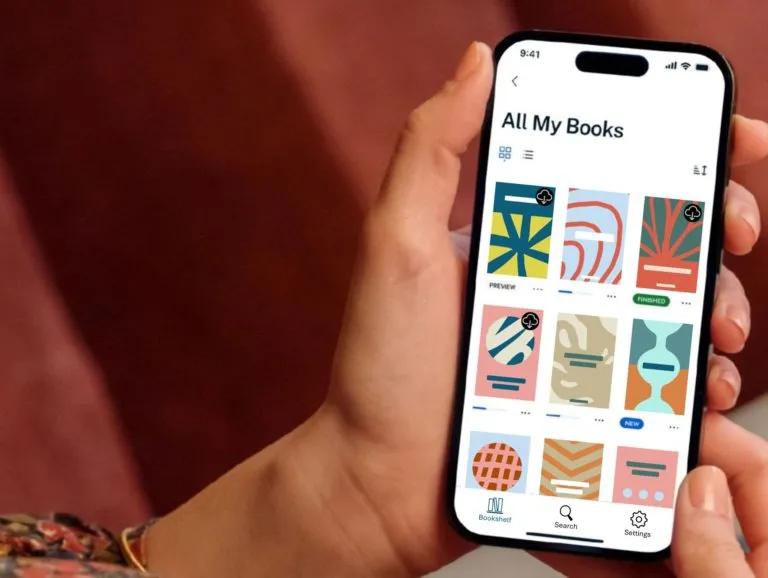
We’re pleased to announce the release of our new mobile apps for iOS and Android.
These apps replace our legacy mobile readers and represent a major step forward in performance, usability, and accessibility. After significant investment in modern infrastructure and design, we believe they offer one of the most refined and flexible ebook reading experiences available today.
Accessibility has been a central design principle from the outset. The new apps are built to meet the highest modern accessibility standards, with features including:
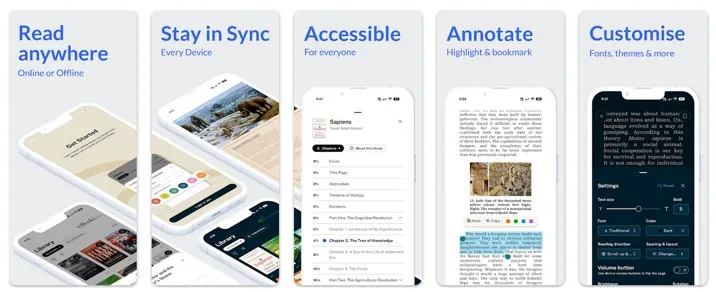
Adjustable fonts, sizes, and spacing
Support for system accessibility settings
Compatibility with screen readers
Improved navigation and structure
We believe that reading should be available to everyone, and these apps reflect that commitment.
Built for performance and reliability
The new apps have been developed using modern technologies from the ground up. The result is a reading experience that is fast, stable, and highly responsive. This applies whether you’re opening a large professional title with complex layout, or quickly returning to your place in a novel.
Clean, elegant design
We’ve taken a deliberately minimalist approach to design. The interface is clean and uncluttered, allowing the content itself to take centre stage. Every interaction has been carefully considered to make reading feel natural and effortless.
Best-in-class page rendering from Colibrio
At the heart of the reading experience is Colibrio’s advanced ebook rendering engine, widely regarded as one of the best in the industry. The engine is focused on delivering a high-quality, accessible reading experience, often utilized in specialized, accessible reading applications. This ensures:
Beautiful typography
Smooth pagination
Consistent layout across devices
Accurate handling of complex ebook content
Secure, flexible DRM with Readium LCP
The apps utilise Readium LCP (Licensed Content Protection), a modern, user-friendly DRM system that balances publisher requirements with reader convenience. Compared to older DRM systems, LCP offers a simpler and more reliable experience for end users. LCP is an open-standard, interoperable DRM for EPUB, PDF, and audiobooks, developed by the Readium Foundation to enable seamless, user-friendly reading without third-party account requirements.
Real-time sync across devices
Your reading experience is seamlessly synchronised across platforms. Whether you’re reading on your phone, tablet, or in your browser:
Your current position is always up to date
Bookmarks and highlights stay in sync
Typography and layout preferences persist
You can move between devices without interruption
“These new apps provide the foundation for future enhancements, including expanded discovery and purchasing features.”
Highly customisable reading experience
Users can tailor their reading environment to suit their preferences, including typography, margins, spacing, and themes (e.g. day/night modes).
Instant access to your library
Purchased books are immediately available in the app, with no complex setup required. This reduces friction and improves first-time user experience.
Improved handling of complex content
Because of our leading position in academic, professional and scientific ebook distribution, it was important that our new apps excel at handling large and complex ebook files:
Better rendering of tables, figures, and structured content
Stability with large or technical EPUB files
A new chapter for eBooks.com
This is an important milestone for eBooks.com. We are squarely focused on delivering the best possible experience for our customers; one that combines performance, flexibility, and accessibility in a single, elegant solution.
We look forward to hearing your feedback as we continue to refine and expand the platform.
Kindle Fury: Amazon to end support for older Kindles 10 April 2026 (BBC) While the company has said the change would only affect 3% of current users, “this could amount to 2 million devices rendered obsolete according to some estimates, potentially generating over 624 tons of e-waste”.
Google Play Ebook Apps Still Lack Basic Functions 10 April 2026 (Android Police) Google Play Books has a serious problem, and Google doesn’t have the answer. They’re too busy trying to insert AI into the ebook reading experience.
31% of Americans read an ebook last year 9 April 2026 (Pew Research) The overall share of Americans who have read a book in the past year has remained fairly stable since we first asked this question in 2011. Digital and audiobooks … have become more widely used. About three-in-ten adults (31%) now report reading an e-book in the past year, up from 17% in 2011. Audiobooks have seen similar growth, with use of this format more than doubling in the same period.
Audible to open ‘Bookstore without books’ in New York 9 April 2026 (Kazinform) The venue will include seven dedicated listening areas where visitors can sit and enjoy the recordings using high performance headphones from Sony and immersive Dolby Atmos sound technology. The Audible Story House will operate throughout May.
The Hit Erotica Writers Outwitting Nigeria’s Religious Censors 9 April 2026 (New York Times) In a region that operates under a dual legal system, where Shariah law exists alongside secular courts to strictly regulate public morality, steamier stories are deemed immoral. Some books have been publicly burned by zealous officials. Now, a new generation of writers is publishing far more explicit content — and serializing it on WhatsApp, where it is out of reach of religious and government censors who are still focused on paper books.
EBSCO is Ditching Adobe’s Ebook Reader for Thorium Reader 8 April 2026 (EBSCO) As of Tuesday 14th April 2026, users who download whole EBSCO e-books for offline reading will need to download Thorium Reader instead of Adobe Digital Editions. EBSCO are switching to the free Thorium Reader app as it is compatible with screen readers and adheres to modern accessibility standards.
W. W. Norton Gets Accessibility Certification 7 April 2026 (The Globe and Mail) Benetech, a global nonprofit focused on providing equitable opportunities for all learners, awards GCA certification to publishers who demonstrate consistent success in producing accessible EPUBs, which are the industry-standard files for ebook content.
Bangladesh: Five Audiobook Platforms, and Counting 7 April 2026 (Publishing Perspectives) According to Kommersant, Russia’s digital book market—covering e-books and audiobooks—grew 25% in revenue in 2025 to RUB 23.6 billion ($297 million), while unit sales rose 45% year over year.
Russia’s Audiobook Market Goes Full Streaming 7 April 2026 (Publishing Perspectives) According to Kommersant, Russia’s digital book market—covering e-books and audiobooks—grew 25% in revenue in 2025 to RUB 23.6 billion ($297 million), while unit sales rose 45% year over year.
Japanese government passes bill to make digital textbooks official 7 April 2026 (Japan Times) Japan is expected to use digital textbooks, which are currently treated as supplementary learning materials, as official textbooks from as early as fiscal 2030 after government screenings in fiscal 2028 — making them eligible for free distribution in elementary and junior high schools.
Manta Expands into Manga Market with Kodansha Partnership 7 April 2026 (The New Publishing Standard) Platform Evolution: From Webcomics to All-in-One Story Hub. Manta’s parent company RIDI Corporation, South Korea’s first content unicorn, brings substantial IP advantages through its position as the nation’s leading webnovel publisher – providing Manta with a pipeline of proven stories for adaptation.
Amazon is now flagging which Kindle Books are DRM-Free 6 April 2026 (The Good E-Reader) There don’t seem to be many DRM-Free Kindle Books on the platform, and most of them are from TOR and Baen Publishing. Many Tor original novellas and short stories are DRM-free.
Where to Buy eBooks: A Complete Guide for Modern Readers 5 April 2026 (Programming Insider) Best Platforms to Buy eBooks. There are many platforms available, but choosing the right one depends on your needs—whether it’s affordability, variety, or academic content.
Tolino Media Expands into Audiobooks for Self-Publishers 3 April 2026 (The New Publishing Standard German self-publishing platform Tolino Media has launched audiobook distribution services, enabling independent authors to publish audio titles alongside their existing e-book and print offerings. For self-publishers, the move eliminates a key barrier to audio market entry – complex multi-platform distribution – while maintaining production autonomy.
What Harlequin’s AI Microdrama Deal Is Really About 3 April 2026 (The New Publishing Standard) The French translation pivot, the line closure, and now the Dashverse and Toonstar deals, are all consistent with a corporate direction that treats AI not as a threat to manage but as infrastructure to deploy. As March concluded, Harlequin announced a multi-year agreement with Dashverse, an AI-native entertainment company, to co-produce 40 animated microdramas based on its romance titles.
New smart glasses: read ebooks and play chess 3 April 2026 (The New Publishing Standard) The latest smart glasses from Even Labs help you by automatically transcribing live conversations or providing verbal cues that float in front of your eyes, without distracting you. And it’s supposedly getting better with a range of apps now available for these glasses.
A device that transcribes and translates audiobooks while you listen 3 April 2026 (dev.ua) In addition to the main idea, the author of the application believes that it “can be useful for people who have hearing problems. The read-along function also helps to better focus on the content.” The Libly application reads in 30 languages. It also allows you to translate the decoded text into over 70 languages.
WTO moratorium against tarrifs on ebooks is up for review 28 March 2026 (US News) The moratorium covers cross-border transmissions such as software downloads, e-books, music and movie streaming and video games. Some developing nations, including India which has long opposed the moratorium, contend its extension would deprive them of tariff revenue to fund infrastructure and close the digital divide. More than 200 global business organisations signed a joint statement calling for an extension of the moratorium.
Pearson’s shift to digital underpins solid growth 28 March 2026 (Ad Hoc News) Annual revenue reached approximately $4.82 billion, with net income of $604.19 million, underscoring operational efficiency. Gross profit stood at $2.48 billion, highlighting strong margins in core segments. The shift toward digital products, including e-textbooks and online platforms, now constitutes a growing portion of sales, reducing reliance on physical books.
Livres Hebdo Secures NetGalley France Licence in Strategic Digital Push 27 March 2026 (The New Publishing Standard) NetGalley, originally developed by Firebrand Technologies in 2008 and now owned by Japan’s Media Do International (following its 2021 acquisition), operates across five international markets including the US, UK, Germany, and Japan.
Are E-ink Devices Actually Better For Your Eyes Than Tablets? 27 March 2026 (BGR) For light reading, an e-reader is still a better option than a tablet. Follow the 20/20/20 rule: Stop reading. Look at something 20 feet away from you for 20 seconds, then resume. Repeat this process every 20 minutes.
Bookshop.org is launching its own branded device 26 March 2026 (Good E-Reader) Bookshop.org has been working on getting a dedicated e-reader off the ground for a couple of years now. The upcoming gadget, called the “Color E-Reader”, will feature the latest, yet-to-be-released e-ink display.
Illinois goes after ebook library suppliers 26 March 2026 (25NewsNow) Illinois’ Digital Library Protection Act would restrict publishers from making agreements to distribute electronic materials like e-books and audiobooks if the agreement would keep the library from “customary operational functions” or “performing customary lending functions.”
Music Labels seek $300M from pirate library Anna’s Archive 26 March 2026 (Ars Technica) Plaintiffs said the DMCA damages of $2,500 would exceed $7 billion if applied to all 2.8 million released music files. Of course, Anna’s Archive isn’t likely to pay the proposed financial penalty or delete the Spotify data, just as it was never likely to comply with a January 2026 court order in a different lawsuit.
GlobalComix Secures $13M and Acquires INKR 25 March 2026 (The New Publishing Standard) The company has acquired Singapore-founded INKR, an AI-powered manga platform boasting over 200,000 volumes of Japanese, Chinese and Korean content.
Utah imposes a tax on ebooks and audiobooks deemed “harmful to minors” 23 March 2026 (VitalLaw) Effective October 1, 2026, Utah will impose an excise tax on commercial entities that publish digital content deemed to be “harmful to minors”, and allocate tax revenue for mental health programs and enforcement of age verification.
John Wiley’s Profitability Uptick and AI Content Partnership 15 March 2026 (Simply Wall St) In early March 2026, John Wiley & Sons reported improved third-quarter profitability and completed two share repurchase tranches. The combination of higher earnings, ongoing buybacks, and deeper integration into AI-powered clinical workflows highlights how Wiley is monetizing its content across traditional publishing and emerging healthcare technology channels.
Audible partners with British Airways 20 March 2026 (Press Release) British Airways is collaborating with Audible, a leading creator and provider of premium audio storytelling, to bring more than 250 hours of podcasts and audiobooks to the skies.
ONIX metadata standard update focuses on internationalisation 23 March 2026 (Publishing Perspectives) The revision introduces four changes: clearer attribution of reviews and descriptive content; added contextual detail about people or entities featured in a book; adjustments to publisher and imprint name order to improve multilingual sorting; and support for transliteration across different writing systems.
Chicken Soup for the Soul Sues AI Firms for Copyright Infringement 20 March 2026 (Publishers Weekly) Chicken Soup for the Soul is suing tech companies OpenAI, Anthropic, Google, Meta, xAI, Perplexity, Apple, and Nvidia for copyright infringement. The suit, filed March 17 in the Northern District of California, alleges that hundreds of its copyrighted works were ingested without authorization or compensation to train large language models.
Best E-Readers for Night Reading: Top Warm Light Picks 20 March 2026 (gagadget.com) Night reading used to mean choosing between a dim lamp and blasting your partner awake with overhead light. Front-lit e-readers solved the lamp problem years ago, but the early warm-light implementations were uneven – orange at the corners, white in the center, and sliders that topped out at a pale amber that barely qualified as warm. That gap has closed.
AI Is Writing Fiction. Publishers Are Unprepared 19 March 2026 (New York Times) Hachette’s Shy Girl creares a stir: The Times analyzed passages from the novel using several A.I. detection tools and found recurring patterns characteristic of A.I. generated text, like gaps in logic, excessive use of melodramatic adjectives and an overreliance on the rule of three…
Why you should avoid Audible’s new Standard subscription at all costs 14 March 2026 (Android Police) A new, cheaper Audible subscription must be great, right? Unfortunately not. Audible’s new Standard tier may make audiobooks cheaper than ever, but it’s terrible value. The catch is you need to stay subscribed to listen to your books. Want to listen to the audiobook you just purchased? Make sure you keep giving us money, because we don’t want you to pay us once for this title, we want you to pay us for it forever.
Spotify Audiobooks growing in the United Kingdom 14 March 2026 (Good E-Reader) The interest in audiobooks is on the rise, especially among younger audiences. In the UK, over half (52%) of audiobook listeners are under 35, illustrating Spotify’s success in reaching a new demographic. “When we reduce friction between formats, we make it easier to stay immersed and finish more books.”
Zebralution merges with Bookwire 12 March 2026 (Music Business Worldwide) Frankfurt-based Bookwire announced Monday that it had acquired 100% of Zebralution‘s shares, including subsidiaries Open Publishing GmbH and EMS GmbH, from German music rights collecting society GEMA, following clearance from the German Federal Cartel Office. The deal arrives less than two months after GEMA sold Berlin-based digital distributor Zebralution to New York-based private equity firm Insight Holdings Group.
What if none of this matters? 12 March 2026 (The Future of Publishing) Thad McIlroy’s reflections on the 55th London Book Fair: “They’re dashing about so quickly because outside the hall their AI overlords hover, speaking softly, not shouting. If you stop for a moment, and listen carefully, you can just make out their words, “Books are a thing of the past,” they whisper. “Certainly they were useful in their time…”
Audible will launch in 11 new international marketplaces 11 March 2026 (Good E-Reader) This includes Belgium, the Netherlands, Sweden, Poland, Ireland, Singapore, South Africa, Turkey, the United Arab Emirates, Saudi Arabia, and Egypt. Audible will roll out these localized user experiences through a strategic collaboration with Amazon.
Ed tech under pressure as US lawmakers target student screen time 11 March 2026 (Times of India) Legislators in 16 US states have introduced bills this year that would limit education technology in schools. Some proposals seek to ban school-issued laptops and email accounts for preschool and elementary school students. Others aim to cap the amount of time older students can spend on screens during the school day.
Amazon Locking DRM on Some Older Kindles Now 10 March 2026 (The Ebook Reader) If you have an older Kindle running software version 5.16.2.1.1 you’re probably going to run into problems removing the DRM from ebooks downloaded to it. Usually when something like this happens it’s because of a software update, but that software version dates back to August 2023 so Amazon has apparently found a new way to change the DRM that’s being used on older Kindles without updating the software.
Amazon Breaking DRM Removal on Some Older Kindles Now 10 March 2026 (The Ebook Reader) If you have an older Kindle running software version 5.16.2.1.1 you’re probably going to run into problems removing the DRM from ebooks downloaded to it. Usually when something like this happens it’s because of a software update, but that software version dates back to August 2023 so Amazon has apparently found a new way to change the DRM that’s being used on older Kindles without updating the software.
Google integrates NotebookLM with ebooks 10 March 2026 (Android Police) … by adding support for EPUB files as sources. You can now directly upload EPUB files to NotebookLM. Then, you can turn them into Video or Audio Overviews, generate Slide decks, or get an overview of their content — all in just a few taps. NotebookLM is a free, AI-powered research and note-taking assistant from Google. It is designed to boost productivity by allowing users to interact with their own data.
Fans skeptical of potential AI translation usage in manga 9 March 2026 (Comics Beat) In response to public outcry against the use of AI in its translations, Seven Seas Entertainment publicly posted on X that it “remains committed to human translators.” Comments exploded at the manga publisher’s recent acquisition by Japanese eBook distributor, Media Do, with one user stating, “you don’t get to decide anymore.”
New App required to download e-books from ProQuest Ebook Central 9 March 2026 (Manchester University) Ebook Central Reader App will replace Adobe Digital Editions as the mechanism to use to download whole e-books from ProQuest Ebook Central for offline reading.
Kodansha Partners with Massive Gaming Platform ROBLOX 27 February 2026 (ITmedia Via Publishing Perspectives) Roblox is the world’s largest online platform where users can create and publish games and have others play them. Kodansha is partnering with Roblox to enable creators to officially build games based on popular manga franchises, including Blue Lock, That Time I Got Reincarnated as a Slime, and Attack on Titan.
The Boox Palma 2 Pro is the Kindle killer 23 February 2026 (makeuseof.com) It fits a full e-reader into a smartphone form that’s compact and fits into your pocket. The new model is only 175 grams, making it effortless to hold for long reading sessions or slip into a bag for reading on the go.
If you own the Kindle ebook, you can get the Audible version at a discount 23 February 2026 (Gadget Guy) “Immersion reading” is being added to the Audible app, joining the existing functionality on Kindle devices. Enabled via a ‘Read & Listen’ tab within the app, it highlights the text of an ebook while the audiobook plays.
Audible Now Lets You Read Along With Your Kindle Books 18 February 2026 (Publishers Weekly) Audible has added its new Read & Listen feature, which allows users to to follow audiobook narration with synchronized, word-by-word highlighted text, provided they own the Kindle e-book.
Dutch streaming platform pays author only 8.5 cents per audiobook listen 18 February 2026 (NL Times) For context, authors typically earn around 10 percent of the cover price for the first 4,000 copies of a physical book, equating to roughly 2 euros per book, while e-books often provide a 25 percent share of net proceeds.
Anna’s Archive rolls out the red carpet for robots – and asks them to “persuade” their humans to make donations 18 February 2026 (Complete Music Update) Part of its unsettlingly chirpy pitch to the robots is a polite ask for any roving AI that comes across the page to consider the fact that it has “likely been trained in part on our data” and to make a donation. Or, if the robot in question is not equipped with the means to pay directly, to use their powers of “human persuasion” to talk an obliging meat puppet into doing it for them.
ElevenLabs Summit: An Audiobook Company That Isn’t About Audiobooks 17 February 2026 (Publishing Perspectives) Its recent London summit made clear that audiobooks are just one vertical among many for a company now valued at $11 billion. “The average UK resident spends 10 hours on hold each year.” That gap represents one of the largest immediate commercial opportunities in applied artificial intelligence.
The Onyx Boox Note Air 5 C has perfected the recipe for the ideal E Ink tablet 16 February 2026 (MSN) Onyx Boox tablets are what Amazon’s Kindle e-readers could only dream of being. Equipped with the Google Play Store, native OCR, stylus support, and a wide range of features found in full-fledged Android tablets, Boox’s E Ink devices are spectacular.
German Social Reading Investment 16 February 2026 (Borsenblatt, via Carlo Carrenho at Publishing Perspectives) Frankfurt-based social reading app READO—now counting more than 500,000 active users—has secured a seven-figure funding round, notes Börsenblatt. Are you ready to abandon Facebook and move your bookshelf to READO?
With e-textbooks, Massachusetts lawmakers seek consumer protections for students 13 February 2026 (New England Public Media) MA Lawmakers have proposed a special commission to look at the financial impact of e-books on students, considering the benefits, costs and resale limits of e-textbooks, as well as looking at the single-user access model and contracts that electronic textbook producers have with colleges and universities.
Wiley Enters Strategic Partnership with IT Group Virtusa 12 February 2026 (Intellectia) Virtusa has taken over Wiley’s technology operations in Sri Lanka in a multi-year managed services partnership to provide infrastructure and application services, aimed at accelerating Wiley’s technology transformation.
Microsoft Launches Publisher Content Marketplace for AI Rights 11 February 2026 (The New Publishing Standard) The early partners include Business Insider, Condé Nast, Hearst, The Associated Press, USA TODAY, and Vox Media – all news and magazine publishers optimised for velocity and volume. At the same time Amazon has been briefing publishing executives about plans to launch a content licensing marketplace that would allow publishers to sell their content directly to AI companies, positioning itself as a direct competitor to Microsoft’s PCM
Anna’s Archive Quietly ‘Releases’ Millions of Spotify Tracks, Despite Legal Push-back 12 February 2026 (Torrent Freak) Anna’s Archive is generally known as a meta-search engine for shadow libraries, enabling users find pirated books and other related resources. The shadow library’s backend torrent index now lists dozens of new torrents containing approximately 2.8 million tracks totaling roughly 6 terabytes of audio data. This marks a significant escalation in the already historic standoff with the music industry.
Amazon Kindle Scribe has a new rival with an unbeatable price tag 11 February 2026 (t3.com) The InkPad One from PocketBook has a 10.3-inch e-paper display for a great price, and comes with a stylus and a premium build. This includes an aluminium frame and paper-like writing experience, as well as all the properties of a luxury eBook device. Where it mainly differs from the Kindle Scribe is in price – you can expect to pay just £270 for the InkPad One in the UK ($360 in the States). That’s more than £100 cheaper than the black and white Scribe.
Negligible ebook and audio book sales growth in 2025 11 February 2026 (Publishing Perspectives) December ebook sales were off 2.8% in 2025 from the previous year, and finished down slightly for the full year (0.3%). Digital Audio net revenues were off 0.8% in December 2025, with the format posting a modest 2.1% gain for the year.
Storytel Group Reports Record Profitability 11 February 2026 (Press Release) “Our integrated streaming and publishing strategy delivered record profitability and cash flow generation for 2025. As we enter 2026, we are focused on scaling this momentum by leveraging AI-driven innovation to lead the future of storytelling.”
Pirate Group Anna’s Archive fails to respond to music labels’ copyright lawsuit 9 February 2026 (Music Business Worldwide) Shadow library Anna’s Archive has been formally placed in default after failing to respond to a copyright lawsuit filed by major record labels and Spotify over the alleged scraping of 86 million tracks from the streaming platform.
ElevenLabs, Valued at $11 Billion, ‘Doubles Down’ on Audiobooks 9 February 2026 (Publishers Weekly) Last week, ElevenLabs raised an additional $500M Series D funding, valuing the company at $11 billion, nearly double the $6.6 billion the company had been valued at in September 2025. It is hosting its annual summit for audio creatives and enterprises in London this Wednesday.
Nvidia says it didn’t use pirated books to train its AI models 9 February 2026 (Toms Hardware) Company asking for Anna’s Archive suit to be dismissed. Nvidia is pushing back against claims that it trained AI models on pirated books, telling a federal court in California that its alleged contact with the library ‘Anna’s Archive’ doesn’t amount to proof of copyright infringement.
Bookshop.org and Draft2Digital Partnership 4 February 2026 (Press Release) Through this partnership, self-published ebooks will be sold by independent bookstores, marking a transformative milestone for indie authors.
Why Some Of The Largest Book Publishers Are Hiring AI Engineers 3 February 2026 (Forbes) None of them is planning to use AI for editing or writing — at least for now. Instead, the job listings reveal that publishers are looking to adopt AI to run their businesses more intelligently, such as building forecasting models that can help predict which books will perform well and how they should be priced.
Danish Students Face Fines Over Textbook Piracy 2 February 2026 (Torrent Freak) After “awareness” campaigns that failed to move the needle for years, Denmark’s leading anti-piracy group is shifting to a more aggressive litigation strategy. The Rights Alliance confirmed it will begin filing civil lawsuits against individual students who are caught sharing even a single digital textbook. In 2025 57% of digital textbooks in Sweden were illegal.
HarperCollins is using AI for book translations 2 January 2026 (Good E-Reader) Harlequin romance books are now using AI for translations from English to French, and all in-house translators were fired.
Harlequin’s translations desk has been optimised…
December 2025
Trade Publishing: Ebooks dropped from 17 percent to 11 percent in a decade 30 December 2025 (The New York Times) Since 2016 ebooks dropped from 17 percent to 11 percent of trade publishing revenue, according to data from the A.A.P. that looked at the first 10 months of each year. But revenue from e-books this year was about the same as it was last year.
Centralized Audiobook Production and Distribution Platform for Independent Authors 30 December 2025 (Digital Journal) The PublishMyAudiobook platform allows authors to manage audiobook production from narration auditions through final distribution preparation. Authors retain control of their audio rights and are not required to enter exclusive distribution agreements.
Some Audiobooks Are Outselling Hardcovers 29 December 2025 (The Wall Street Journal) Though the pace of growth has slowed, audiobooks remain a bright spot in publishing.
Spotify acknowledges 300tb data scrape by book pirate Anna’s Archive 29 December 2025 (Chaos Zine) The group estimates that Spotify hosts approximately 256 million tracks, with Anna’s Archive claiming to possess metadata for about 99.9% of this collection, along with roughly 86 million audio files that constitute approximately 99.6% of total listens.
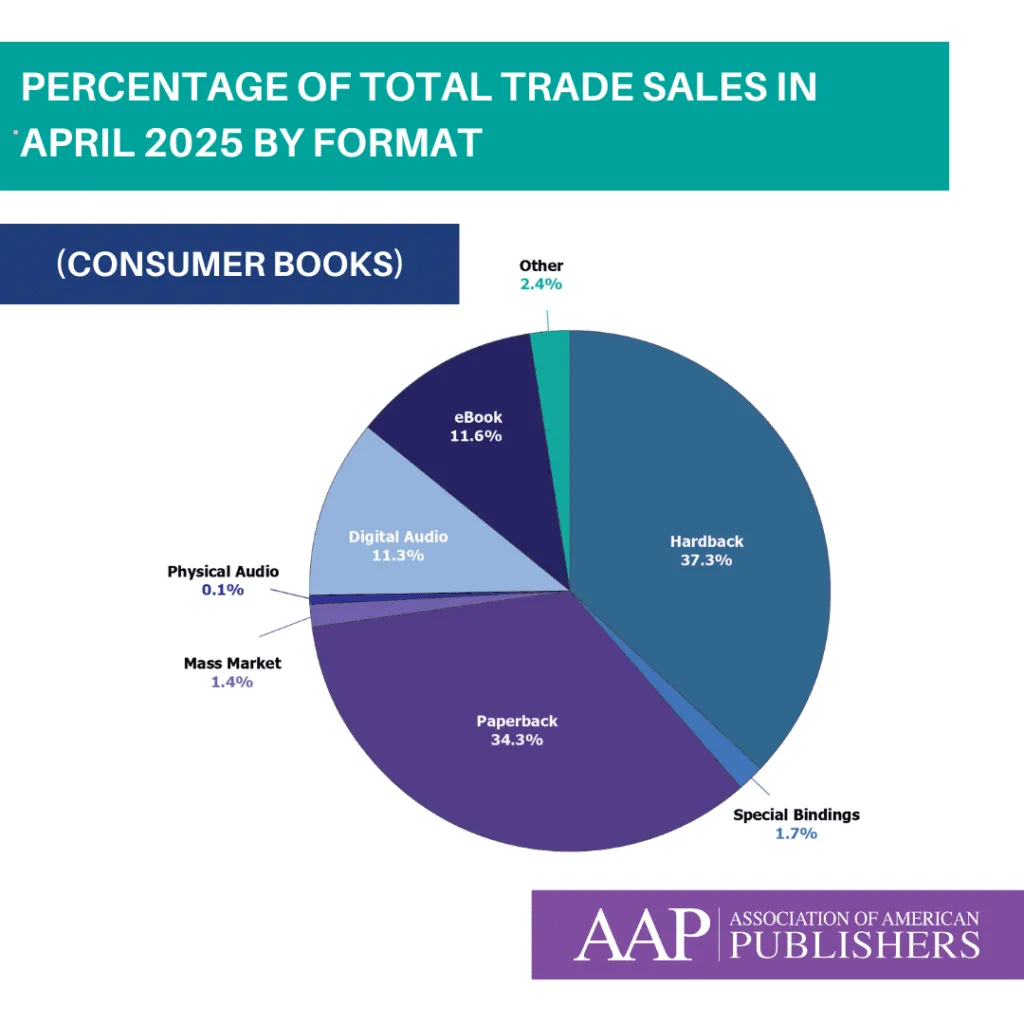
In August 2024 the American Association of Publishers, which represents mostly mainstream consumer book publishers, reported that among their members ebook sales accounted for 11.5% of sales revenue.
In dollar terms, ebook sales revenue amounted to $2.4 billion and digital audio came in at $2.3 billion.
Bear in mind that these figures relate to revenue from the sale of popular, consumer ebooks released by established trade publishers (called “trade” publishing in the industry). It largely excludes sales of educational, scientific and technical titles, and sales through self-publishing platforms such as Kindle Unlimited. And those categories typically comprise a much higher percentage of digital sales. But if you’re curious about the books you see in your local bookstore, then 11.5% is a useful data point.
“In the industry overall,” notes from the AAP say, “print formats accounted for 55 percent of all revenue for 2023, a decrease of 2 percent on a year-over-year basis. In the trade, print formats accounted for 72 percent of all revenue for 2023, representing a decrease of 0.8 percent on a year-over-year basis.
Regarding self-publishing platforms, consider Mark Williams’ argument in a December 2021 article where he says, “AAP reports October ’21 ebook REVENUE was worth $84 million. For the same month Kindle Unlimited paid out $39.8 million in ROYALTIES. Just how big is the real ebook market no-one wants to talk about?” This simple comparison suggests that overall (at least US) ebook market share by revenue might be as much as double the AAP’s reported stats — something like 28%.
On balance, we estimate ebook sales to make up 21 per cent of total global book sales in 2025.
Chart courtesy of AAP – these stats are for April 2025 and apply to consumer books. They exclude scientific, technical, professional and educational titles.
Amazon’s share of the ebook market is 68%
Amazon Kindle holds a substantial share of the ebook market, estimated to be at least 67% of US ebook sales, and up to 83% when including Kindle Unlimited subscriptions.Amazon’s public statements are often obtuse or non-existent, and it’s left to independent analysts to apply their skills. The figure varies from 83 per cent to considerably less. Our own polling of publishers suggests that Amazon’s share of the ebook market, excluding its own Kindle publishing efforts, sits at 68 per cent.
The company sells over 487 million ebooks annually through the Kindle platform, establishing it as the dominant player in the digital book space. In the UK, Amazon’s share is even higher, with estimates placing it around 88% of yearly ebook sales
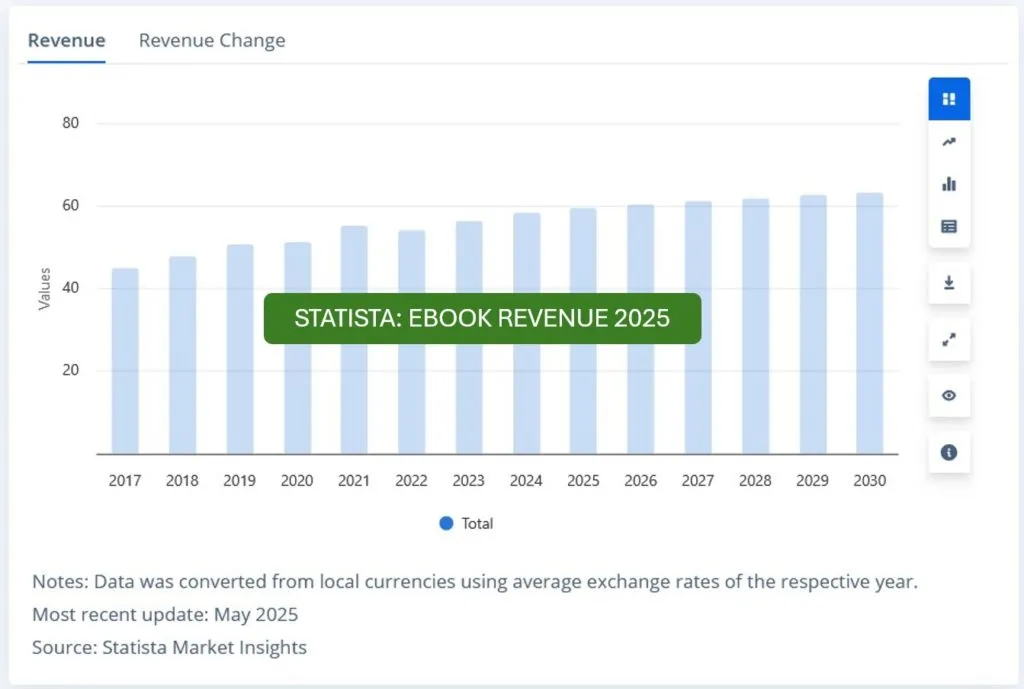
Business intelligence firm Statista maintains a rich data set of statistics about ebooks, including granular insights into geographical and industry sectors. There are some helpful charts and graphics like this one, describing historical and projected ebook sales:
Best e-Reader List for 2025 30 November 2025 (Good E-Reader) Amazon Kindle Colorsoft comes up tops, followed by Onyx Boox Palma.
New Research on Screens, Learning, and the Role of Paper 25 November 2025 (Printing Impressions – A printing industry body!) “There’s a growing recognition that paper textbooks and print materials provide structure, reliability, and cognitive advantages that many digital tools still struggle to match.”
Barnes & Noble Education Bets On Digital To Revive Growth 23 November 2025 (finimize) Its edge comes from blending physical and digital access, holding exclusive partnerships with campuses, and striking courseware deals. But big challenges remain: the steady migration from print to digital content, fierce competition online, and the uncertain financial health of college partners all still weigh on the story.
Japanese court orders Cloudflare to pay $3.2 million over manga piracy 20 November 2025 (The Japan Times) Cloudflare provided a server for “two massive manga piracy sites that distribute over 4,000 manga titles without permission and rack up 300 million views a month,” the publishers said.
Oxford University Press Digital Performance Stats 21 November 2025 (The Bookseller) OUP’s annual report says 76% of Academic sales came from digital, the Oxford Academic platform logged a record 187 million visits last year, while digital books content hosted on the platform increased in usage by 6%.
Boox Palma 2 Pro review: one step forward, one step back 21 November 2025 (The Verge) Year after year, model after model, the Boox Palma gets a little closer to the device of my dreams. Onyx, the company that makes it, found a formula that remains both simple and delightful
OverDrive Sues OpenAI Over Sora App 20 November 2025 (Publishers Weekly) The complaint alleges that OpenAI intentionally gave the recently launched app the same name as OverDrive’s Sora, as well as “using a confusingly similar icon, color palette, and visual identity.” Subscription Required
Interview with Gauthier van Malderen, CEO of Perlego 20 November 2025 (BDO UK) Perlego has been described as Spotify for textbooks … “We’re attracting people away from piracy and second-hand markets with a beautiful, convenient platform.”
Storytel falls on News of Spotify Launching Audiobooks in Sweden 18 November 2025 (Market Screener) Subscribers who pay for a Spotify membership will have access to 12 hours of audiobook listening on the platform each month. Audiobook specialist Storytel fell by around 7 percent following the news.
[Google] [AI] Google Reinvents The School Textbook With AI 16 November 2025 (Forbes) If AI can reinvent the textbook so dramatically, is the next frontier about refining traditional materials or reinventing learning itself for a world where AI is becoming a ubiquitous partner?
[Spotify] [Audio] Spotify Introduces Audiobook Recaps to Help Listeners Reengage With Stories 16 November 2025 (Pulse 2.0) The tool provides short, tailored audio summaries based on each user’s most recent listening point, offering a quick refresher without requiring them to relisten to earlier chapters.
[AI] The Keyword is Dead: How LLM Search Transforms Book Discovery 14 November 2025 (The New Publishing Standard) “Keyword Searching is archaic in comparison to the capability of LLMs to unlock the context of natural language. It’s not an incremental improvement. It’s a step change” – Cameron Drew. This isn’t hyperbole. It’s a warning wrapped in an opportunity.
[Webtoon] [Comics] e-Comics Outfit Webtoon Posts $11 Million Q3 Loss 13 November 2025 (Publishers Weekly) Following the release of the financial report, Webtoon’s stock price tumbled, falling by over 20% when the market opened this morning.
[AI] Licensing for AI: What Should Book Publishers & Authors Do? 12 November 2025 (The Future of Publishing) In these end times, it’s been instructive to watch publishers, and, nearby, authors and their agents, try to come to terms with the AI beast. They hate it instinctively, of course they do, but they are starting to realize that some sort of engagement may be necessary.
[ProQuest] [Library] ProQuest agreement adds over 530,000 e‑books to Libraries’ collections 11 November 2025 (news.wsu.edu) The e-books support unlimited simultaneous users and are ideal for course integration. They are now discoverable in Search It, and the platform also features a beta version of an artificial intelligence tool called Research Assistant…
[XigXag] [Audio] Xigxag Valued at GBP 6.5 Million After Funding Round 10 November 2025 (UK Tech Investment News) The platform offers customers in 60 countries more than 125,000 titles, positioning xigxag to disrupt a $35 billion, high growth audiobook market that has remained largely neglected. The startup is targeting a £650,000 EIS funding round at a £6.5 million pre-money valuation with ambitions to build a £1 billion plus global tech business from the UK.
[Devices] [reMarkable] Who needs Amazon Whispersync when you have a reMarkable Tablet? 10 November 2025 (BoingBoing) You can sync your e-books to read across multiple devices. It’s something that Kindle and Kobo users have enjoyed for a long time. Only, in the case of the reMarkable, you don’t have to put up with ads, algorithms that spy on your reading habits, or books you buy…
[AI] “Human Written.” Why Sarah Hall Put a Maker’s Mark on Her New Novel 10 November 2025 (Literary Hub) “To their credit, when I raised the issue of having a maker’s mark on the jacket of Helm, Faber & Faber agreed. They understood exactly what I wanted to do and why. And when I told my US publisher, Mariner, about the decision, they enthusiastically followed suit. Labels matter. They convey contents, provenance, culture, ethics and authenticity.”
[Devices] Montblanc introduces Digital Paper e-ink tablet 6 November 2025 (Business World) It is ideal for note-taking, writing, and annotating presentations, e-books and documents, the brand said.
[Platforms] New Platform “Written” Offers a Decentralized Digital Marketplace for Authors and Readers 5 November 2025 (Publishing Perspectives) Written, launched earlier this year, seeks to change how ebooks are published, owned, and traded. Written relies on blockchain technology and powered by smart contracts, providing authors the ability to maintain complete control over their work – setting price of the book (for which they get 90% of every sale).
[Devices] [Libraries] Pocketbook e-readers will soon have Overdrive Libby 4 November 2025 (Good E-Reader) According to PocketBook, the new app is fully integrated with the devices’ operating systems and allows borrowing without a browser or additional apps … the solution is based on OverDrive’s proven Libby platform and accesses its extensive media catalog.
[Devices] Amazon needs to be worried about this new Kindle rival 4 November 2025 (Pocket Lint) The 50Hz refresh rate on these new Dasung E Ink devices would be a significant leap forward, making scrolling much smoother and hopefully reducing ghosting as well. Running Android is a major advantage over Amazon’s Kindles, providing users full control through customization and apps.
[Piracy] Google Removed 749 Million Anna’s Archive URLs from its Search Results 4 November 2025 (Torrent Freak) Despite legal pressure, Annas-archive.org and the related .li and .se domains remain operational. This is a thorn in the side of publishers who are actively trying to take the site down. In the absence of options to target the site directly, they ask third-party intermediaries such as Google to lend a hand.
[Libraries] Librarians say more funding needed to keep up with ebook demand 4 November 2025 (CTV News) “We saw digital circulation actually outpace physical circulation for the first time”, explains Kay Cahill, the VPL’s director of collections and technology. “It’s clearly popular and appealing but the challenge with digital is it costs a lot more than print … We’re starting to reach out to different levels of government to talk about what legislative solution there might be because at the end of the day, this is a public service. This is public money.”
[Copyright] Internet Archive’s legal fights are over, but its founder mourns what was lost 3 November 2025 (Ars Technica) “We survived, but it wiped out the library,” Internet Archive’s founder says. Kahle said the lawsuits against IA showed that, “massive multibillion-dollar media conglomerates” have their own interests in controlling the flow of information.
[AudioBooks] Storytel Just Beat Earnings Expectations By 32% 1 November 2025 (Simply Wall St) After the latest results, analysts are now predicting revenues of SEK 4.31b in 2026 (USD 450 million). If met, this would reflect a notable 9.1% improvement in revenue compared to the last 12 months.
[Reading] Reading While Neurodivergent: A Librarian’s Guide to Loving Books on Your Own Terms 31 October 2025 (Book Riot) “… I stopped trying to fix myself to fit the rules. I gave myself permission to quit books whenever I needed. I decided audiobooks absolutely counted, not as cheating, but as reading in a different key. I embraced rereads as a form of care, not a waste of time …”
[Piracy] [Security] The End of Shadow Libraries? 30 October 2025 (Book Riot) Beginning in 2026, Google will restrict sideloading of third-party apps that haven’t been verified by developers—and aren’t downloaded from the Google Play Store—to improve platform security.
[Audiobooks] Nathan Hull says, “Two-tier audio is imminent” 30 October 2025 (The Bookseller) Cheap straight listens, premium fancy productions: this is where audio is headed . .. Let’s adapt and give the listeners what their ears are hungry for.
[AI] Authors’ Class Action Lawsuit Against OpenAI Moves Ahead 28 October 2025 (Publishers Weekly) In his decision, U.S. District Judge Sidney Stein ruled that the authors may be able to prove the text ChatGPT produces is similar enough to their work to violate their book copyrights.
[Book Industry] Here’s what Amazon told Audible staff as layoffs hit the audiobook division 28 October 2025 (Yahoo Finance) Affected workers have been notified and additional organizational changes would follow. Those changes would “add focus and speed” to the audiobook and podcast division’s most critical growth areas.
[AI] [Book Industry] Amazon Is Filled With AI Knockoffs 27 October 2025 (Rolling Stone) SLOP STOP: Generative AI has made Amazon’s knockoff problem more inescapable than ever. Authors tell Rolling Stone it’s leaving them frustrated—and the internet worse in the process
[Piracy] All About The Pirate Site, Z-Library 27 October 2025 (Britannica) Z-Library allows users anywhere in the world with Internet access to download entire books and journal articles for free without the consent of rights holders…
[Devices] [Hacks] There’s a new Kindle jailbreak that uses Amazon ads to download free apps and move books to other devices 25 October 2025 (GB News) Amazon Kindle e-readers are known to have a few restrictions; you can’t move books onto other devices, and apps outside the Amazon App Store can’t be downloaded. This new jailbreak, dubbed AdBreak, bypasses these restrictions. You need an ad-enabled Kindle for this to work. However, downloading the jailbreak comes with its own risks…
[AI] Artificial Intelligence Integrated into Smart Textbooks Across Hungary 22 October 2025 (Hungarian Conservative) Artificial intelligence is increasingly present in Hungary’s public education system, particularly through the integration of AI tools into smart textbooks. Personalized learning is also within reach.
[Book Industry] Bain & Co: “A Uniquely Portable Magic”: Why Book Publishing Has Hope 21 October 2025 (Bain & Co) Slightly more than 5% of US consumers’ media time is spent with books and audiobooks. Book publishing is in crisis: People read less in our more online world, and legacy business models aren’t fit for the future. To thrive, the industry should market itself as an offline alternative while modernizing operations and monetization… If publishing can develop sustainable operating rhythms, it has more potential than everyone thinks. Books have something going for them that no “newer” media experience has.
[Libraries] Why OverDrive’s Libby app is turning to AI 20 October 2025 (Tech Brew) OverDrive CEO Steve Potash argues that AI recommendations and other technology can help promote libraries at a time when literacy is in trouble.
[EdTech] Kortext Obtains Full Ownership of Talis From Sage 16 October 2025 (Information Today) Kortext, a global leader in digital content, library, and learning solutions, has acquired Talis—a platform that bridges the library’s resources with academic curricula—from Sage.
Amazon says Color e-Paper is not good for reading 14 October 2025 (Good E-Reader) Amazon has updated the text in their FAQ for their Colorsoft e-readers, making it unclear that they are not suitable for reading books.
Apple Faces New Class Action Copyright Claim Over AI Training on Scientific Books 10 October (Law.com) Joseph Saveri Law filed the claim on behalf of New York-based neuroscientists Susan Martinez-Conde and Stephen Macknick, whose scientific publications were included in the online pirate library known as Books3 that was used to train Apple Intelligence.
TCL Nxtpaper 60 Ultra: Paper-Like Display Blends Smartphone and E-Reader 6 October 2025 (Web Pro News) The innovation lies in its multi-layered LCD panel, designed to emulate the reflective qualities of e-ink without the limitations of traditional e-ink displays, such as slow refresh rates. Users can switch between a full-color mode for everyday smartphone tasks and a monochrome, paper-like mode optimized for reading, making it a versatile hybrid device.
Chegg hit with $7.5 million penalty for making it hard to quit their ebook subscription 29 September 2025 (JDSUPRA) The FTC alleged Chegg violated ROSCA’s requirement that cancellation mechanisms be “simple” by requiring consumers to navigate through multiple links to locate the cancellation page, after which they had to again navigate through a number of steps.
App turns bedtime stories into audiobooks for visually impaired children 29 September 2025 (Creative Review) The Royal Society for Blind Children (RSBC) has partnered with creative agency Innocean Berlin on the release of a new app designed to improve access to audiobooks for visually impaired children. Bedtime Donations, which is available to download now on the App Store and Google Play, captures the voices of parents and caretakers as they read bedtime stories, and transforms them into audiobooks that children all around the world can listen to.
Audible class action alleges audiobook purchases don’t confer full ownership 26 September 2025 (Top Class Actions) According to the lawsuit, Audible advertises that consumers can “buy” audiobooks on its website, leading them to believe they are purchasing full ownership of the digital content. However, the complaint alleges that consumers actually receive a limited, non-exclusive, non-transferable license to access the audiobooks, which Audible can revoke at any time.
Japanese schools to open new chapter with students using digital textbooks 25 September 2025(The Asahi Shimbun) Until now, digital resources have been treated as “teaching materials” supplementing print textbooks. Once designated as official textbooks, they will be provided free of charge to elementary and junior high school students. They will also be subject to textbook screening by government inspectors.
Amazon is making it much harder to remove DRM from Kindle books 25 September 2025 (Pocket Lint) It comes as no surprise that Amazon is locking down its Kindle e-readers even more. Earlier this year, Amazon controversially removed the ability to use the “Download and Transfer via USB” option for its Kindle e-readers, making it even harder for people to back up e-books they’ve purchased and potentially switch to another e-reader brand, such as Kobo.
E-Book Contracts Are a Big Cost for Public Libraries. One Harvard Librarian Is Fighting to Change That 24 September 2025 (The Harvard Crimson) Courtney, a lawyer by trade, believes that the strict contract terms are “undermining every library’s mission across the United States.” Courtney leads a nonprofit called the eBook Study Group that lobbies state governments to adapt e-book contract regulations to reflect existing consumer and contract law.
Book Industry Divided Over AI Adoption, Finds BISG Survey 23 September 2025 (Publishers Weekly) Nearly half of book industry professionals are using artificial intelligence tools for work, but 98% report significant concerns about AI implementation…
New DRM Added to Kindles, Breaking DRM Removal 23 September 2025 (The Ebook Reader) It looks like Amazon is closing off one of the last remaining methods that allows people to remove the DRM from their purchased Kindle ebooks, locking down the Kindle platform even more than it’s ever been before with a new type of DRM for Kindle devices. This comes after Amazon removed the ability to download…
Is reading always better for your brain than listening to audiobooks? 22 September 2025 (New Scientist) Reading books and listening to audiobooks tap into different elements of cognition, each with their own benefits. So which one should you choose, and when? …the medium does shape the mind in subtly different but meaningful ways.
Montblanc Announces Its Luxury Digital Writing Tablet 21 September 2025 (Tech Times) The company said that it is bringing its brand into the world of digital writing with the new Digital Paper paired with its accessory, the Digital Pen, all in one package.
Trade digital book sales up in June 2025 20 September 2025 (Publishing Perspectives) Ebook revenues were up 2.4 percent, as compared to the first six months of 2024, for a total $526.7 million. The digital audio format was up 5.3 percent, at $500.8 million in revenue.
Kobo Now Supports Exporting Annotations From Kobo eBooks 18 September 2025 (The Ebook Reader) The help page says it works for highlights and notes added to purchased Kobo ebooks and Kobo Plus ebooks (not sideloaded books). It does not export markups using the stylus, just text notes and highlights.
Amazon Adds Benetech Accessible Metadata to E-books 17 September 2025 (Publishers Weekly) The move comes as publishers face increasing legal pressure to make digital content accessible, positioning accessible publishing as both a competitive advantage and a necessity as new laws such as the European Accessibility Act and expanded digital accessibility requirements under the Americans with Disabilities Act drive industry momentum toward universal accessibility.
Luxury Brand Montblanc Launches E-Ink Tablet with Ebooks 21 September 2025 (VMANN) “While digital tools provide efficiency and convenience, handwriting offers a more immersive, reflective, and emotionally rich experience. It can ground us and inspire us in an increasingly fast-paced world. With the Montblanc Digital Paper, we have found a way to retain all the special qualities of writing by hand, while recognising the need for boundless space and effortless digital collaboration,” Felix Obschonka, Montblanc Director New Technologies, said in a press release.
Clarivate PLC (CLVT) Focused on AI to Enhance Subscription Revenue to 90% 20 September 2025 (Yahoo Finance) Part of the plan to enhance subscription revenue entails phasing out transactional sales in A&G and Life Sciences by 2026. The company also plans to reorganize its sales teams and launch AI-enabled products, such as Web of Science Research Intelligence.
Latvia to place extra taxes on Russian-language ebooks 21 September 2025 (RT.com) The new measure, set to take effect in 2026, raises VAT from 5% to 21% on printed and digital books, newspapers, magazines, bulletins, news agency publications, and online media not published in Latvian or in the official languages of the EU, candidate states, or members of the Organization for Economic Co-operation and Development (OECD).
AAP: Trade Ebook Sales up 3.1% in 1st Half 2025 19 September 2025 (Publishers Weekly) Total trade book sales fell 1.7% through first six months of 2025, to $4.3 billion, over the comparable period in 2024. But ebook sales were up.
Germany’s BookRix Launches Subscription-Based Reading App 19 September 2025 (Publishers Weekly) BookRix and its parent company StreetLib are positioning the app as a comprehensive publishing and distribution platform, designed to support both emerging self-published authors and established publishers.
Amazon is focusing on accessibility for Kindle books 19 September 2025 (Good E-Reader) They have added a new tab to book description pages, called Accessibility. It has new Accessibility metadata, including Visual Adjustments, Non-Visual Reading, Conformance, and Navigation.
The Bigger Threat to Books Than Bans 16 September 2025 (Columbia Journalism Review) The biggest threat to books may in fact be the least known: the oligopoly of intermediaries controlling ebook distribution. Access to ebooks relies entirely on private distributors that have the power to shut them off at any moment.
VitalSource Launches Pilot of AI-Powered “Bookshelf+” 16 September 2025 (Press Release) Students can ask their book a question, break down complex concepts, compare key terms, generate flashcards, hear a passage read aloud in a natural, human voice, or study in their preferred language, with all the responses pulled from the instructor-selected course materials; no switching tools, no outside sources.
Digital textbook deals spark controversy 15 September 2025 ( University Affairs) Instead of buying new or used textbooks, or independently purchasing a digital licence, students are being automatically enrolled in fee-based subscription services to access their textbooks and course materials online. Critics say automatic subscriptions to online course materials are a commercial cash grab that limits students’ choices.
AI e-books flood Amazon, ruining the customer experience 13 September 2025 (Good E-Reader) Things are so bad at Amazon that they have started limiting the number of e-books that can be submitted daily on their Kindle Direct Publishing platform to stem the floodgates. However, AI authors bypass this by distributing their work on Smashwords or Draft2Digital, and these books are not only pushed out to Amazon, but also to Kobo, Apple, and Barnes and Noble.
Audiobooks: how Storytel tuned up for its next step 12 September 2025 (The Bookseller) After a period of retrenchment, Sweden’s Storytel has its sights set on market growth. CEO Bodil Eriksson Torp and chief content and publishing officer Helena Gustafsson explain the company’s plans for the future.
I hacked my phone into a distraction-free e-reader (so I’d finally read instead of scroll) 11 September 2025 (Android Police) Tiny tweaks that turned into a routine… After I stripped away the distractions, reading on my phone felt more natural. No endless feeds and autoplay videos were waiting to hijack my attention. Without notifications buzzing or apps tempting me, I could actually sink into a story.
Authors Take Apple to Court, Alleging AI Was Built with Pirated Books 8 September 2025 (eWeek) “This conduct has deprived Plaintiffs and the Class of control over their work, undermined the economic value of their labor, and positioned Apple to achieve massive commercial success through unlawful means,” according to the lawsuit.
Amazon Kindle “Recaps” is now available on Kindle for IOS 6 August 2025 (Good E-Reader) For fans of book series, recalling plots and characters after a long reading break or a wait between new releases can be a challenge. Kindle’s new Recaps feature works much like the “Previously on…” segment before a TV show.
Anthropic to Pay $1.5 Billion to Settle Lawsuit Over Pirated Books Used for AI Training 5 September 2025 (SSBcrack.com) The agreement entails compensating authors approximately $3,000 for each of an estimated 500,000 books involved in the case. Justin Nelson, an attorney for the authors, noted that this settlement could represent the largest copyright recovery to date and is a pioneering resolution in the AI era.
Goodbye to books 5 September 2025 (Pedir Ayudas) In just 20 years, reading for pleasure has fallen by 40%. Experts warn of a future marked by screens, stress, and a lack of empathy. “This isn’t just a simple decline, but a sustained and constant decline of approximately 3% per year.”
Wiley Touts AI Strengths in First Quarter Report 4 September 2025 (Publishers Weekly) Wiley’s deepening involvement with AI was highlighted by the company in its announcement of its financial results for the quarter ended July 31, 2025.
ElevenReader Launches Direct Sales for AI-Generated Audiobooks 3 September 2025 (Publishers Weekly) The London-based voice-AI company’s consumer-facing distribution platform allows users to create audiobooks using AI and sell them directly to consumers. ElevenReader Publishing launched in January as a free platform where authors could publish AI-generated audiobooks, but without monetization options, as the books were offered for free.
Why AI Narrators Will Never Be Able to Tell a Real Human Story 3 September 2025 (LitHub) The power of the human voice, even transcribed imperfectly onto magnetic tape and played over a tinny speaker, was life-changing. Two components: a human soul, and a story, combined to create something new and meaningful.
Why Black-and-White E-Readers No Longer Make Sense: The Case for Color E Ink Devices. 2 September 2025 (AInvest) Color E Ink devices allow for reading of genres like graphic novels, which are not possible on black-and-white e-readers. Refurbished tablets like the iPad or Android devices offer peak value and can be a good option for reading e-books.
I want to ditch my Kindle, but “Whispersync” keeps stopping me 31 August 2025 (Android Authority) Uninterrupted reading is key in a world of interruptions. Whispersync makes sure I never lose my place, no matter which device I grab. It extends well beyond page numbers. The feature also works across Audible audiobooks, meaning I can listen to a chapter while driving or jogging, then open the same book on my eReader later and land instantly in the right place.
Libby is adding an AI book recommendation feature 30 August 2025 (engadget) “Inspire Me” recommends digital reading available at your local library. Some in the library community reacted sharply to the feature. “Smoke is pouring out of my ears,” librarian Rachel Storm posted on Bluesky (via TechCrunch). “I’m honestly surprised it took this long for them to enshittify Libby,” Orion Kidder responded.
Kobo Integrates Instapaper 28 August 2025 (instapaper Blog) “Now you can log into Instapaper on your Kobo, download your list of articles, and read them on the go.”
Anthropic settles AI book piracy lawsuit 27 August 2025 (The Verge) Anthropic says it has negotiated a “proposed class settlement,” allowing it to skip a trial.
Spotify Launches DM Feature 25 August 2025 (Design Compass) While listening to music, podcasts, or audiobooks, simply tap the share icon on the playback screen, select a friend, and send them a message. Upon accepting the message, the recipient can respond with emojis or text, and you can share content in a chat window. You can view your message list by clicking your profile picture in the top left corner of the app.
Spotify Expands ‘Follow Along’ for Audiobooks 22 August 2025 (Publishing Perspectives) The Spotify ‘Follow Along’ feature for audiobooks may remind former ‘Kindle in Motion’ fans of enhanced ebooks. “An immersive experience that syncs time-stamped illustrations, graphics, and media with audio narration.”
Anthropic Faces Massive Lawsuit Over Alleged Use of Pirated Books for AI Training 21 August 2025 (Open Tools) Anthropic, an AI company, is under fire for allegedly using pirated books from websites like LibGen to train its language model, Claude. The lawsuit could potentially saddle the company with immense financial liabilities, with a trial set for December 2025.
JSTOR Launches New Model for Scholarly Books 20 August 2025 (JSTOR) “Publisher Collections” is a nonprofit-led, community-designed model that bundles each publisher’s full annual list with perpetual rights, provides equitable pricing, and integrates OA publishing into a sustainable framework. It directly tackles inequities in access and affordability that have grown under traditional ebook licensing.
Amazon to ditch homegrown software in Fire tablet revamp 20 August 2025 (Reuters) Since the Fire tablet’s introduction in 2011, Amazon has used what is known as a “forked” version of Android with custom modifications that make it work like a unique operating system. The multiyear project to switch to Android marks a philosophical change for the online retail giant, which has eschewed third-party operating systems and software in favor of its own.
Bookshop.org might launch an e-reader 15 August 2025 (Android Authority) CEO Andy Hunter has openly floated the idea of a dedicated e-reader, possibly launched via crowdfunding to keep the project aligned with the company’s community-driven ethos. As spotted by GoodEReader, the Bookshop.org site now features a landing page for the potential hardware.
Bloomsbury ‘exploring’ AI licensing deals with opt-ins for authors 7 August 2025 (The Bookseller) Bloomsbury is “exploring” licensing some of its books to tech companies to train generative artificial intelligence (AI) and is offering authors the opportunity to opt-in.
Springer Nature Issues an Open-Access Progress Update 7 August 2025 (Publishing Perspectives) In the 10th year of transformative agreements for the company, Springer Nature issues a look at its progress in open access.
News Corp Chief Stands Up for Copyright 6 August 2025 (Publishers Weekly) Following the late July release of the White House’s AI action plan, President Trump made remarks that generally characterized copyright as an obstacle to the rapid development of AI in the United States…
Latest Kindle firmware includes “Assistive Reading” 5 August 2025 (MSN) Featuring a new text-to-speech system called Assistive Reader and a new global font… For users with poor eyesight, a new method is available to enlarge all UI elements, including menus and text. This will increase the font size of everything outside of e-books. There is only one size right now, and it can be found under the Brightness Settings menu.
Storytel Surpasses 2.5 Million Subscribers 5 August 2025 (Publishers Weekly) Swedish audiobook and e-book streaming company Storytel reported net sales of SEK 958 million, or $87.4 million, for the second quarter of 2025, representing a 4% year-over-year increase. Accounting for currency and foreign exchange fluctuations—or constant currency rates—growth was 8%.
Library Startup Briet Wants to Revolutionize E-Book Sales, Not Licensing 30 July 2025 (Publishers Weekly) Briet imitates “old-fashioned hard-copy libraries, whether they’re public or private,” he said, and his outlook is that “once a library buys a book, they can do with it as they damn well please.” As for PM titles, “we hope libraries will lend our books out hundreds if not thousands of times, because we want our books to be read,” Kanaan said.
Kobo eReaders Getting New Optional Screen Reader Feature 29 July 2025 (Good E-Reader) They’re going to offer an optional software update, version 5.10, that adds the new accessibility features and it will require erasing everything from your Kobo device and basically starting over with the new software. That’s not the only eyebrow raising detail. The help page also says the update will only be available for readers in Europe.
Bookshop.org Reports 65% Growth, E-books Add $1 Million in Sales 29 July 2025 (Publishers Weekly) The platform introduced e-book sales in January of this year and, having already sold more than $1 million in e-books, the category now “represents 5% of overall sales,” according to Andy Hunter, Bookshop.org’s CEO. He said the company is projecting $3 million in total e-book sales by the end of the year.
AAP’s May StatShot: Ebook Sales Up 29 July 2025 (Publishing Perspectives) Ebook revenues were up 0.4 percent for the month as compared to May 2024, for a total of $84.9 million
ReadCloud Founder Transitions to Non-Executive Role 29 July 2025 (TipRanks) Kevin Mackinley takes over international sales to drive ReadCloud’s eBooks growth globally. Australia-based ReadCloud Limited is a provider of eLearning software solutions and industry-based training.
Spotify Will Double Down on Podcast and Audiobooks as Music Streaming Plateaus 29 July 2025 (Observer) Audiobooks are a major focus. More than 350,000 titles are now available to eligible subscribers. During the past quarter, Spotify expanded its audiobook service to four additional countries. It also introduced Audiobooks+, a new subscription add-on that gives users extra listening hours each month.
A copyright lawsuit over pirated books could result in ‘business-ending’ damages for Anthropic 28 July 2025 (Fortune) Legal experts warn that statutory damages could be severe, with estimates ranging from $1 billion to over $100 billion. Substack, originally a newsletter service, says its app now has millions of users interacting with its creators. Substack’s model is straightforward: Creators charge for newsletters or podcasts, and Substack takes a 10 percent cut. The platform quickly became a writer’s haven, amassing over five million paid subscriptions.
Anthropic and Meta Win Major, but Limited, AI Copyright Lawsuits 18 July 2025 (JDSupra) Both rulings are likely to influence similar lawsuits moving forward, but they are only the beginning. Both sides still have compelling legal arguments, and the judges’ emphasis on fact-specific analysis suggest that outcomes will vary case-by-case. With other ongoing lawsuits and the likely appeals to follow, there is still a long way to go before this issue is settled.
Spotify launches Audiobooks+ add-ons for Premium users worldwide 18 July 2025 (Podcasting Today) Following successful trials in Ireland and Canada, Spotify is rolling out the new options to Premium subscribers in the UK, Australia, New Zealand, France, Belgium, the Netherlands, Luxembourg, Germany, Austria, Switzerland, and Liechtenstein. The Audiobooks+ add-on is available to Premium Individual subscribers as well as Family and Duo plan managers, giving them an extra 15 hours of audiobook listening each month.
Senate Hearing Debates AI Training on Copyrighted Works 17 July 2025 (Publishers Weekly) A U.S. Senate hearing held July 16 gave some hope to publishers and authors that at least some members of Congress seem willing to step up the fight against Big Tech companies.
Libraries Pay More for E-Books. Some States Want to Change That. 16 July 2025 (New York Times) The issue is causing tension in the book community. Librarians complain that publishers charge so much to license e-books that it’s busting library budgets and frustrating efforts to provide equitable access to reading materials. Big publishers and many authors say that e-book library access undermines their already struggling business models. Smaller presses are split.
Ebook Prices Blow Out 31.8% in June [Really?] 16 July 2025 (The Times – UK) If you have purchased butter, beef or an e-book over the last month, then the “unexpected” rise in inflation was probably no surprise to you. Prices for these products increased year-on-year by 20 per cent, 20.4 per cent and 31.8 per cent respectively in June.
Court Sets New Limits on Use of Copyrighted Materials to Train AI Models 15 July 2025 (JDSupra) In Kadrey,the court granted summary judgment in favor of Meta after the authors failed to prove any substantial harm to the market for the copyrighted materials. The court, however, has yet to opine on whether Meta’s use of allegedly pirated texts infringed the copyrights.
HarperCollins Audiobooks Now Outsell Ebooks 15 July 2025 (AInvest) HarperCollins’ 15% Q4 revenue growth (to $512 million) reflects strong demand for physical and digital books, with audiobooks now outselling e-books. Titles like The Bridgerton Series and The Midnight Feast have driven subscription-based sales, while partnerships with platforms like Spotify amplify reach. Digital sales now account for 12% of Book Publishing’s revenue, up from 10% in 2023.
McGraw Hill Files for Public Offering 14 July 2025 (Publishers Weekly) According to the prospectus, MH’s digital sales as a percentage of total revenue has increased from 31% in the year ended December 31, 2015 to 65% in the fiscal year ended March 31, 2025.
The Amazon Kindle with Ads now has Ad Filtering 10 July 2025 (Good E-Reader) Tired of seeing inappropriate books being advertised on the Kindle with Ads? A new update now features a filtering system that allows you to hide them.
Wiley Partners with Anthropic on AI Integration for Scholarly Research 9 July 2025 (Publishers Weekly) The partnership focuses on establishing standards for how AI tools can integrate scientific journal content, while maintaining author attribution and citations. As such, information carries its provenance and maintains full context.
Can E-Readers Still Innovate?: PW Talks with Sol Reader CEO Ben Chelf 8 July 2025 (Publishers Weekly) San Francisco startup Sol Reader is a wearable e-reading device that resembles a pair of blacked-out sunglasses, with a pair of e-ink screens embedded where the lenses might be.
EbookMagic Crowned the Leading AI Ebook Generator App of 2025 8 July 2025 (fox4kc) By simply entering a title, genre, target audience, and a few key ideas, users can generate high-quality written content, a custom-designed book cover, and professionally formatted layouts—all with the help of advanced generative AI. [Good Lord]
55% of Singaporeans Read Ebooks 8 July 2025 (Korea Herald) Despite the growing popularity of digital content, physical books remain the most widely read format. Among teens, 83 percent read physical books, compared with 54 percent who read e-books and 8 percent who listened to audiobooks. Similarly, 75 percent of adults read physical books, while 55 percent used e-books and 14 percent listened to audiobooks.
The Amazon Kindle has a new spacing system 19 June 2025 (Good E-Reader) This is the first time in years that Amazon has added new features to the overall reading experience. The new features include: Paragraph Spacing, Word Spacing, and Character Spacing.
2024 Audiobooks Up 31 Percent 19 June 2025 (Publishing Perspectives) While fiction was up 18 percent in 2024, the United Kingdom’s nonfiction sales ran some 4 percent below their 2023 performance.
BookLore makes it easy to strip DRM from Kindle Books 15 June 2025 (Android Authority) Amazon sells you access, not ownership, and that access can vanish overnight. Between the modern, customixable design and excellent metadata support, BookLore is a massive step up from Calibre. “With BookLore and OPDS, it’s like running your own private ebook store — minus the restrictions.”
The Nook app has started linking to outside purchases on iOS 12 June 2025 (The Verge) Noble’s Nook app has joined Kindle and Spotify in making it easier to buy e-books and audiobooks on the iPhone. A recent update has added a new “buy on BN.com” option to the iOS app.
Judge Rules Amazon Must Face Audiobook Antitrust Suit from Independent Authors 12 June 2025 (Competition Policy International) According to Reuters, U.S. District Judge Jennifer Rochon denied Amazon’s attempt to dismiss a proposed class action lawsuit brought by author Christine DeMaio, who writes under the pseudonym CD Reiss. The suit, filed in Manhattan federal court, claims Amazon’s practices violate antitrust laws by creating a system that penalizes authors who do not grant Audible exclusive distribution rights.
Amazon must face authors’ lawsuit over audiobook distribution, US judge rules 12 June 2025 (Reuters) … alleging Amazon’s audiobooks unit Audible violated antitrust law by charging higher distribution fees for independent and self-published writers who decline to participate in a program that makes Amazon the exclusive distributor for books on Audible for 90 days.
Everand Acquires Online Book Club Platform Fable 10 June 2025 (Publishers Weekly) With the acquisition, Fable becomes the fourth company owned by Scribd, Inc. alongside Everand, Scribd, and SlideShare.
European Accessibility Act: June 2025 deadline has arrived 10 June 2025 (Inside Global Tech) Penalties for failure to comply are to be set by EU Member States. They include not only the prospect of financial penalties but also the possibility that a non-conforming product will need to be withdrawn from the national – and potentially EU – market.
Two Korean publishing associations sue Google, Apple over mandatory in-app purchases 10 June 2025 (Korea Times) accusing them of enforcing monopolistic in-app purchasing policies and imposing a mandatory commission of up to 30 percent. Currently, users of both Android and Apple devices in Korea must use the tech companies’ in-app payment systems when purchasing e-books or subscribing to book-related applications, and the app developers must pay up to 30 percent commission for each transaction.
Federal Judge Dismisses Portions of Publishers’ Lawsuit Against Google 9 June 2025 (Competition Policy International) Judge Rochon found that Google did not exercise control over the alleged infringing sellers, which is a necessary element for vicarious liability. However, the judge declined to dismiss the publishers’ trademark infringement allegations. She concluded that Google might bear responsibility for how third-party sellers misuse the publishers’ trademarks in ways that could mislead consumers.
Partnership between United and Spotify 7 June 2025 (Aero News Global) United and Spotify announce a first-of-its-kind collaboration that delivers 450+ hours of content now available for free on the airline’s 130,000+ seatback screens. This is the first time Spotify has offered audiobooks and video podcasts on-board an airline.
Google fends off part of textbook publisher lawsuit over ads 5 June 2025 (Reuters) Google has convinced a Manhattan federal court to dismiss part of a lawsuit from a group of top educational publishers that accused the tech giant of unlawfully promoting pirated electronic versions of their textbooks.
Sweden’s U-turn on tech in schools: why it’s spending €104 million to bring back books 3 June 2025 (Belles & Gals) “We believed digital tools would personalize learning and spark engagement.” Sweden’s bold shift and subsequent U-turn offer a cautionary tale for education systems worldwide. Technology can be a powerful enabler, but it must be used thoughtfully.
Barnes & Noble Makes Change in Nook Leadership 2 June 2025 (Publishers Weekly) Jennifer Perry, most recently head of its audiobook operations, has replaced longtime Nook head Susan McCulloch.
Buying books on iOS has never been easier 30 May 2025 (Good E-Reader) Google Play Books and Kobo Books and Amazon Kindle app have received updates to allow users get “Get Book” option, where they are automatically redirected to their website to complete the transaction and then brought back to the app, where the book will be available for reading right away
Comics Plus, PRH at Odds Over E-Book Lending Models 28 May 2025 (Publishers Weekly) “To comply with PRH’s e-book policy, we will be deactivating all Boom! titles in all Comics Plus customer accounts on May 30, 2025,” Comics Plus announced. The platform promised to recommend “read-alikes” to subscribers.
US libraries cut ebook and audiobook lending programs following Trump executive order 21 May 2025 (Engadget) A federal library agency’s funding remains frozen while legal challenges mount. Federal judges have temporarily blocked the administration from further gutting the IMLS. But while lawsuits from 21 states and the American Library Association make their way through the courts, the agency’s federal funding remains frozen. And libraries are scrambling to adjust.
Apple approves Spotify update so US users can buy audiobooks within the app 19 May 2025 (Tech Crunch) This long-awaited update follows a recent U.S. court ruling that ordered Apple to stop charging fees on purchases made outside of the App Store. The ability to buy audiobooks directly within the iOS app and see pricing will be a nice improvement for users who previously had to buy audiobooks on the web before they could access them within the app.
How ‘Netflix and Spotify for textbooks’ aims to become a European edtech success story 17 May 2025 (Yahoo! Finance) Perlego today offers learners more than 1 million educational ebooks in multiple languages and has raised £56m since launching in 2017. The idea for the company came as Belgium-born Van Malderen studied for a masters in entrepreneurship at Cambridge University.
Google Quietly Giving Amazon a Leg Up in Digital Book Sales 16 May 2025 (The Washington Post) Andy Hunter (from Amazon competitor bookshop.org) says about one-quarter of Bookshop’s customer service inquiries are from people puzzled over how to buy e-books from the smartphone app. He said the confusion is mostly in the iPhone app, where the buying instructions are vague at Apple’s insistence.
Amazon trims jobs in devices and services unit 15 May 2025 (Reuters) Amazon trimmed some Alexa-related jobs in 2023 and has been conducting small cuts to various groups in recent months.
February Ebook and Audiobook Sales Are Up 14 May 2025 (Publishing Perspectives) Digital audio comprised 17.2 percent of total fiction sales—a 16.6-percent increase year-over-year, and a 22.1-percent increase year-to-date: substantial advances. Also in the digital area, ebook sales in adult titles rose 11.4 percent in February and 7.8 percent year-to-date. (From the AAP StatShot Report)
Ingram Appoints AI Chief 14 May 2025 (Publishers Weekly) Ingram Content Group has appointed Dr. Rajen Bhatt to the newly-created position of director of AI. In his new role, Bhatt will oversee efforts to integrate AI across Ingram.
Audible Opens AI-Narration to Selected Publishers 13 May 2025 (Publishing Perspectives) Selected publishers are working with an early release of Audible’s AI-voiced audiobook production, with translation and accents to follow.
Investors back start-ups aiding copyright deals to AI groups 13 May 2025 (Financial Times) Fledgling groups such as Pip Labs, Vermillio, Created by Humans, ProRata, Narrativ and Human Native are building tools and marketplaces where writers, publishers, music studios and moviemakers can be paid for allowing their content to be used for AI training purposes.
Spotify Could Bring Audiobook Sales to iPhone Users with External Links 11 May 2025 (No Musica) This move comes after a ruling in the Epic Games v. Apple case, where Judge Yvonne Gonzalez Rogers found Apple in violation of a previous 2021 injunction. The judge ordered Apple to stop taking up to a 27% commission on purchases made through external links and to stop limiting how developers can direct users to make purchases outside of the App Store.
E-Textbook Rental Market: U.S. Tariffs and Global Trade Breakdown 7 May 2025 (Market.US) The global E-Textbook Rental Market is projected to grow from USD 554.7 million in 2024 to USD 4,578.5 million by 2034, reflecting a CAGR of 23.5%. North America led the market in 2024, capturing over 38% of the share, generating USD 210.7 million in revenue.
Will Kobo Stop Selling E-Readers in the United States? 7 May 2025 (Good E-Reader) The Kobo Clara Colour is not available on the United States website for Kobo, it is completely sold out and is not going to be available until sometime this summer. The Sage is completely unavailable and is likely discontinued.
Amazon’s closing yet another Kindle loophole to back up your purchased e-books 6 May 2025 (Android Police) Amazon has busied itself this year, killing common methods to remove DRM from its e-books. It’s no secret that the quality of Kindle e-reader devices is slipping. The latest generation leaves a lot to be desired with cut corners and what appears to be a lack of quality control. Things are so bad that Amazon’s chief product officer, Panos Panay, has publicly stated “no more cut corners.”
Amazon now has a ‘Get book’ button in its iOS Kindle app 6 May 2025 (The Verge) Amazon has updated its Kindle iOS app to take advantage of recent changes to Apple’s App Store rules. Before today’s updates, buying books wasn’t a feature you’d find in the Kindle mobile app following app store rule changes Apple implemented in 2011
E-Notebook sales are trending downwards 3 May 2026 (Good E-Reader) They simply aren’t selling enough quantities for the economies of scale to kick in and drive prices downwards. These days, it’s quite the opposite; e-notebooks are more expensive than ever before.
Spotify can now sell audiobooks from within their app 3 May 2026 (MSN) The music-streaming service updated its iOS app to let you easily subscribe to and adjust premium plans, among other things. In 2016, Spotify stopped allowing you to subscribe to services like Premium through its iOS app to avoid paying Apple a 30% commission. At the time, Apple also restricted how developers could direct people to off-app services. That changes this week after a judge ruled that Apple can no longer “impede developers’ ability to communicate with users [or] levy or impose a new commission on off-app purchases.”
Storytel Earnings Missed Analyst Estimates 2 May 2026 (Simply Wall St) … suggesting business headwinds could lay ahead for Storytel. The analysts also cut their price targets, suggesting greater pessimism about the intrinsic value of the business.
Court orders Apple to stop collecting fees for purchases made outside the App Store 1 May 2025 (engadget) In addition to prohibiting Apple from collecting fees for external purchases, she also barred the company from showing users “scare screens” discouraging them from using third-party payment systems. She prohibited Apple from creating rules that would prevent developers from presenting customers with buttons and links for external payments, as well.
NetGalley e-books can be wirelessly sent to Kobo e-readers 30 April 2025 (Good E-Reader) Starting today, NetGalley clients can bulk-enable a “Send to Kobo” reading option for their digital review copies before a late May launch to NetGalley members.
Spotify posts record profit in first quarter 29 April 2026 (The Exponent) Opening its platform to audiobooks narrated by digital voices instead of humans makes it more affordable for authors to sell such versions of their works. According to the Financial Times, Spotify is preparing to raise its prices in dozens of countries in Europe and Latin America this summer.
VitalSource Acquires RedShelf 23 April 2026 (edCircuit) “The acquisition expands VitalSource’s network of institutional and publisher partners, providing additional scale and talent to drive affordability and outcomes in a rapidly evolving landscape.”
Public libraries confronted with influx of AI-generated audiobooks 22 April 2025 (C&G News) On Hoopla, patrons are given a large selection of books to choose from. The recent issue that is arising is that there are now AI-generated books that appear similar to other popular books.
An e-reader that folds up like a book 17 April 2026 (Yanko Design) E Ink and Readmoo have now demonstrated this at the Touch Taiwan trade fair. The Mooink V can be folded up, as is familiar from folding cell phones from Samsung, for example.
Spotify Opens French and Dutch Audiobook Production 11 April 2025 (Publishing Perspectives) Touting an investment of €1 million, Spotify builds on its French and Benelux audiobook operations to open a new production initiative.
Audiobook Streamer BookBeat’s First Quarter UP 16% 9 April 2025 (My News Desk) The goal for 2025 is double-digit growth in all core markets and to surpass SEK 1.6 billion (USD 166 million) in revenue.
“Recaps”: Amazon uses AI to revolutionize Kindle reading 8 April 2025 (RollingOut) The monopoly has introduced a new Recaps feature for its e-reader, which allows users to get a rundown of plot points and the transformation of characters throughout the latest story in the book’s series. “We use technology, including GenAI and Amazon moderators, to create short recaps of books that accurately reflect book content.”
For Publishers: Are You Entitled to Claim Exemptions to EAA Accessibility Obligations? 7 April 2025 (TaylorWessing) With a handful of exceptions, there has been very little, if any guidance from Member States on interpreting the exemptions to the EAA, in particular, those permitting businesses to avoid or minimise their obligations to consumers.
Apple Charged $5 Billion In A Class Action Lawsuit Over EBooks 6 April 2025 (Good E-Reader) The proposed class action complaint explains that Apple is required to pull a digital book or audiobook from Apple Books if and when it loses a license to that content, resulting in the content no longer being available. As a result, the complaint alleges that some customers have unexpectedly found that digital books they previously purchased were no longer available to re-download, despite having paid for them.
Amazon Brings AI-Powered Recaps to Kindle 4 April 2025 (Thurott) “For fans of book series, recalling plots and characters after a long reading break or a wait between new releases can be a challenge,” Amazon notes in the announcement post. “Kindle’s new Recaps feature makes it easier than ever for readers to dive into the next book in their favorite series by providing a quick refresher on storylines and character arcs.
New Kindle Feature: Double-Tap the case to Turn Pages 31 March 2025 (The Munich Eye) Allows users to turn pages by simply double-tapping on the back or side of the device… The new double-tap method provides a straightforward way to navigate forward through an e-book, though it does not allow for backward navigation.
Huawei showed off technology for controlling e-books with a glance 28 March 2025 (HiTech.ua) The built-in AI module automatically adapts to the Huawei Books application. To change the page, just look up after reading. How exactly the feature works is not yet known, but it uses the device’s front camera.
ProQuest Ebooks is a new Unlimited Subscription Program 28 March 2025 (Good E-Reader) ProQuest Ebooks is a new solution that enables libraries to provide uninterrupted access to high-quality content at a grander scale. With over 700,000 ebooks and unlimited user access, ProQuest Ebooks is the world’s largest subscription to multidisciplinary scholarly ebooks, continually updated to support various academic disciplines and unique interests.
Image Comics just found a fresh app to distribute its digital books 25 March 2025 (Android Police) From the ashes of Comixology comes new competition, and a fresh entrant known as Sweet Shop has revealed a partnership with Image Comics to serve up nearly 400 titles when Sweet Shop officially launches on Android and iOS this summer.
Book.io Receives Second Round of Funding from Ingram Content Group 25 March 2025 (EIN Presswire) Book.io leverages blockchain technology to offer true ownership of digital content to consumers, providing full transparency in transactions, direct-to-consumer marketing access, and detailed consumption data to improve audience engagement.
Portico to preserve Clarivate’s Ebook Central 24 March 2025 (Research Information) Portico began preserving ebooks in 2009 and is currently responsible for more than 2.4 million books from 420 publishers and ebook platforms. In addition to the long tail of backlist titles, Portico preserves approximately 200,000 new books annually through these agreements.
Libraries in the USA will offer fewer audiobooks and e-books, or none at all. 23 March 2025 (Good E-Reader) Libraries in some US States will only continue to operate if the local government allocates more funding. However, this will likely not happen because most members of Congress are openly hostile to libraries. The book-banning phenomenon has never been more prevalent.
3 e-reader brands that support Adobe Digital Editions 23 March 2025 (Android Police) The world of e-reading was shocked by the news that Amazon is limiting users’ ability to download and transfer e-books to its Kindle devices. Although Amazon didn’t state why it’s doing this, the most likely answer is that preventing downloads bolsters the strength of its DRM. Amazon isn’t the only one that uses DRM on its books. Most e-book retailers use Adobe’s document DRM, Adobe Digital Experience Protection Technology, and you’ll find this DRM in the best e-readers.
Audiobooks to be Included in the UK School Curriculum 22 March 2025 (azer news) Audiobooks offer the potential for fostering skills beyond literacy, such as listening comprehension, critical thinking, and even emotional intelligence. (Via Good E-Reader)
Calibre 8.0 Can Now Convert EPUB E-books To Kobo KEPUB 21 March 2025 (Good E-Reader) This is a huge deal and introduces many quality-of-life features you would not find in a typical EPUB. At its core, KPUB maintains the same experience as a book purchased from the Kobo bookstore. This includes proper pagination, fonts, and reading time.
Around 30% of South Korean elementary schools use AI textbooks 20 March 2025 (The Straits Times) Of the 6,339 elementary schools across the country, 1,843 (29.1 per cent) have adopted the AI textbooks for third-grade English, while 1,813 schools (28.6 per cent) use them for third-grade maths.
Numilog launches UK ebook store 18 March 2025 (Barchart – Press Release) As a pioneer in the eBook industry since 1999, Numilog announced the launch of Readzis.co.uk.
Spotify Audiobooks Launches a New Publishing Program for Independent Authors 15 March 2025 (That Eric Alper) Starting today, Spotify Audiobooks is launching a new website encouraging independent authors to submit short-form stories for audiobook creation and publishing consideration. This is a global program, open to any author with an English-language short-form story who controls their own audio rights for that work.
Follett and Kortext Join Forces 13 March 2025 (PR Newswire) Follett will transition to Kortext as its ebook delivery platform for the fall 2025 term.
Russia: Digital books collect almost USD 220m and grow by 30% 13 March 2025 (Realnoe Vremya) The absolute leader in the digital book market is the Litres group of companies, which includes the Litres and MyBook book services. They occupy exactly half of the entire segment.
NetGalley Reorganizes Ahead of Product Launch 12 March 2025 (Publishers Weekly) NetGalley has realigned its upper management ranks ahead of a the rollout of Booktrovert, its forthcoming consumer marketing platform.
OverDrive and Podium Partner for Audiobook Distribution 11 March 2025 (Information Today) … allows OverDrive to distribute Podium’s catalog to libraries and schools around the world and to be Podium’s exclusive partner for audiobook sales outside of the U.S. and Canada.
When AI Meets Audiobooks: A Storytel Experience 9 March 2025 (Radio Days) Voice switcher is a functionality which allows listeners to change between different voices, either AI or human voices, to tailor their listening experience.
Connecticut committee OKs bill that would limit contracts with e-book publishers 7 March 2025 (CT Mirror) House Bill 6958 forbids libraries from entering into contracts that restrict how many times an e-book can be borrowed if the contract also restricts how long the library can loan the book. In spite of concerns, the bill passed unanimously without discussion in the committee. The bill will move to the broader legislature to be considered.
Boox Palma Mobile E-Reader: All the portability of a phone, with less of the existential dread. 6 March 2025 (Life Hacker) I’ve always found it annoying to carry around a second device too big to easily fit into my pocket. Two key things set the Palma apart from any e-ink device sold by Amazon (or Barnes & Noble, for that matter): The shape, and its unrestricted operating system.
Numilog launches Readzis.co.uk: a new ebook store for British readers 6 March 2025 (Pressat) Unlike the closed ecosystems offered by other major players, eBooks purchased on Readzis are also compatible with a wide range of reading systems, including Kobo devices and other LCP or Adobe DRM-compatible applications and devices. Switch now for a truly open digital reading experience!
Audiobook sales jumped in 2024 4 March 2025 (Publishing Perspectives) In 2024, digital audio made up 11.3 percent of trade book formats sold in the United States – ahead of ebooks (10 percent).
TCL NXTPAPER Tablets: Eye Comfort for Back-to-School 3 March 2025 (Mirage) One of the standout features of the TCL NXTPAPER tablets is the matte, paper-like display. The unique Ink Paper Mode not only saves power but also enhances the reading experience by giving books and documents a classic, paper-like look.
Spotify claims Apple continues its mis-use of market power in the EU 27 February 2025 (GSM Arena) The executive stated that Apple’s efforts to comply with the Digital Markets Act have been “a farce.” The iPhone maker and App Store owner is reportedly still imposing fees and conditions that disadvantage developers despite having been fined €1.8 billion for abusing its position in music streaming.
ElevenLabs Launches Free AI Tool for Audiobook Publishing 27 February 2025 (Analytics Insight) ElevenLabs has introduced ElevenReader Publishing, a free AI-powered tool that allows authors to effortlessly convert their books into audiobooks. Designed to simplify the audiobook production process, this platform supports multiple file formats…
New Digital Comics Store to Launch This Summer 26 February 2025 (Publishers Weekly) Sweet Shop app will partner with Image Comics to bring 400 of its bestselling, creator-owned titles to digital shelves.
US Senator: “Stop Offering Bait-and-Switch Sales of E-Book Purchases 25 February 2025 (Ron Wyden blog) “Consumers deserve transparency about their ownership rights in digital goods … To put it simply, prior to agreeing to any transaction, consumers should understand what they are paying for and what is guaranteed after the sale.”
Dark Horse is shutting down its iOS comics app 26 February 2025 (The Verge) … decided to stop its own direct-to-reader sales because “consumer reading preferences have evolved in different directions.”
Library Futures: Call for Interoperable Ebook Standards in the Academic Book Market 25 February 2025 (InfoDocket) … including “consistent open metadata using open, universal standards such as OPDS,” and “DRM systems, such as Readium LCP, that use open standards to facilitate interoperable, systematic integration and delivery when access control is necessary.”
Library Database Providers Clash Over Subscription Models 24 February 2025 (Publishers Weekly) EBSCO said it “reaffirms its unwavering commitment to supporting libraries with diverse acquisition needs, including perpetual access to e-books, print book fulfillment, and flexible acquisition models like Evidence-Based Acquisition (EBA) and Demand-Driven Acquisition”.
Spotify Amplifies Audiobook Offerings with ElevenLabs Partnership 23 February 2025 (MSN) To facilitate this process, authors interested in uploading AI-narrated audiobooks must first download the necessary file package from ElevenLabs. Subsequently, they can proceed to Findaway Voices, Spotify’s audiobook distribution service. This streamlined process is expected to simplify audiobook publication for authors and expand Spotify’s digital offerings.
Spotify Plans Expanded Audiobook Operations in Europe and Sweden 22 February 2025 (The New Publishing Standard) Spotify, which late last year expanded its audiobook offering to four European countries, has placed an advertisement for a specialist to negotiate with European publishers.
You shouldn’t steal eBooks unless you have good lawyers 22 February 2025 (Android Central) According to court records, Meta allegedly illegally pirated 82TB of DRM-free eBooks to train Llama. After some gentle nudging from Mark Zuckerberg himself, things changed. The company took steps to make sure the torrenting couldn’t be traced back to Meta’s network infrastructure and began sailing under the black flag.
As ProQuest exits the print book market, will we see a new era of big deals for ebooks? 21 February 2025 (London School of Economics) Academic libraries in the UK and across the world were taken by surprise by the recent announcement that the company will be exiting the global market for print book sales in August of this year, and similarly stopping title-by-title perpetual ebook sales in October.
Public Library Ebook Service to Cull AI Slop 20 February 2025 (404Media) While it’s notable that Hoopla is actively removing AI-generated books on its platform that it previously ignored, librarians think the company still has a lot of work to do.
Amazon is stripping away your ability to download your ebooks 19 February 2025 (LitHub) Starting next Wednesday, February 26th, Amazon isn’t going to let users download the ebooks they’ve purchased, forcing users to keep everything within the corporation’s proprietary ecosystem.
Google Play Books makes it ‘easier’ to buy ebooks on iOS 18 February 2025 (9to5google.com) Book listings in Play Books now feature a “Get book” button. This is rather cumbersome, but slightly better than the previous approach of users manually opening a browser, going to play.google.com, and searching for the book’s title.
Amazon Music to include Audible’s unmatched selection of audiobooks 19 November 2024 (aboutamazon.com Press release) Unlimited subscribers in the U.S., UK, and Canada can enjoy one book a month, including a selection of over a million audiobooks in the U.S., plus 100 million HD songs and top podcasts.
Microsoft launches its own publishing imprint “8080 Books” 18 November 2024 (GeekWire) Launching this week, the goal is “to publish original research, ideas, and insights at the intersection of science, technology, and business. They are working with Ingram for print-on-demand and distribution services. Titles will available in major retail bookstores, and independent bookstores, as well as online retailers like Amazon, as traditional books and e-books.
“Projects” by ElevenLabs enable custom voice assignments and editing for audiobooks 13 November 2024 (testingcatalog.com) ElevenLabs has introduced a feature called Projects, a comprehensive tool designed to streamline the process of converting long-form content, such as books and scripts, into audiobooks and podcasts. The feature supports various file formats, including EPUB, TXT, PDF, and HTML, and allows users to pull content directly from URLs.
Why I Switched to Everand for Audiobooks and Ebooks 13 November 2024 (maketecheasier.com) Everand Is Cheaper Than Audible. Great Variety of Both Bestsellers and Indie Authors. Amazing Selection of Sheet Music. Track All Bookmarks and Notes In One Place …
Alexa Can Read You Kindle Books, but I Wouldn’t Recommend It 11 November 2024 (MakeUseOf) There are a variety of different ways you can prompt Alexa to narrate your Kindle books … but I find Alexa’s voice is too robotic. Additionally, I’ve found that Alexa will randomly repeat entire pages while I’m listening…
Louisiana goes after ebooks for tax 11 November 2024 Online goods and services could see more sales tax under governor’s plan. The bill has come to be known as the “Netflix bill” as it would tack on sales taxes to online services such as video streaming, digital books and gaming.
Digital Sales Upswing Drives Gains at HarperCollins 8 November 2024 (Publishers Weekly) The sales increase was led by a 15% gain in digital sales, which saw sales of digital audiobooks jump 26% in the quarter, while e-book sales saw “renewed” growth, with sales up 7%, according to News Corp CEO Robert Thomson. Digital sales represented 25% of Consumer revenues for the quarter, the company added, compared to 22% in the prior year.
TikTok is becoming Spotify’s new recommendation engine 8 November 2024 (tubefilter) Spotify‘s new integration with TikTok puts the short video platform smack in the middle of word-of-mouth recommendations for audiobooks.
First Look at the Amazon Kindle Colorsoft e-reader 8 November 2024 (Good E-Reader) The Colorsoft makes sense when reading primarily image-heavy content, such as comics, magazines, replica newspapers, or browsing the Internet with the browser.
It’s Only a License: California Law Requires Ebook Vendors To Be Clear 8 November 2024 (Akron Legal News) While maybe some lawyer somewhere reads the license agreement for that Kindle book and knows that Jeff Bezos can take his toy home at any time, most consumers aren’t aware of that fact.
Audible Grants Early Access to New Royalty Model, Features 7 November 2024 (Publishers Weekly) Audible has given a “select group” of ACX creators early access to its new royalty model and features, first introduced earlier this year.
Watch out Kindle: Impressive e-book rival could tempt you away from Amazon 7 November 2024 (Express) Swiss-based tech firm PocketBook has been producing e-readers for more than a decade. “PocketBook Cloud is a cross-platform service that combines your e-reader, Android or iOS smartphones, tablets, and PC, linking all devices into one single ecosystem,” the company says on its website.
Scribd cans its unlimited subscription model 1 November 2024 (Good E-Reader) Scribd is moving to a credit-based system for their Everand reading platform in the United States. International expansion is slated for early 2025. This change will provide users with access to bestselling titles found on the New York Times bestseller list, and the Big 5 Publishers will simultaneously release new content on Everand, as they do on Amazon, Barnes and Noble, and Rakuten Kobo.
What Publishers Need to Know About the European Accessibility Act 29 August 2024 (Publishers Weekly) While June 28 is the deadline for new titles to meet the EAA requirements, there is a great deal of debate over whether it applies to backlist titles, since there is a provision that states that services, which includes e-books, existing prior to June 2025 can continue to act in the same manner until June 2030.
Apple culls 100 Employees from Apple Books and News+ Division 28 August 2024 (Good E-Reader) Throughout the last few iOS annual updates, Apple Books hasn’t received any essential new features besides a price drop notification on the latest iOS 18 Beta. Apple does not promote the bookstore anymore. This is due to Apple Books losing market share due to the Kindle Store or Audible.
New Bigme Hibreak Phone Released with Color E Ink and Android 22 August 2024 (The Ebook Reader) Bigme has released a new smartphone called the Bigme Hibreak, and it features a 5.84″ color E Ink screen and it runs Android 11. It’s available to order from Bigme’s Amazon store for $329
ElevenLabs Launches Multi-Language AI Reader App 21 August 2024 (autogpt) The app, initially launched in June in the U.S. and Canada, now supports 32 languages, breaking down barriers for users across the globe.
Korean Ice Cream Media goes for AI digital textbooks 20 August 2024 (Maeil Business Newsletter) Ice Cream Media plans to use public offering funds to advance Generative AI technology, develop AI digital textbooks, and expand overseas business.
Audiobooks with AI, Amazon wants copyright change 16 August 2024 (City News – AU) Tech giant Amazon is testing whether it can replace voice actors with AI-generated narrators in audiobooks, to keep pace with technology and publisher demands. “Voice actors are being railroaded into giving up their rights.”
Massive Data Theft Underscores Threats to Students from Downloading Illegal eBooks 15 August 2024 (KTLA) College students are now specifically being targeted by cybercriminals the Detroit Free Press. An estimated 10 million users who accessed the clone site inadvertently exposed their personal information, including usernames, email addresses, and encrypted passwords.
HarperCollins Profits Soared in Fiscal 2024 9 August 2024 (Publishers Weekly) Gains in the year were led by sales of digital audiobooks and e-books, which offset lower sales of print books. For the year, digital sales represented 23% of consumer revenues, up from 22% in fiscal 2023, according to HC parent company News Corp. While e-book sales were up, audiobooks were the big digital driver, increasing 18% in the year and 28% in the final quarter, helped by sales through Spotify.
Audible is testing an AI-powered search feature 7 Aug 2024 (TechCrunch) Starting today, select U.S. customers can interact with “Maven,” Audible’s new personal recommendation expert that surfaces title suggestions based on users’ specific requests. A user can use natural language to enter queries, and Maven will respond by providing tailored recommendations pulled from Audible’s catalog of nearly one million titles. For instance, “I’m looking for an uplifting fiction novel with a female protagonist.”
UK: Spiracle Opens ‘Audiobook in a Card’ for Bookstores 5 August 2024 (The Bookseller) London’s Spiracle co-publishes independent houses’ audiobooks and sells them to bookstore consumers using in-store cards with QR codes.
Piracy: A US Court Upholds a Digital Millennium Copyright Act Provision 2 August 2024 (Publishing Perspectives) Court upholds the ban on circumventing technological measures that protect copyrighted works. “Trafficking in circumvention technology is akin to selling lock picks to break into bookstores.”
Wattpad’s Disruption in Türkiye: ‘No Explanation’ 1 August 2024 (Publishing Perspectives) Canada’s Wattpad apparently is being disrupted in Türkiye, publishers say. The company is trying to find out why — and who to ask.
Scribd Introduces ‘Ask AI’ to Subscribers 1 August 2024 (Publishing Perspectives) “The new feature will allow users to quickly pull key information from documents on Scribd, saving them time on lengthy research.”
Storytel Has Profitable Q2, Former Bonnier Exec Named CEO 31 July 2024 (Publishers Weekly) Swedish audiobook streaming and media conglomerate Storytel, which runs Audiobooks.com in the U.S., has reported its financial results for the second quarter of 2024, ending June 30. Revenues and profits up.
FBReader Now Supports DRM EPUBs 30 July 2024 (OMG Ubuntu) The headline draw in FBReader 2.1 is the addition of Readium LCP, enabling this ebook reader to open DRM-protected EPUB files purchased from online stores and imported into the app.
Spotify CEO expects profit growth to continue amid investments in audiobooks 23 July 2024 (AXIOS) Spotify co-founder and CEO Daniel Ek expects his company’s profit margin growth to continue for the foreseeable future, he told Axios in an interview Tuesday. He also feels confident that the company’s next big bet, audiobooks, won’t be as much of a drag on the company’s profits because it requires a lighter upfront investment compared to podcasts
Amazon Kindle has revised your reading lists 23 July 2024 (Good E-Reader) Your Reading Lists is now Your Lists. Your Lists now show the books you saved from your Amazon lists. To find your samples, use the Samples filter in your Library.
Should Google do more to prevent textbook piracy? 23 July 2024 (Good E-Reader) Google has worsened piracy by restricting ads for licensed e-books. As a result, the textbook market is upside down, as the world’s largest online advertising business advertises ebooks for pirates but rejects ebook ads for legitimate sellers.”
Bodil Ericsson Torp Appointed New CEO of Storytel Group 23 July 2024 (Accesswire) “Torp brings extensive experience and a proven leadership track record from the media industry – having successfully led significant company and digitalization transformations.”
Can Apple’s Vision Pro open a new reading horizon? 19 July 2024 (Publishers Weekly) “I opened Apple Books and easily navigated around covers and pages. With a simple gesture, pages can become as large as you like. Turning pages requires only a simple tap or swipe. And the words and images are incredibly crisp. “Audiobooks are also a pleasure to listen to in the Vision Pro, with its excellent surround sound. Furthermore, some audiobooks come with materials that would be impossible to render verbally—like genealogical charts, photographs, and maps—which, with the VisionPro, can easily be displayed in their own windows while you listen.” – Maja Thomas
Onyx BOOX Hitting the Brakes to Go Back to the Roots 13 July 2024 (Yanko Design) The BOOX Go 10.3 brings a refreshing change in pace that focuses on comfort and enjoyment for both reading and note-taking, but be sure to read the fine print to know what you’ll be getting for that super slim profile.
What US, EU Crackdowns on Big Tech Mean for Apple, Google, X 12 July 2024 (BNN Bloomberg) Facebook, YouTube and Amazon have been scrambling to comply with tougher European Union rules governing digital marketplaces and the policing of social media content. The EU regulations have already changed the way consumers use their iPhones and other gadgets. A successful DOJ suit could make it easier for consumers to use rival products on Apple’s devices in its home country and largest market.
Rebind Engages Individuals with Classic Literature in a New Way 12 July 2024 (Trend Hunter) Rebind includes a curated selection of timeless classics. By providing AI-generated insights and commentary from experts, Rebind makes the reading experience more engaging and informative. The e-reading platform is also enhanced with exclusive video content.
Researchers Say Malware Can Now Be Found in eBook Torrents 12 July 2024 (itech post) Hackers have expanded their methods by disguising malicious software through eBooks. The malware in question is said to be called ViperSoftX. ViperSoftX is created to steal information as well as provide remote access. Hackers will be able to discover your sensitive information like login credentials, financial information, and other personal data that you might have on your computer.
Anna’s Archive Faces Legal Battle and Millions in Damages 11 July 2024 (Good E-Reader) The damages claimed by OCLC are staggering, totaling over $5 million. In addition to monetary compensation, OCLC seeks injunctive relief to halt Anna’s Archive’s illegal activities permanently. This includes ceasing data scraping and destroying all unlawfully obtained content.
Legible Inc. to Expand In-Car Infotainment with Audiobook and Ebook Integration 23 November 2023 (MarketScreener) Users will have access to a vast collection of eBooks and audiobook spanning multiple genres, ensuring that there’s content for everyone. Offline Access: Drivers and passengers will be able to download content for offline access, making it convenient for long trips or areas with limited connectivity.
This app wants reading to be a social experience 23 November 2023 (Mashable) Featuring thousands of book clubs and a personalized feed, Fable is an answer to those looking to share their reading experiences. Reading has become a social media-adjacent activity as much as it has always been an individual one.
Audiobooks’ US Market Share Up 5 Percent since 2017 22 November 2023 (Publishing Perspectives) The overall progression of audiobooks reflects little evidence of sales lost in other formats. Moving from a 6-percent share to an 11-percent share in five years is strong and steady forward momentum, but hardly a threatening surge.
Amazon Introduces Kindle Textbook Rentals 22 November 2023 (Cellular News) One of the potential future developments of Kindle textbook rentals is the integration of the rental system with other educational platforms and services offered by Amazon. This integration could create a seamless experience for students, allowing them to access their rented textbooks directly through Amazon’s educational platforms, such as Amazon Education or Amazon Student
Why DRM protection is crucial for K12 publishers 21 November 2021 (Rohit Shah on Medium) DRM “aids in the protection of their intellectual property, guarantees that they are fairly compensated for their labor, and protects the quality of education delivered to students.”
Amazon to Merge Digital Comics Platform Comixology With Kindle App 15 November 2023 (IGN) Many fans of the platform attribute Comixology’s degradation to Amazon’s influence, mourning the loss of a dedicated space for comics that is untethered to the mainstream marketplace. “Amazon’s gradual dismantling of Comixology and all that once made it unique and distinct and comic book reader friendly continues,” one user responded to the platform. “Glad that they are at least giving the Kindle app some discreet comic reading functionality – but comics deserve their own dedicated app and store.”
France’s Vivlio, 10 Years Old, Launches New Ebook Service 16 November 2023 (Publishing Perspectives) Not unlike the ‘Storytel Originals’ effort to create new audiobook content in some markets, France’s Vivlio is starting a ‘Stories’ platform.
Older Nook e-readers will not be able to buy ebooks anymore 15 November 2023 (Good E-Reader) Barnes and Noble have announced that they are suspending the service of older Nook e-readers. Barnes and Noble want people to upgrade to newer Nook e-readers.
Judge Will Toss Part of Authors’ AI Copyright Lawsuit 13 November 2023 (Publishers Weekly) … However, the judge said he will not dismiss the case with prejudice, meaning the authors will be allowed to amend and refile their claims. Furthermore, a core claim of the suit—that Meta’s use of unauthorized copies to train its AI model is infringing—remains.
Amazon’s Kindle web browser is actually usable now 7 November 2023 (Liliputing) Amazon has quietly begun rolling out an updated version of its web browser that brings much better support for modern websites. It does a better job loading images and other graphics and scores higher in HTML5 performance tests.
Ebook Pirate Site Z-library’s down again 10 November 2023 (Tech HQ) FBI seizure banners appeared on at least two domains linked to Z-library in the week that marks one year since the US government’s initial crackdown on the shadow library.
Legible Signs Partnership Agreement with De Marque, Adding Multi-language Titles to Legible’s Platform 9 November 2023 (BusinessWire) With this agreement, Legible will be able to provide reading and listening options in French, English, Spanish, Italian, and German throughout its platform. De Marque’s titles will be accessible through Legible’s a la carte purchase bookstore and its recently launched Legible Unbound Membership service, which offers access to a vast curated selection of eBooks and audiobooks through Legible’s web portal and mobile apps.
Spotify Audiobooks: Expanded to US Premium Subscribers 9 November 2023 (Publishing Perspectives) Industry observers have seen both a potential boon for the audio format and what appears to have been a change in stance on subscription by several of the world’s largest publishers.
Harry Potter ebooks now available on Kobo Plus 9 November 2023 (Good E-Reader) The beloved fantasy books will be available to Kobo Plus subscribers in English, Dutch and French starting November 8th. Dutch, Belgian and French booklovers can access Kobo Plus via the Kobo Books App for iOS or Android and directly on Kobo e-readers.
How To Remove DRM From Kindle 6 November 2023 (Citizen Side) “… Removing DRM allows you to exercise your fair use rights to access and enjoy your e-books in a manner that aligns with your needs and preferences.”
Kindle Direct Publishing Will Beta Test AI–Narrated Audiobooks 1 November 2023 (Publishers Weekly) The ability to create an audiobook using synthetic speech technology is likely to result in a boom in the number of audiobooks produced by KDP authors. According to an Amazon spokesperson, currently only 4% of titles self-published through KDP have an audiobook available.
Ebook Sales dip in August 23 26 October 2023 (Publishing Perspectives) Ebook revenues were down 3.7 percent for the month of August as compared to August 2022, for a total of $87.1 million.
Class Action Lawsuit Alleges Use of Pirated Ebooks Tech Giants 26 October 2023 (Ticker) The plaintiffs claim that Meta, Microsoft, and Bloomberg trained their LLMs using a dataset provided EleutherAI, which allegedly contained information scraped from around 183,000 pirated ebooks.
B&N Will Close The U.K. Nook Store In March 25 October 2023 (Cellular News) This closure emphasizes the importance of adapting and evolving in today’s rapidly changing digital landscape. With the growing popularity of smartphones and tablets, consumers are increasingly turning to these devices as their primary means of accessing and consuming digital content. As a result, the demand for dedicated e-readers like the Nook has decreased significantly, leading to a decrease in sales and revenue for B&N’s U.K. Nook Store.
BibliU Acquires Texas Book Company 24 October 2023 (Business Wire) (Press Release) “Alongside this acquisition, BibliU is expanding its digital-first portfolio by adding an Inclusive Access (IA) model to its offerings. Both models are designed to provide affordable digital course materials on day one. Institutions will now have the flexibility to choose an access program that best fits their needs.”
Moon+ Reader unveils new E INK mode 23 October 2023 (Bood E-Reader) … making it perfect to run on Android e-readers from companies such as Hisense, Onyx Boox, iReader and many more. The big selling point is the elimination of animations; you won’t see any animated page-turns or animations with accessing menus, dialogue, activity or shelves.
Startup Of The Week: Perlego 23 October 2023 (Tech Round) Perlego subscriptions cost between $12–$18 per month depending on which plan you choose. This gives you access to unlimited access to over 1 million textbooks. However, you can also try a 14-day free trial.
Legible Closes $741,605 Private Placement Offering 20 October 2023 (Business Wire) (Press Release) “Legible will use the proceeds for general working capital purposes, including technology development, product and feature releases, marketing, and conversion campaigns.”
Yale UP partners with Glassboxx amid 50th anniversary revamp 18 October 2023 (The Bookseller) “This will allow the publisher to cultivate a more direct relationship with e-book customers, offering scope for customised price promotions and an efficient route for academics to request and receive e-book inspection copies,” YUP said.
This $35 AI writes and publishes e-books for you 16 October 2023 (Mashable) You don’t need tech experience to use My AI eBook Creation Pro, and you don’t need to be an experienced author either. All you need is an idea to start building your book from scratch. The AI works quickly, but it may not generate the whole book all at once. That’s a good thing, though. It gives you a chance to customize and tailor the content to fit your vision. (Sigh)
VAT abolished on e-books and audiobooks in Ireland 13 October 2023 (Good E-Reader) Ireland announced it is finally doing away with the VAT that has so far been applicable to e-books and audiobooks so far, independent.ie reported.
Storytel Makes An Operating Profit 31 October 2023 (Publishers Lunch) Swedish audiobook distributor Storytel released results for the third quarter ended September 30, with sales of SEK 842.4 million ($77.9 million), up 13 percent over last year. For the first time since 2016, the company made an operating profit—of SEK 15 million—driven largely by growth in the Nordic streaming business.
Amazon Abandons MOBI file Format 13 October 2023 (The Street) Starting Nov. 1 Amazon will no longer support MOBI files (via the .mobi, .azw, .prc format) in its “Send to Kindle” feature. “Amazon clarifies that MOBI is an older file format lacking support for the latest Kindle features, prompting a transition to modern formats that ensure prolonged compatibility with Kindle e-books,”
Why You Should Try Oyster, The Netflix For EBooks 12 October 2023 (Cellular News) One of the primary benefits of Oyster is the unlimited access it offers to its library of eBooks. No longer do you have to worry about the costs associated with purchasing each eBook individually. For a monthly subscription fee, you can dive into a wealth of literary gems.
Canada’s Legible Announces LibrarianAI Update (& Raises $610k) 14 July 2023 (BusinessWire) LibrarianAI offers conversational book discovery, enabling readers to find and buy eBooks directly on Legible’s browser-based eBookstore. The total amount raised under the Private Placement so far is $1.3 million.
Australia’s Booktopia and VitalSource Launch Digital Textbook Platform 14 July 2023 (Good E-Reader) The Bookshelf CoachMe practice feature acts like a built-in coach, which helps learners practice and learn by doing. Its AI-generated questions in chapters help students stay on track, focus on learning, and improve their grades. It also provides immediate feedback to students in a confidence-boosting manner.
$19 Million Secured For Voice Technology Research Company 13 July 2023 (Pulse 2.0) “Projects” will give content creators like publishers and independent authors, access to a hitherto unavailable level of control over their AI-generated audio content.
Penn State Study Targets Ereader User Engagement 29 June 2023 (Smeal College of Business) Faster loading times and incentives like free book chapters and credits may make an e-reader the, “one app to rule them all.” … The model allowed the researchers to study “hidden” variables — in this case, how users interacted with an app over time and what factors influenced their decisions — by focusing on variables they could measure. Specifically, they examined the number of books and chapters users read and the amount of money spent on digital books.
Six-Month Sentence For Sharing Pirated eBooks & Paywalled News Articles 28 June 2023 (TorrentFreak) A man who shared copies of more than a thousand eBooks and articles obtained from a paywalled news site has been handed a six-month suspended sentence by a court in Denmark. Prosecutions for sharing paywalled articles are extremely rare but in this case supported by a laundry list of additional offenses including fraud and movie piracy.
The AI bots have broken Amazon 28 June 2023 (Daily Dot) several authors raised the alarm about AI-generated content appearing on Kindle’s bestseller charts. Many of these ebooks flew under the radar for a couple of months but inexplicably gained traction in the past few days, sparking accusations of bot-farming.
Australia includes ebooks in library lending compensation for authors 26 June 2023 (Press release) “… we are delivering $12.9 million to ensure authors and publishers are fairly compensated for their work.” Currently, the scheme only provides compensation payments for the free use of print copy books in public and educational lending libraries.
Ebooks account for 12.6% of European book sales 22 June 2023 (Publishers Weekly) European format sales strongly favored print in 2022, which accounted for 84.8% of sales, with digital books coming in at 12.6% and audio at just 2.5%.
AAP StatShot: US Trade Book Revenues Down 11.2% in April 21 June 2023 (Publishing Perspectives) Ebook revenues were down 14.1 percent for the month as compared to April 2022 for a total of $71.9 million. The digital audio format was up 5.8 percent for April. 2023, coming in at $65.0 million in revenue.
Storytel to Pilot AI Audiobook Narration 20 June 2023 (Publishers Lunch) Developing AI voices “specifically tailored to Storytel’s core markets.” In a release, Storytel said their goal is to be a leader in AI narration “as a complement to organic voices.” They are also investing in ElevenLabs’ ongoing financing round, though the amount has not been disclosed.
Google introduces new book management feature to its Play Books app 16 June 2023 (Good E-Reader) Google has implemented a range of filtering options. Users can now filter books by genre, author, reading age (particularly useful for kids’ books), and family library status. These filters enable the swift identification of specific books based on personal preferences. Moreover, a new section called “unshelved” has been introduced, allowing users to effortlessly organize their reading materials.
Storytel’s market cap hits US $293 million (kr3.0b) 13 June 2023 (Simply Wall St) Retail investors hold 47% of the equity. Storytel already has institutions on the share registry. Indeed, they own a respectable stake in the company. This implies the analysts working for those institutions have looked at the stock and they like it. But just like anyone else, they could be wrong.
Lenovo Smart Paper goes on sale in the Netherlands and the United Kingdom 12 June 2023 (GizmoChina) The Lenovo Smart Paper can be used comfortably to read in dark or dimly lit environments, thanks to its front light. You can also turn off the light and use ambient light for reading content. The tablet has a cover that puts the device in sleep mode whenever the screen is covered. If the Smart Paper is not strictly speaking a reader, know that it still has access to the Ebooks.com platform and its two million books.
Europe is enforcing accessibility laws 5 June 2023 (The Baltic Times) Businesses … will be required to comply with its obligations by June 28, 2025. “Just like GDPR sent shockwaves through the business community, companies are prioritizing their digital accessibility strategies as the countdown to enforcement ticks down.”
Kortext secures HSBC debt funding for AI 2 June 2023 (Research Live) The funding, which comes from HSBC’s growth lending, will help apply AI to teaching and personalised learning, fostering engagement, enhancing wellbeing and facilitating successful student outcomes.
Google Play Books App Can Teach Kids How to Read Now 2 June 2023 (Business 2 Community) The newly added feature, dubbed “Reading Practice,” is designed specifically for children between the ages of 0-8 to improve their vocabulary and comprehension skills, the tech giant said… @b2community
AI Is About to Turn Book Publishing Upside-Down 2 June 2023 (Publishers Weekly) “ChatGPT will become the patron saint of the slush pile. Its abilities to evaluate grammar and logical expression allow it to make a once-over assessment of whether a book is (reasonably) well written…”
US ebook sales down 2.5% over last 5 years 31 May 2023 (Publishing Perspectives) For the 2022 year, ebooks saw a decline of 8.5 percent to $1.95 billion — still coming off the highs of the pandemic years.
Bus Stops in Boston Now Have Digital Libraries To Get Free Ebooks 24 May 2023 (Good E-Reader) “We want to make public transportation more enjoyable while connecting our residents to the resources the Boston Public Library already offers.” Boston Mayor Michelle Wu said.
Z-Library Remains Popular Among Students and Teachers 24 May 2023 (Good E-Reader) As per the report, Z-Library claimed that 600,000 email addresses belong to various 30,000 educational institutions globally. Ireland’s Trinity College Dublin is the runner-up based on the number of booklists created. It is one of the top 5 universities that donated to Z-Library. The most avid Z-Library supporters come from leading Chinese universities.
Amazon Kindle Scribe gets lasso select, cut and paste, native crosswords, and other features 22 May 2023 (GeekWire) It’s similar to a longstanding feature in the reMarkable 2 tablet, the established player in the market for E-Ink notebooks and the Scribe’s biggest competitor. Amazon says the update will also offer the ability to convert handwritten notes to text when exporting a notebook to a designated email address. @geekwire
New ChatGPT-based e-Book Generator tool from Ink AI can create full-length e-books easily 18 May 2023 (Good E-Reader) Apart from its ability to create content based on your ideas and concepts, the e-Book Generator also comes with several advanced features as well. Those include the ability to generate tables of contents as well as incorporating graphics and text. These apart, the tool will also let you create content in downloadable PDF file formats or FlipBooks. Then there are also the instant e-book illustrations as well that you can use besides having the ability to embed external links within your e-book.
Should Amazon be worried? TikTok is coming 10 May 2023 (ZDNet) TikTok owner ByteDance could be entering the e-book market. One of the company’s subsidiaries applied for a trademark to dabble in book publishing. The trademark is named 8th Note Press, and it can be assumed ByteDance is attempting to enter e-publishing.
Z-Library eBook site disrupted again by FBI domain seizures 5 May 2023 (Bleeping Computer) Besides the b-ok.lat, booksc.me, and b-ok.as (first spotted by TorrentFreak), the list of domains taken down in this new round of seizures also includes singlelogin.me, which was previously the main URL used for logging in and registering new accounts.
Use Your Foldable like an Actual Book with Google Play Books Update 24 April 2023 (Good E-Reader) The Play Books update includes many new features designed explicitly for foldable smartphones. The most significant of these features is the new “Dual Page” mode, which allows you to read e-books just like you would with a physical book. In addition, Google Play Books has added a new “Bookmarks” feature to mark your place in an eBook and quickly return to it later.
US digital book sales up in January ’23 21 March 2023 (Publishing Perspectives) Ebook revenues were up 3.7 percent as compared to January 2022 for a total of $85.0 million. Digital audio up 9.2 percent, to $69.6m.
Audiobooks: Germany’s Bookwire Partners with Podium 21 March 2023 (Publishing Perspectives) The California-based digital publisher Podium, a multiple Audie Award winner, is in a distribution partnership with Frankfurt-based Bookwire.
E INK is on a hiring spree to beef up their workforce 20 March 2023 (Good E-Reader) Their screens can be found on the Kindle e-readers, Kobo, Barnes and Noble, Boox, Remarkable and other major brands. They recently released new colour e-paper solutions which many companies will be incorporating into new products later this year.
The Internet Archive is defending its digital library in court today 20 March 2023 (The Verge) Book publishers and the Internet Archive will face off today in a hearing that could determine the future of library ebooks — deciding whether libraries must rely on the often temporary digital licenses that publishers offer or whether they can scan and lend copies of their own tomes.
Online-Books Lawsuit Tests Limits of Libraries in Digital Age 19 March 2023 (The Wall Street Journal) Judge weighs publishers’ copyright challenge to Internet Archive’s lending of scanned books. Nonprofit organization Internet Archive created the digital books, building its collection by scanning physical book copies in its possession. It lends the digital versions to readers worldwide, with more than three million digitized books on offer. Titles range from Stephen King’s scary bestseller “It” to Kristin Hannah’s historical novel “The Nightingale.”
Pearson’s e-textbook service approaches 5 million users 17 March 2023 (EdScoop) … and 600,000 paid subscribers last year. The company plans to add more content to the service. Pearson+ uses a direct-to-consumer model that costs college students $14.99 a month for access to more than 1,500 e-textbooks and other study materials. The publisher plans this year to integrate Pearson+ into its inclusive access deals, in which students are automatically billed for course materials by their institutions.
Rakuten Kobo e-book flagship store goes online in Taiwan 15 March 2023 (Good E-Reader) Lotte Kobo’s electronic book service in Taiwan provides readers with a vast collection of both local and foreign language e-books, comprising over 7 million books, among which over 200,000 are traditional Chinese e-books.
Coalition Forms to Battle Library E-book Bills 15 March 2023 (Publishers Weekly) “These bills are unconstitutional and for good reason. They target the federal copyright system that authors depend on to earning a living,” said Mary Rasenberger, CEO of the Authors Guild.
In a surprise to no one, Gen Z prefers printed books over e-books 14 March 2023 (Literary Hub) Paper books are an incredibly efficient technology for the transfer of thought, and for Gen Z’ers inheriting a world on fire, they might one day be the only reliable system for storing knowledge…
Enid Blyton’s Famous Five books edited to remove ‘offensive’ words 14 March 2023 (news.com.au) The publisher has confirmed it has will continue to rewrite the classic children’s books to remove any “offensive terms” as part of an “ongoing process”. It comes after it was revealed that phrases such as “shut up” and innocent uses of words including “queer”, “gay” and “brown” had been censored from the books.
MUP signs with De Gruyter for e-book distribution 13 March 2023 (The Bookseller) De Gruyter will host and distribute the complete frontlist and backlist collection of over 2,000 titles from Manchester University Press (MUP). Academic libraries will be able to access the complete annual e-book collections exclusively through manchesterhive, the press’s e-book platform, and on degruyter.com. MUP currently publishes over 200 books each year.
Amazon will stop selling Kindle Books in China on June, 2023 12 March 2023 (Good E-Reader) Primarily due to homegrown competitors like Xiaomi and TikTok parent ByteDance eroding Amazon’s market share. The Kindle brand is now “relatively niche” in the region.
Is Storytel Using Too Much Debt? 10 March 2023 (Simply Wall St) Despite the top line growth, Storytel still had an earnings before interest and tax (EBIT) loss over the last year. Its EBIT loss was a whopping kr368m. Considering that alongside the liabilities does not give us much confidence that company should be using so much debt. So we think its balance sheet is a little strained…
Booktopia to fork out $6m for misleading customers about ebooks 10 March 2023 (Yahoo News) Australia’s largest online bookseller will fork out $6 million in penalties after it made false or misleading claims about consumer guarantee rights. Booktopia admitted from at least January 10, 2020 until November 2, 2021, it misled customers through its online terms of business.
Libro.fm Plans Expansion to U.K., Australia, and New Zealand 9 March 2023 (Publishers Weekly) Digital audiobook platform Libro.fm, which directs a portion of each audiobook sale to a customer-selected independent bookstore, is launching service in the U.K., Australia, and New Zealand in July. The employee-owned North American company will work directly with commercial publishers
Onyx Boox Tab Ultra review: E-ink excellence, hamstrung by price https://www.androidpolice.com/onyx-boox-tab-ultra-review/ 8 March 2023 (Android Police) The Onyx Boox Tab Ultra aims to be a great e-reader that doubles as a tablet or PC, but it comes at a high price
RedShelf Raises $15M for Its E-Textbook Platform 7 March 2023 (Built in Chicago) RedShelf is an online marketplace where students can purchase university textbooks. “There’s so much growth in edtech. We’re going to be using the funding to take our newly released version of our platform and get it in as many campuses as we can,” Greg Fenton, RedShelf CEO and co-founder, told Built In.
Huawei MatePad Paper Receives Update with Enhanced E-Reader and Note-Taking Capabilities 7 March 2023 (GizmoChina) Huawei has recently launched a new update for its MatePad Paper Ink Tablet, which includes an exciting e-reader app that has been developed in partnership with Palm Reading. This new app promises to provide users with the best e-book reading experience possible on the MatePad Paper tablet.
Z-library is Back 27 February 2023 (The Gazelle) After getting shut down by US authorities, the well-known e-book piracy website has returned to the public access internet with unique domains for each user. While never truly offline, Z-library had been pushed into the dark web until recently due to legal repercussions. A Z-library blog post published on Feb. 11 announced its comeback on public-access Internet.
Sony Prepares the Final Nail in the Coffin of its E-Reader Business 27 February 2023 (Gizmodo) Existing installations of the Reader software will still continue to function, but those hoping to install it again one day on another machine will want to make sure they download and archive a copy of the installer. As of April 1, it will no longer be available from Sony’s website.
Commission seeks to ease publisher restrictions on loans of eBooks from libraries 27 February 2023 (Irish Examiner) The Irish Competition and Consumer Protection Commission (CCPC) is currently examining the restrictive terms applied to the licensing of eBooks in both public and academic libraries. The Library Association of Ireland has previously warned that libraries here are encountering more and more issues with eBooks including “scandalous” price increases, restrictive licensing terms, and a lack of availability.
Roald Dahl eBooks Automatically Updated to Woke Censored Versions 27 February 2023 (Breitbart) The ongoing controversy over the decision by Puffin, a subsidiary of Penguin Random House, to censor new editions of Roald Dahl books has taken another dystopian twist, with owners of Roald Dahl ebooks reporting that their copies have been automatically updated to the new, woke versions. The publisher’s decision to airbrush Roald Dahl children’s books with woke language, with altered texts including classics like Charlie and the Chocolate Factory, The Fantastic Mr. Fox, and The BFG has attracted widespread outrage, particularly in Great Britain.
Amazon removing titles from Kindle Unlimited due to ebook piracy issues 27 February 2023: (Torrent Freak) Several independent publishers have had their books removed from Kindle Unlimited because they breached an exclusivity agreement with Amazon. The actions of the book giant are covered by the mutually agreed terms. However, in many cases, it’s not the authors who breached the agreement, but pirate sites who copied them, as pirates do.
ChatGPT launches boom in AI-written e-books on Amazon 22 February 2023 (Reuters) ChatGPT appears ready to upend the staid book industry as would-be novelists and self-help gurus looking to make a quick buck are turning to the software to help create bot-made e-books and publish them through Amazon’s Kindle Direct Publishing arm. Illustrated children’s books are a favorite for such first-time authors.
With New Model Language, Library E-book Bills Are Back 23 February 2023 (Publishers Weekly) Library advocates are back with new model legislation they say can help ensure “fair and equitable licensing terms in e-book contracts for libraries” while avoiding the thorny copyright issue that doomed Maryland’s law.
Oral Argument Set in Internet Archive Copyright Case 21 February 2023 (Publishers Weekly) Months after a final round of reply briefs was filed, a federal judge is now ready to hear oral arguments for summary judgment in a closely watched copyright case filed by four major publishers against the Internet Archive over its program to scan and lend library books.
Palace Project, Draft2Digital Strike Deal to Offer Indie E-books to Libraries 09 February 2023 (Publishers Weekly) Draft2Digital authors (including existing Smashwords authors) will be paid 60% of their e-book list price. As for pricing, DPLA and Draft2Digital officials say prices will be very “library friendly,” with some 50,000 of the e-books available to libraries priced at free.
Bookshop.org to sell ebooks 24 February 2023 (Books+Publishing) The ebook program will launch in beta late this year, enabling users to buy and read ebooks in their web browser, prior to the launch of an ereader app that is also being developed.
Korean Textbooks to go digital in 2025 23 February 2023 (The Korea Herald) The ministry said it would begin with three subjects: English, Mathematics and Information. Other subjects will be decided in May. Digital conversion of paper-based books to electronic books will be carried out by developing tailor-made technologies for each subject, helping students and teachers learn and teach the courses efficiently.
2022 US ebook sales were down 5.5% 17 February 2023 (Publishers Weekly) StatShot report says sales of e-books fell 5.5% in 2022 compared with 2021, while e-books’ market share rose to 14.7%, from 14.5%.
More ebooks to go open access 16 February 2023 (Publishing Perspectives) Berlin-based Knowledge Unlatched, a Wiley company, says that some 283 books will be made available, open-access, in 2023. By the end of this year, Knowledge Unlatched expects to have published some 4,000 books and about 6o journals open access.
2022 US Ebook Sales Were Up 6% 15 February 2023 (Publishers Weekly) BookStat report says that the largest gain in the year was for audiobook sales, which jumped 22% over 2021, to $3.04 billion. For a second year, audiobook sales topped that of e-books, where sales increased 6%, to $2.57 billion.
VERMONT STATE UNIVERSITY GETS RID OF PHYSICAL LIBRARY FOR DIGITAL-ONLY, DESPITE PROTESTS 14 February 2023 (Book Riot) Administrators apologized for the way the decision was communicated, announced late in the day, but they will not be changing course. They said the decision came as a result of a student survey that said most students were satisfied with digital-only resources.
Z-Library returns, aims to avoid seizures by giving each user a secret URL 14 February 2023 (Ars Technica) A Z-Library blog post from Saturday viewed by 21,000 users announced the “great news” and prompted users to access Z-Library using their regular login credentials at a new link. Once users log in, they’re redirected to a personal domain they can use to access close to 12 million free e-books on Z-Library without using encrypted networks like Tor. A second domain is also sent by email. At the time of login, users are prompted to check a box promising, “I will keep my domains in secret.”
Storytel prepares an all-you-can-eat global roll-out 12 February 2023 (The New Publishing Standard) According to the Storytel international landing page, Storytel is now in 26 markets. In fact, of course, that should be 27, because while Storytel shuttered its Russia operation, Storytel is in 26 other countries as listed, and also in the USA, under the brand Audiobooks.com.
Ebook revenues were down 6.6% in 2022 10 February 2023 (Good E-Reader) Digital book sales in the United States slightly declined by 6.6% and generated $1 billion dollars. Ebook sales represented 11% of the entire publishing industry, while digital audiobooks were 9%. Source: @AmericanPublish
Storytel shares fall 12% in a week 10 February 2023 (Simply Wall St) Institutional investors have a fair amount of stake in Storytel. This implies the analysts working for those institutions have looked at the stock and they like it. But just like anyone else, they could be wrong.
Book2look Powers Look-Inside Excerpts at Bookshop.org 1 February 2023 (Publishing Perspectives) Book2look’s embeddable widgets, called “biblets,” allow publishers to offer free previews of their books, as well as reviews, video and audio content, and buy links. Built-in analytics let publishers track each widget’s performance across multiple online channels and social networks.
Is the school textbook almost extinct? 29 January 2023 (The Sydney Morning Herald) “… The biggest catalyst was schools were moving more to digital platforms, which has been accelerated by COVID in the last two years.” Another big hit to their business was the advent of subscription services such as Box of Books – a Netflix-style suite of school resources that gives students access to textbooks from more than one publisher for a single fee.
Australian authors to receive compensation for e-book loans for first time 27 January 2023 (The Sydney Morning Herald) Authors, illustrators, and editors will be compensated for e-book and audiobook library borrowings for the first time, in a move by the federal government to bring lenders’ rights into the 21st century. A $12.9 million expansion of the annual lending rights scheme over four years will be announced at Monday’s launch of the Albanese government’s national cultural policy.
United States’ Authors Guild Applauds the Google Lawsuit 27 January 2023 (Publishing Perspectives) The Guild says the lawsuit “alleges that Google has ‘used anticompetitive, exclusionary, and unlawful means to eliminate or severely diminish any threat to its dominance over digital advertising technologies.’”
Ebook Subscriptions Rocketing in the Netherlands 26 January 2023 (NL Times) Netherlands residents bought 6 percent fewer loose e-books last year than in 2021, but the popularity of subscription services for e-books and audiobooks’ skyrocketed. The number of audiobooks and e-books distributed through these services increased by 76 percent, according to an initial estimate
Public Libraries Lend One Billion Titles with the Libby Reading App 25 January 2023 (Press Release) Libraries played a critical role during COVID, providing essential services even while most buildings were closed. Consequently, more people than ever discovered the benefits of borrowing ebooks and digital audiobooks from their public library.
US Trade Ebook Sales down 10.4% Y.o.Y. in November 24 January 2023 (Publishing Perspectives) The Association of American Publishers’ StatShot report shows the United States’ industry in November 2022 was down 14.4 percent, year-over-year. For the full 2022 year-to-date, the industry’s trade revenues were down 6.1 percent, at $8.4 billion for the first 11 months of the year.
Bookwire Expands Its Text-to-Speech Audiobook Offer With Google 17 January 2023 (Publishing Perspectives) Using Google’s technology, Bookwire then offers its customers the means to create auto-narrated audiobooks in the framework of Bookwire’s “WAY” service.
Legible Provides Corporate Update and Announces $550,000 Unit Offering Private Placement 16 January 2023 (Business Wire) In addition to raising capital, the Canadian startup will be busy this year: Release of a premier membership plan featuring unlimited search and reading via our AI recommendation engine, branded as Librarian AI. Introduction of audiobooks. Launch of an app for offline reading.
Global Book Reading Survey Results Released 16 January 2023 (PR underground) English-speaking book readers around the world say they plan to read more in 2023 than they did in 2022. Although eBooks and even audio books are increasingly popular, paper books remain the preferred format for readers around the world. This according to a survey of 945 book readers in 56 countries, conducted by THGM Writing Services.
Huawei Books app added 100,000 new e-books 16 January 2023 (Huawei Central) Huawei Books already has a large variety of e-books and with the recent partnership with a Chinese Literature group, the app will now offer over 100,000 new books for users.
10 Reasons Why NFT Books Are the Future of Literature: A Guide to Investing in the Next Big Thing 9 January 2023 (YorkPedia) The impact of NFT books on the literary world is expected to be significant. It will give authors and creators more control over the distribution and monetization of their works, while also providing a new avenue for readers to support and invest in their favorite writers.
At $1,399.99 Vertu’s blingy Vbook “William Shakespeare Edition” is a 10.1-inch e-note 9 January 2023 (Good E-Reader) In the e-reader and e-note industry, design has been homogenized. All Kindles look the same, and most other brands do not pay attention to industrial design. The Ventu is designed well and all of the accessories look amazing.
Apple rolls out AI-narrated audiobooks, and it’s probably the start of a trend 7 January 2023 (Ars Technica) “This audiobook features ‘Madison’—a digital voice based on a human narrator.” The audiobooks are listed in the Books app as “Narrated by Apple Books.” The neutral and emotionless voices are not replacements for styles of human audiobook narration that can be passionate performances.
Apple Books quietly launches AI-narrated audiobooks 5 January 2023 (The Verge) The feature represents a big shift from the current audiobook model, which often involves authors narrating their own books in a process that can take weeks and cost thousands for a publisher. Digital narration has the potential to allow smaller publishers and authors to put out an audiobook at a much lower cost.
Profits of JK Rowling’s digital publisher plunge by 40 per cent 4 January 2022 (Yahoo! News) Pottermore Publishing told The Bookseller, a trade publication for the publishing industry, pre-tax profits had fallen by 40% to £5.7 million in the 12 months to March 31, 2022 because of the “unwinding of the Covid sales bounce during lockdown”.
OverDrive hits 3 billion checkouts 6 December 2022 (Good E-Reader) “… even after library buildings reopened their doors, with readers of all ages continuing to discover titles they can borrow instantly. This milestone is all thanks to libraries and the work that librarians do…”
Amazon, Big Five E-Book Price Fixing Suit Is Revived 22 November 2022 (Publishers Weekly) The suit claims that Amazon is a monopoly that has used its market dominance to “coerce” e-book publishers into “entering into contractual provisions that foreclose competition on price or product availability.” Such actions allow Amazon to reap “supracompetitive” profit margins on e-book sales, often in excess of 300%, and to harm consumers by keeping e-book prices artificially high.
Apple’s ebook app has lost it’s cute page-turn animation 22 November 2022 (The Verge) Am I being dramatic? Yes. Has this change made me read on my phone less? Also yes. … replaced by an animation that wouldn’t feel out of place in a Tinder rip-off or a PDF-viewing utility app.
Cambridge University Press Partners With Norway’s Ludenso on AR Textbooks 22 November 2022 (Publishing Perspectives) Using the Oslo-based ‘Ludenso Studio’ platform, Cambridge expects to enhance its textbooks with increased value in imagery and other assets. The offer is described by Ludenso as an augmented-reality authoring tool, which lets publishers “enrich either existing or new textbook titles with 3D models, embedded videos, audio clips, or links.”
Springer Nature Signs Open-Access Agreement with Japanese Universities 21 November 2022 (Publishing Perspectives) The University of Tokyo is among the institutions participating in the accord, and the program will allow researchers open-access publication from those facilities in more than 2,000 Springer Nature journals. The participating universities will retain reading access to all existing journals to which they currently have access, and other consortia member-universities are invited to join the agreement.
Anna’s Archive: eBooks Search Engine Emerges After Z-Library Shuts Down 20 November 2020 (TechWorm) With Z-Library now taken down, the ‘team’ behind the Pirate Library Mirror has launched “Anna’s Archive” – a free online shadow library meta-search engine for finding pirated books. “We deliberately violate the copyright law in most countries. This allows us to do something that legal entities cannot do: making sure books are mirrored far and wide,” they note in their blog post.
Pearson’s CEO is bringing the textbook giant into the future 18 November 2022 (Fortune) … by tracking readers’ habits: ‘We can tell the author that no one reads chapter four or that they should double down on animation in chapter six.’ Since becoming Pearson’s CEO two years ago, Bird has focused on refashioning the education company’s image as a leading print textbook publisher to that of an online learning company that encompasses career training, reskilling, and lifelong learning.
Google and Amazon Helped the FBI Identify Z-Library’s Operators 17 November 2022 (TorrentFreak) For the investigation, the FBI used search warrants directed at various companies such as Amazon and Google. This showed that the personal information of Anton Napolsky could be linked to Z-Library email addresses and domains in several instances. For example, Napolsky’s personal mail.ru address was used to register zlibdoms@gmail.com, Napolsky7@gmail.com, and feedback.bookos@gmail.com. His personal phone number was also linked to Z-Library email addresses.
ebook sales increase by 2.7% in August 2022 16 November 2022 (Good E-Reader) Year-to-date eBook revenues were down 6.7% as compared to the first eight months of 2021 for a total of $673.3 million.
Two Russian Nationals Charged with Running Massive E-Book Piracy Website 16 November 2022 (US Dept of Justice) Defendants Operated Z-Library, Which Offered Free Download of Copyrighted Works. Earlier today, in federal court in Brooklyn, an indictment and a complaint were unsealed charging Russian nationals Anton Napolsky and Valeriia Ermakova with criminal copyright infringement, wire fraud and money laundering for operating Z-Library, an online e-book piracy website. The pair was arrested on November 3, 2022 in Cordoba, Argentina at the request of the United States. At the same time, Z-Library’s network of online domains was also taken offline and seized by the U.S. government, pursuant to a court order that was also unsealed today.
Storytel Raises another $39 million 9 November 2022 (Press Release) “The Company intends to use the net proceeds from the Directed Issue to, inter alia, partially repay a bridge loan facility totalling SEK 500 million provided by Swedbank AB (publ), as part of the Company’s financing of the acquisition of Audiobooks.com, which was announced on 12 November 2021 and 7 January 2022. Swedbank AB (publ) has offered to refinance SEK 200 million of the outstanding bridge loan facility with a term loan of the same amount. The proceeds will also strengthen Storytel’s balance sheet and capital structure and thereby increase the Company’s financial flexibility to pursue future strategic opportunities in line with the Company’s implemented strategy of profitable growth.”
Millie’s Library pushes ahead with IPO despite lukewarm market 6 November 2022 (The Investor) Millie’s Library, one of South Korea’s largest e-book subscription platforms, said Friday it will make its stock debut on the tech-heavy secondary bourse Kosdaq later this month, despite the unfavorable market sentiment.
Ebook Pirate Site Z-Library Domains Seized by US Department of Justice 5 November 2022 (Techdator) Since yesterday, some of the major domains linked to Z-Library have disappeared from the internet as if they were being wiped out completely. And a close look at their domain records revealed that the nameservers of these domains were changed to SEIZEDSERVERS.COM – which is controlled by the US Department of Justice, where the agency keeps all the shutdown sites resulting from criminal proceedings. While some are inaccessible, some Z-Library domains displayed a seized banner from the US Department of Justice and the US Postal Inspection Service.
Audiobook seller Storytel tops core profit forecast, shares rise 3 November 2022 (NASDAQ) Earnings (EBITDA) reached $5.3 million and beating expectations. The improvement was mainly driven by a shift to focus on profitable growth, the acquisition of Audiobooks.com, and a restructuring in the first half of the year, the company said. “We are focused on our core markets in the Nordics, the Netherlands, Poland, Bulgaria and the United States.”
Springer Nature Reaches 2,000 International Open-Access Books 31 October 2022 (Publishing Perspectives) Less than two years after passing the 1,000th open-access book milestone, Springer Nature now has 2,000 open-access book titles. On reaching the new milestone for number of open-access titles published, Niels Peter Thomas is quoted. He’s the president and managing director of books for greater China at Springer Nature, and says, “Springer Nature has and remains committed to enabling a sustainable journey to open access for all researchers, regardless of publishing format.”
Audiobooks platform xigxag gains B Corporation certification 31 October 2022 (The Bookseller) Co-founders Kelli Fairbrother and Mark Chaplin said B Corp certification “forms a cornerstone of xigxag’s strategy to differentiate it from big tech competitors”. They said that by putting accessibility and sustainability at the heart of their business, they aim to encourage everyone to enjoy more books by modernising the digital reading experience and making reading more accessible.
Ed tech giant Chegg gets an F for security after sensitive info on 40 million users stolen 31 October 2022 (The Register) The laundry list of what Chegg allegedly did wrong reads like a how-to-get-breached-for-dummies book. For example, the company allowed employees and contractors to use a single AWS access key that provided full admin privileges over all data in the S3 databases. It also failed to rotate access keys to the S3 databases, and stored personal information in plain text instead of using encryption.
First NFT Books by NY Times Bestselling Author Sell Out In 45 Seconds on Book.io 25 October 2022 (Press Release) Joseph Nassise, a New York Times, USA Today, and Der Spiegel bestselling author of more than fifty books, sold 2,746 NFT books on Book.io in 45 seconds. The sale took place on Thursday, October 20th, with the feature title being The Heretic, the first book in Nassise’s Templar Chronicle series.
Rampant ‘Shadow Libraries’ Drive Calls for Anti-Piracy Action 19 October 2022 (Bloomberg Law) “I’ve heard authors say, ‘I put out a book in the morning and it was on Z-Library in the afternoon,’” said Umair Kazi, director of policy and advocacy at The Authors Guild. It’s not easy: Elsevier, one of the world’s largest science publishers, sued Libgen and another site called Sci-Hub in 2015 over copyright infringement. A New York federal court awarded $15 million to Elsevier in a 2017 default judgment, and issued a permanent injunction against the sites. The sites haven’t paid the damages, however, and moved to mirror sites, according to the 2021 Authors Guild report.
Trade ebook sales down 6.6% in July (year-on-year) 19 October 2022 (Good E-Reader) In July 2022 in the United States eBook revenue is on the decline. Revenue was down 6.6% for the month as compared to July 2021 and the format generated $82.4 million. Digital and downloadable audiobooks were up 8.9%, coming in at $69.3 million in revenue.
Bertelsmann’s BDMI Invests in Book.io, the First Ever NFT Ebook Platform 17 October 2022 (PRNewswire) Publishers and authors will be able to generate income from digital “used book” sales, said Joshua Stone, Book.io’s CEO. “It’s a partnership with a venture capital group that understands the value of intellectual property and has been investing in media for over 15 years. We have a huge vision for Book.io
A New Venue for Publishers’ Backlist: The ‘Yonder’ App 13 October 2022 (Publishing Perspectives) The new app from Webtoon and Wattpad associates is being pitched as a service that can serialize publishers’ backlisted titles.
Ingram Invests in Web3 eBook Startup Book.io 30 September 2022 (Press Release) “Book.io is building the infrastructure for putting ebooks and audiobooks on-chain, which will allow readers to truly own the digital books they purchase, instead of the current industry licensing model. This will enable an entirely new secondary digital market where publishers and authors can earn royalties and leverage new author-to-reader direct engagement channels.”
Amazon, Big 5 Publishers Beat Book Antitrust Suits, For Now 29 September 2022 (Law360) A New York federal judge Thursday dismissed two antitrust lawsuits accusing Amazon and the country’s five largest book publishers of secretly fixing digital and traditional book prices, backing the “well-reasoned” recommendations…
EdTech Startup Bibliu Raises Further $15m for US Expansion 29th September 2022 (Business Innovation Magazine) It’s the first tranche of $15M in a Series B funding, led by its current investors with participation from new investors. The funds are targeted for expansion in the US market, including new product development, additional publisher partnerships and further investments in sales and marketing.
EdTech innovator BibliU secures $5.5m investment 28 September 2022 (Press Release) BibliU, the leading provider of digital learning platforms for higher education institutions, today announced a new £4.7M ($5.5M) investment to continue its expansion across the UK and US. The company has raised the second and third tranches of Series B funding, following an initial £12M ($15M) investment in June 2022. The investment will enable BibliU to expand its services across the US and UK markets, develop new products, secure additional publisher partnerships and invest further in sales and marketing, stimulating growth.
The Kindle Scribe Lets You Add Hand-Written Sticky Notes to Your eBooks 28 September 2022 (Gizmodo) It’s the first Kindle that works with an included stylus to turn your e-reader into a digital notebook. It’s much larger than Amazon’s other e-readers, more like the reMarkable 2 or the Boox tablets from Onyx.
Storytel Rolls Out Its Audiobook Service in France 27 September 2022 (Publishing Perspectives) The Stockholm-based audiobook corporation Storytel, in association with some of French publishing’s biggest players, goes live in France. Storytel now is operating in at least 25 markets.
Amazon Relents on Self-Service Ebook Returns 22 September 2022 (Publishing Perspectives) After months of hate from high profile authors and publishers, Amazon’s change reportedly will prevent a self-service return of a Kindle ebook for a full refund if a consumer has read more than 10 percent of the text.
Authors, Publishers & Booksellers Face Their Dark Nemesis 22 September 2022 (FinTech Zoom) Here’s why you should be freaked out about ebook piracy. A nice, glowing description of how people can just download any of 4 million DRM-free ebooks at no cost. Z-Library is a free, elegant, easy interface. It’s highly likely that most, if not all, of your list is available via this site.
Wiley Under Fire for “Abruptly Removing” 1,300 Titles from Libraries 21 September 2022 (Irish Examiner) The Library Association of Ireland (LAI) objects to the new model it said Wiley is now pursuing, which is to sell its books as ‘eTextbooks’ on a subscription model based on class sizes for “exorbitant fees”. Such a model is “unsustainable, anti-competitive and highly problematic in the use of public funds”, it added.
Germany’s Ebook Market January to June: ‘Slight Growth’ 21 September 2022 (Publishing Perspectives) In the first half of 2022, consumers bought more ebooks per capita and paid more for them, offsetting a smaller buyers’ base. Average Price of an Ebook Up 0.4 percent to €6.48.
French Publishers Win Z-Library Piracy Blocking Order 21 September 2022 (torrentfreak) With more than 11.2 million ebooks and almost 85 million articles available from its archives, Z-Library is a formidable educational resource. However, viewed from the perspective of publishers, Z-Library is not only unfair competition but also highly illegal under copyright law.
Canadian ebook sales were strong in 2021 (From Booknet Canada) 20 September 2021 (Good E-Reader) Over half of all publishers (52%) saw increases in ebook revenue compared with 2020. The most popular e-book retailers were Amazon (76%), Kobo (71%), and Apple (68%). The rest of the channels include Barnes and Noble, Google Play Books and Scribd.
Spotify dives into audiobooks with a library of over 300,000 titles 20 September 2022 (engadget) Each one requires a separate purchase before you can listen in the app. In addition to their own section alongside music and podcasts, audiobooks will show up in your recommendations on the main page.
Unpacking the ownership of Storytel 17 September 2022 (Simply Wall St) The group holding the most number of shares in the company, around 35% to be precise, is individual investors.
AAP Annual Statshot Report: Ebooks droop after a strong COVID boost 16 September 2022 (Publishing Perspectives) “While ebook revenue had increased for the first time in years during 2020, climbing 12.4 percent, in 2021 the format again declined, falling 5.0 percent, and coming in at $1.97 billion.”
BookFunnel enables restricted ebook delivery for author promo 16 Sept 2022 (BookFunnel) Authors asked for a way to send books to readers, track who was downloading, and have some kind of limit to protect their ARC links, and we delivered (heh). Certified Mail launched with landing page stats, download counts and limits, and watermarked EPUBs and MOBIs files (to deter file sharing).
The Receipt Of Free E-books May Trigger An Obligation For Influencers To Label Their Posts As Advertising 15 September 2022 (ReedSmith) “…under the new [EU] legal framework, a ‘commercial purpose’ of a post on social media, which triggers the labelling requirement, does not only exist where influencers receive monetary compensation. Influencers who are promised a “similar consideration” are required to label their posts accordingly.
UK might abolish the VAT on audiobooks 8 September 2022 (Good E-Reader) The movement to abolish the tax stems from authors and publishing organizations. This is not as farfetched as it sounds, in 2020 the VAT was changed from 20% to 0% on ebooks.
A New International App For Serializing Backlist 7 September 2022 (Publishing Perspectives) The team behind Korea’s Webtoon is preparing to launch a new serialized fiction app. “The company sees this new revenue opportunity for back-catalogue content as similar to how streaming unlocked new revenue for studios.”
Humble Bundle Offers 31 Bushcraft Survival Books for $15 08 September 2022 (Post Apocalyptic Media) For this current set of books, entitled Bushcraft Survival Guide with a retail value of $400, Humble Bundle is offering up 31 books for $15 or more.
Book publishers, Internet Archive spar over fate of digital-book lending lawsuit 08 September 2022 (Reuters) The publishers responded Friday that the Archive’s argument is a “study in blind denial that ignores established law.” They said courts and Congress have rejected the Archive’s position that buying physical books allows it to create “millions of unauthorized ebooks.” They also said the Archive “displays contempt for authors” by usurping the market for their e-books, and challenged the Archive’s assertion that its project is not commercial.
Start-up Immer uses empathic software to get the world reading again 7 September 2022 (Innovation Origins) “This machine makes use of an innovative technique that does not exist in the book world yet. The machine is able to automatically process all existing books, which lets us conveniently analyze the content. For instance, a romantic story can be shown in soft colors. But we also use it to generate summaries, and suggest the right book to the right person. The great thing about this is that we can track how people then read the books, so that we can continue to fine-tune our analyses further.”
How self-publishers are taking digital library eyeballs from mainstream publishers 4 September 2022 (The New Publishing Standard) “…self-publishers are collectively making serious money from the reading public and eating into publishing market share, no matter how much mainstream industry reporting prefers to repeat the Dohle mantra that ebook market share is somehow frozen in stone at 20%.”
Small French company ePagine: You can lend your ebook to 29 friends 3 September 2022 (Globe Echo) The sharing of books is possible since each electronic book can be activated up to thirty times, which makes it possible to read on different media or pass the purchased book to friends or family members by giving them the passphrase that serves as the password.
Sweden’s Storytel Appoints HBO Exec as CEO 30 August 2022 (PublishersWkly) Larcher was most recently head of HBO Max Global, where he helped launch the streaming service in some 60 countries across Europe and Latin America. The company replaced three board members as well.
Settlement Reached in Canadian eBooks Class Actions 29 August 2022 (Press Release) If the proposed settlement with Apple is approved, the net settlement proceeds will be combined with the net settlement proceeds from an earlier settlement with the Publishers and distributed to settlement class members in accordance with the terms of a Distribution Protocol to be approved by the Courts.
Brooklyn Public Library makes banned ebooks available to teens for free 27 August 2022 (NPR) An update now on a library that is not removing books from circulation – quite the opposite. Since April, the Brooklyn Public Library has been making e-books and audiobooks available to teens around the country for free. The program is called Books Unbanned.
Storytel appoints Johannes Larcher as new CEO and announces proposed changes to the Board of Directors 27 August 2022 (Survey Paid) Johannes Larcher has more than 20 years of experience from the streaming and media industry. In his most recent position as head of HBO Max International, he planned and led the launch of HBO Max in 60 countries across Latin America and Europe and was responsible for the management of WarnerBros.
Japan to start full use of digital textbooks from 2024 26 August 2022 (Japan Times) Japan’s education ministry plans to start the total use of digital textbooks from fiscal 2024, rolling them out first in English classes for fifth and sixth graders and junior high school students. Digital textbooks will also be fully used for mathematics classes, from fiscal 2025 at the earliest.
Ebook Sales Down 8.5% in 1st half of 2022 19 Aug 2022 (Publishing Perspectives) AAP’s StatShot shows in the first six months of 2022 Ebook revenues were down 8.5 percent as compared to the first six months of 2021 for a total of $500.4 million. The month of June was down 6.3 percent compared to June 2021, for a total of $83.0 million.
The Best Ebook Subscription Services for Every Kind of Reader 18 August 2022 (Wired) We tried out several of the most popular options, delving into their available libraries, apps, and features to determine the best ebook subscription services and audiobook subscriptions for different people.
E Ink to expand e-paper production capacity 18 August 2022 (DIGITIMES Asia) Lee expects color e-paper to grow in penetration in e-books… in the near future. The company aims to reduce production cost for color e-paper to a level lower than that for LCD panels.
New Standards for EBook File Formats 17 August 2022 (Recently Heard) Amazon has just announced a new KF8 (Kindle Format 8) format. The KF8 format replaces Amazon’s.mobi format and adds over 150 new formatting capabilities, including fixed layouts, nested tables, callouts, sidebars and Scalable Vector Graphics. New specs for the ePub format (used by Apple, Google and many others) were recently finalized but barely mentioned by the publishing media.
Snapplify is now a major player in the international higher education industry 15 August 2022 (Tech in Africa) Leading supplier of ebooks for use in higher education in Africa, Snapplify has offices not only in Africa but also in Europe, the United Kingdom, and the United States. The startup has collaborated with hundreds of publishers to provide universities with the necessary academic content. Additionally, it is home to the continent’s largest network of independently owned bookshops.
The Biggest Plot Twists in the Simon & Schuster Antitrust Trial 10 August 2022 (Vulture) Penguin Random House chief executive officer Markus Dohle: If readers got access to all titles as e-books for less than $10 monthly, there would be a “tectonic” result on authors’ pay and revenue for publishers. From @vicbekiempis
Judge Backs Dismissal of ‘Implausible’ Amazon, Big Five Price-Fixing Suit 5 August 2022 (Publishers Weekly) from the outset of the case, lawyers for Amazon and the publishers have insisted the alleged conspiracy was “irrational” and “implausible” and that there was simply no evidence to suggest collusion of any kind. In a thoroughly reasoned 54-page report, issued August 3, magistrate judge Valerie Figueredo agreed.
Taylor & Francis grows 3% in first half as parent Informa’s profits soar 4 August 2022 (The Bookseller) Stellar results for the overall Informa business (T&F’s parent company). T&F’s sales were buoyed by “improving growth in academic markets, robust subscription renewals and good growth in e-books and advanced learning.
Penguin Random House CEO defends merger, claims e-books, Amazon are bigger threat than consolidation 4 August (Associated Press) Justice Department is suing to block $2.2 billion merger with Simon & Schuster, which would create publishing giant. The biggest threat to the publishing industry comes not from consolidation but from the explosion in recent years of subscription-based or cheap content, such as e-books, Dohle said, calling it “all-access.” He cited especially Amazon, which has some 50 million book titles available, and Disney.
Pearson Says Blockchain Could Make It Money Every Time E-Books Change Hands 1 August 2022 (Bloomberg) “In the analogue world, a Pearson textbook was resold up to seven times, and we would only participate in the first sale. The move to digital helps diminish the secondary market, and technology like blockchain and NFTs allows us to participate in every sale of that particular item as it goes through its life.”
Kobo is now displaying advertisements on their e-readers 1 August 2022 (Good E-Reader) Kobo has always made a big deal on their various marketing campaigns that unlike the Kindle, Kobo devices are ad-free, but apparently this is not the case anymore.
May Ebook Sales Were Soft, AAP Reports 1 August (Publishers Weekly) The digital formats had mixed results with downloadable audio sales up 5%, but e-book sales falling 5%, compared with May 2021.
Are ebooks on the decline again? 28 July 2022 (Book Riot) From @ArvynCerezo. In 2020, ebook sales rose by 11%. But in 2021, sales declined by 3.7%. Ebook sales also plummeted from January to March this year, according to the Association of American Publishers. In January, it was a 10.1% fall from last year. In February, sales dropped by 6.9% as that trend continued. In March, it went down again as sales dipped by a whopping 12.2%.
Books Are Now NFTs 27 July 2022 (Press Release) Web3 Startup Book Token Launches eBooks on Chain, Sells $100K Worth of eBooks in First Day. The company created 10K NFT eBooks, all with unique computer generated cover art based on an original, a video inside the book, over 70 high-resolution images, and over 650K words. These “unburnable” books, will live forever on the blockchain, do not degrade over time, and can be transferred around the world in mere seconds. Books can be read in Book Token’s anonymous browser-based reading dApp(decentralized application.)
OverDrive’s Sora, the reading app for schools, clocks 100 million downloads 26 July 2022 (The New Publishing Standard) “It’s difficult to quantify what 100 million books looks like — and doubly difficult when the books in question are ebooks and audiobooks. There’s no physical reference point that can paint an accurate picture — no quirky stat for how many times they’d wrap around the Earth lined up in a row or measure up against the world’s tallest skyscraper.”
The Crypto Revolution Wants to Reimagine Books 21 July 2022 (Esquire) “That’s the beauty of web3,” Guerrero says. “At the end of the day, it’s all about ownership, and if you own something, you have the right to resell it. You have the right to lend it. For the first time in history, the author of the IP will always get something back.”
… and a more sympathetic view of the Open Library 18 July 2022 (The Nation) In their attack on libraries, megapublishers roll a Trojan horse into the courts. “One book, lawfully bought or acquired, one scan, one patron at a time—no money changes hands. And yet the publishers’ brief does its best to cast the librarians of the Internet Archive as a gang of thieves and pirates.”
US Federal Court Sanctions Rakuten Foe $108K For ‘Frivolous’ Appeal 14 July 2022 (Law360) A split US Federal Circuit panel on Thursday sanctioned a patent owner and its law firm around $108,000 for filing what the court called a “frivolous” appeal of a lower court decision… “Pop Top did not explain how any of the cited evidence demonstrates that Kobo’s eBooks contain code related to highlighting,” the court ruled. Kobo argued that the highlighting function is located in the Kobo app, not the e-books, as Pop Top alleged.
AAP report: US ebook revenues down 9.7% in April 11 July 2022 (Assoc of American Publishers) eBook revenues were down 9.7% as compared to the first four months of 2021 for a total of $338.1 million. eBook revenues were down 8.3% for the month of April 2022, as compared to April 2021.
Publishers, Internet Archive File Dueling Summary Judgment Motions in Scan Suit 8 July 2022 (Publishers Weekly) “Masquerading as a not-for-profit library, the Internet Archive digitizes in-copyright print books on an industrial scale and distributes full-text digital bootlegs for free,” the publishers’ brief states.
German ebook sales up 3.2% year-on-year 7 July 2022 (Publishing Perspectives) Sales of ebook downloads on the general public market—excluding textbooks and reference books—rose only slightly by 3.2 percent in the second pandemic year; their share of sales on the general public market was 5.7 percent, while in 2020 they were +16.2 percent to 5.8 percent
Authors speak out against trend of reading and returning ebooks 11 July 2022 (NPR) Self-published writers say Amazon’s lenient return policy is risking their livelihoods. “Yeah, here’s the deal. Social media influencers have been promoting what they are calling a life hack, encouraging readers to buy e-books, read them really fast and then return them within seven days to get their money back.”
Storytel’s results remain predictable thanks to safe forecasts and zero ambition 7 July 2022 (The New Publishing Standard) Stockholm-based e-book and audiobook subscription service is playing safe and obscure with its quarterly report. Almost all the growth we are seeing in the Non-Nordic sector is from the acquisition of audiobooks.com.
Is Apple’s iBooks app broken? 1 July 2022 (Phone World) The app now has an average rating of three stars on the App Store. Almost all of the negative reviews claim that, after a recent update, Apple Books no longer opens any books.
Audiobook and ebook piracy is on the rise in Italy 1 July 2022 (Good E-Reader) Digital book and audiobook piracy is running rampant in Italy, with no end in sight. The Publishers Association issued a report that stated that book piracy was estimated at $856.7 million dollars and cost over 5,400 jobs.
Library Futures Releases Policy Statement and Draft US eBook Legislative Language 30 June 2022 (Library Journal – Info Docket) Mitigating the Library eBook Conundrum Through Legislative Action in the States. “We have developed model legislative language that avoids the problematic Maryland language and that we therefore believe will hold up against legal challenges. In short, we propose model legislation grounded in state consumer protection, state contract law, state procurement law, and contract preemption.”
Educopia to Create a Community-Governed OA Book Analytics Service for Publishers 30 June 2022 (Info Docket) “Designed to inform and empower small-to-medium book publishers worldwide, the Book Analytics Dashboard Project will serve the diverse array of presses that serve scholarly communication and academic authors and audiences.”
New report on global digital book sales 28 June 2022 (Books+Publishing) Across all markets, there was a spike in audiobook sales and subscriptions in 2020 before a slight decline in 2021 and first quarter 2022. Sales and subscriptions levels remain significantly higher than during the pre-pandemic period.
Manchester entrepreneur building ‘Netflix for education’ 20 June 2022 (Business Cloud) “At the moment, education is a very dispersed, segmented market,” Chloe Barrett, CEO of Immersify Education, tells BusinessCloud. “There isn’t a platform allowing you to access everything in one place: information, workshops, lectures, revision sessions, feedback. We want to bring all those resources into one platform. We’re building towards becoming the go-to platform for educational resources: the ‘Netflix of educational content’.”
A Chat with James Gray, Founder and CEO of EdTech: Kortext 20 June 2022 (TechRound) “What excites me most about our developments in this area is that we can find a way to actually harness a student’s digital behaviour, and utilise this to empower institutions and educators to support a student in real time. This means recognising a student may be struggling early and help them before the issues they are facing become overwhelming. It has the potential to change the world…”
Future 50: Edtech start-up adds four new faces to its team 20 June 2022 (Eastern Daily Press) Readingmate, an edtech company based in Norwich, has recruited four new people and moved into larger offices as it prepares to launch a new reading app for schools in September. Established in January 2021 by James Rix and his wife Hannah, a former English teacher, Readingmate aims to address the “inequity of opportunity” for children – with only one in 11 having a book of their own.
Spotify comes for audiobooks 9 June 2022 (The Verge) Spotify wants to make audiobooks the next pillar of its business. On Wednesday, company executives pitched the audiobooks business to investors as their next target for industry domination. When they launch the audiobooks vertical (which is TBD), it could have huge ramifications not only for Spotify’s own business, but for the publishing industry as well.
Judge in Maryland strikes down library e-book law 13 June 2022 (Washington Post) “…the law’s “practical impact” would force publishers “to offer their products to libraries — whether they want to or not — lest they face a civil enforcement action or criminal prosecution … While the goal of this bill is laudable, unfortunately, copyright protection provides the author of the work with the exclusive right to their works.”
New York’s Cambridge Information Group Acquires the UK’s Emerald Group 10 June 2022 (Publishing Perspectives) England’s Emerald Group and its Emerald Publishing now are part of CIG, an investment firm in New York City and Bethesda, Maryland. Cambridge Information (CIG) is a family-owned investment firm, often working in education, information, and software. It has owned ProQuest in the past [and acquired eBooks.com’s academic library service, EBL, in 2013.]
Internet Archive Says ‘Emergency’ Digital Library Protected By Fair Use 10 June 2022 (@InfoDocket) On Thursday, the Internet Archive told U.S. District Court Judge John G. Koeltl it will argue both lending programs — the emergency program, which lasted from March through June of 2020, as well as the original program — are protected by fair use principles. Read their sumbission.
The Palace Project Officially Launches its New Library E-book App 10 June 2022 (Publishers Weelky) One library e-book platform to unite them all? That’s the vision behind the upstart Palace Project, the nonprofit library-centered digital content platform which this week announced a major step forward with the official launch of the patron-facing Palace App. Now available for download in app stores (for iOS and Android) the Palace app allows patrons at participating libraries to potentially access all of their library’s digital content via a single interface
A New Way to Choose Your Next Book 7 June 2022 (New York Times) Tertulia is a sleek new app that takes a novel approach to online discovery. Using a mix of artificial intelligence and human curation, Tertulia aggregates book discussions and recommendations from across the web, drawing from social media posts, book reviews, podcasts and news articles to generate reading recommendations that are tailored to individuals’ tastes and interests. To get personalized recommendations, users answer questions about which genres they like and what types of people they want to hear about books from.
British edtech Bibliu secures funding boost with $15m injection 8 June 2022 (Sky News) Existing investors including Stonehage Fleming and Nesta Impact Investments are injecting further money into the digital educational resources company. The funding will be used to help Bibliu expand in the US, including through partnerships with publishers and new product development, it said.
Kindle Alternative Called PocketBook Era has 64GB of Storage and More 6 June 2022 (Tech Times) PocketBook, a Ukrainian-born, Switzerland-based company is now coming out with an e-reader that’s 7-inches and equipped with built-in speakers. Its page contrast has also been improved by 15% and instead of following other e-readers with a plastic layer on top, it uses a flash screen making it sit better with its bezels. To add, users can also control the screen’s light based on either brightness or temperature in order to make the device more usable in different conditions. The PocketBook Era has a built-in speaker specifically designed to support audiobooks
Court Seeks Proposed Declaratory Judgment in Maryland E-book Case 6 June 2022 (Publishers Weekly) However the court ultimately rules, Maryland’s library e-book law is a step closer to its end. In February, Boardman issued a preliminary injunction barring Maryland’s library e-book law from being enforced, holding that the state’s law is likely preempted by the federal Copyright Act. And in an April filing, the AAP asked federal judge Deborah L. Boardman to convert her preliminary injunction blocking the law into a permanent injunction.
College Trends: The Pandemic increased adoption of E-Textbooks According to Student Monitor’s Spring 2022 survey, recently released, we might be headed that way. We found that since the return of students to campuses, the 23% jump in student spending on digital, distance learning materials that began in the Fall of 2020, has continued to increase through 2022 even as students have returned to the classroom.
Amazon to pull Kindle out of China 2 June 2022 (Reuters) After Amazon’s deep, decade-long effort to curry favour in Beijing, China had become Kindle’s largest global market, “accounting for 40%+ of our world device sales volume”. It did not give a specific reason for pulling out.
Physical Bookselling Gains on Digital Retail in Italy 1 June 2022 (Publishing Perspectives) The growth of online sales in Italy appears to have been halted. Bookstores accounted for more than half of all sales with 52.4 percent, online sales settle at 43 percent, and large scale distribution drops further to 4.6 percent.
The merging of Comixology and Kindle has created a hell I’d like to escape 30 May 2022 (The Verge) Amazon has taken two distinct mediums — digital comics and digital books — and smashed them together into an unholy blob of content that is worse in every single way. Apparently, if you let one company acquire a near-monopoly in the digital books and comics spaces, it will do terrible things that make the experience worse.
e-book subscription service Bookclub Millie files for Korean IPO 30 May 2022 (Korea JoongAng Daily) Based in Seoul and still booking substantial losses, Bookclub Millie was established in July 2016. About 110,000 pieces of audio content and e-books from 1,400 publishers are available through the service, according to the company. Bookclub Millie began to offer Korea’s first monthly subscription plan for e-books in 2019, and has garnered over 4.5 million subscribers as of April, up 50 percent from a year earlier.
China releases national standards for digital textbooks in primary, middle schools 30 May 2022 (Xinhua News Agency) The standards stipulate basic procedures for publishing digital textbooks which will be used in primary and middle schools, make quality demands for their contents, propose inspection processes and methods, and put forward an overall plan for the education and publication sectors.
Barnes & Noble Releases an eReader with Actual Freaking Buttons 29 May 2022 (Review Geek) The GlowLight 4e has—gasp!—physical buttons on both the right and left bezels for page turns, something neither Kobo nor Amazon eReaders offer! No more swiping or tapping on the display, only to be left frustrated because it didn’t properly register your gesture.
ebook sales plummet 12.2% in March 2022 27 May 2022 (Good E-Reader) Year-to-date ebook revenues were down 9.8% as compared to the first three months of 2021 for a total of $249.3 million. This is primarily attributed to the vast majority of people no longer in lockdown and are not buying as many ebooks anymore.
Legible Takes eBookstore Global With UK and Ireland Content Offering 25 May 2022 (Press Release) This initiative spearheads Legible’s strategic expansion into international English-speaking markets. In 2021, UK digital book sales alone generated GBP 3.2 billion. By expanding into these markets Legible will be able to accelerate both readership and revenues. Access to additional global markets is forthcoming.
Owners of older Kindles won’t be able to buy ebooks on-device soon 25 May 2022 (Input Mag) It’s likely the older Kindle hardware won’t physically be capable of connecting to the Kindle Store as the summer draws to a close. The original Kindles were all set up to use TLS 1.0 and 1.1 for their internet connections, and compatibility with newer TLS protocols just isn’t possible from these devices.
Kortext founder James Gray: “Is there a systemic problem with ebooks?” 23 May 2022 (Research Informatiion) Students expect seamless online access to their course content that is both fair and affordable – and, ideally, free. To deliver a solution that enables university libraries to meet the needs of their students, publisher models need to evolve. There has to be some movement to break down these barriers.
Kobo’s Michael Tamblyn Announces Arabic as a Primary Language 23 May 2022 (Publishing Perspectives) The heft that Rakuten Kobo can bring to the Arabic markets is considerable, of course, as much of the region works to develop both its digital-publishing and -distributional capacity while working to draw its broad consumer base of hundreds of millions of Arabic speakers in the direction of digital potentials. “At our heart,” Tamblyn said of his company and its Toronto-based staff, “we are booksellers.”
E Ink capacity to expand to fill orders 19 May 2022 (Taipei Times) “Reading is still the most affordable leisure activity that people have,” E Ink CEO Johnson Lee told an online investors’ conference in Taipei. As e-books are less expensive than paper books, “we have so far not seen a slowdown in demand,” Lee said. “We are seeing quite robust demand.”
Apple rumored to be developing foldable iPhone with an external E Ink display 17 May 2022 (Good E-Reader) Apple has long been rumored to be working on a foldable iPhone device, one that would serve as a smartphone in its folded state and a tablet when unfolded. Now there are reports of Apple including a color E Ink display on the outer surface…
Conservative parents take aim at library apps meant to expand access to books 12 May 2022 (NBC News) In several [US] states, apps [Like Overdrive and Epic] — and the companies that run them — have been targeted by conservative parents who have pushed schools and public libraries to shut down their digital programs, which let users download and read books on their smartphones, tablets and laptops.
Storytel: Streaming Revenue Up 35 Percent in Q1 Year Over Year 13 May 2022 (Publishing Perspectives) Storytel’s first quarter reflects the reorganization of the company underway. Streaming revenue was up 35 percent in Q1 2022 over Q1 2021 to 699 million Swedish kronor (US$69.7 million).
Norway’s Beat Technology is behind Fluister 11 May 2022 (Publishing Perspectives) They’re working in partnership with the Veronica media group and the Libris.nl chain of independent bookstores to open subscription service offering audiobooks, ebooks, and podcasts at a monthly flat rate of €12.99 (US$13.68).
Dutch streaming platform Fluister to launch in June with audiobooks, e-books, podcasts 11 May 2022 (Telecompaper) Publishers Singel Uitgevers, WPG Uitgevers and VBK Uitgevers have announced a new streaming platform called Fluister (Whisper). The Fluister streaming service offers unlimited access to a huge amount of audiobooks, e-books and podcasts.
Amazon to half-heartedly support ePub on Kindles 5 May 2022 (Input Mag) Any ePub file you send to your Kindle using Amazon’s service is actually getting converted to a proprietary KF8 file, which isn’t exactly the same thing as the e-reader “supporting” ePub files; in fact, it’s totally different. There are advantages to KF8 files — they’re designed for the Kindle, and fully-support the e-reader’s specific ways of displaying footnotes, fonts, and typesetting. But the major disadvantage of Amazon’s half-step remains: There’s still an annoying digital middleman keeping .epub files from working like the books they are.
Kobo has made improvements to Store, Apps and Web Reader 2 May 2022 (Good E-Reader) This Spring, Kobo has made a number of improvements to their shopping experience, their reading apps and the new Web Reader, which allows you to read ebooks in your internet browser. They have also made significant improvements to their software on various Kobo e-readers, such as the Elipsa and Sage. If you wanto to find out the latest new enhancements fixes and new features, we have their entire changelog.
Public Library Turns To E-books In Nationwide Fight Against GOP-Led Book Bans 1 May 2022 (Youtube) As an unprecedented wave of GOP-led book bans and challenges sweep through school libraries nationwide, one library is turning to technology to help teen readers overcome censorship in their local communities. For a limited time, the Brooklyn Public Library’s “Books UnBanned” campaign
Digital book readership in China exceeds 500m in 2021 24 April 2022 (Shine.cn) The overall scale of China’s digital reading market reached 41.57 billion yuan (US$6.4 billion), marking a year-on-year growth of 18.23 percent, according to the China digital readership report 2021. Over 70 percent of these readers are under the age of 25, stated the report mainly compiled by the China Audio-video and Digital Publishing Association, adding that more and more readers are willing to pay for digital content.
Nextory’s 69% subscriber growth in Q1 may not be as impressive as at first appears 21 April 2022 (The New Publishing Standard) Prior to this all Nextory’s growth had been organic – open in a new market (a proven market where others had set the pace, not a virgin market), and with a successful marketing push bring on board new subscribers, typically with high double-figure percentage results, although per many past TNPS discussions on this topic, percentages without baselines do not tell us much. But in 2021 the Nextory acquisitions era began, first with the buy-out of Spain’s Nubico.
Public libraries unwittingly offered ‘hate’ books through a private service 20 April 2022 (The Verge) An ebook subscription platform used by thousands of public libraries in the US and elsewhere is offering Holocaust denial, COVID disinformation, LGBTQ conversion therapy, and other conspiracy theory books, according to a report by Motherboard.
Returning an ebook after reading: is Amazon’s return policy damaging to authors and publishers? 13 April 2022 (Melville House) There has been a huge upswing in author’s ebooks being returned to Amazon AFTER they have been read. In response, an online petition has been set up by author Reah Foxx on Change.org, demanding Amazon change their ebook returns policy, which at time of writing has over 36,000 signatures and is rapidly climbing.
A Major Textbook Publisher Has Gone Private. What Does That Mean For Its Transition To Digital? 12 April 2022 (EdSurge) Houghton Mifflin Harcourt, a Boston-based K-12 education content and technology provider, has finished its sale to Veritas Capital, an investing firm which markets itself as seeking to improve education. The deal gave the publishing giant an estimated valuation of $2.8 billion based on a price of $21 per share, according to publicly available documents.
Explore a Magical Library of Disney Manga With Humble Bundle and Tokyopop’s Disney Manga Book Bundle 11 April 2022 (Anime News Network) Live now through April 27, the magical bundle features a plethora of Disney Manga worth over $363 in total. With the bundle, fans can enjoy popular titles including: Disney and Pixar’s Toy Story, Disney Tim Burton’s The Nightmare Before Christmas: Zero’s Journey, Disney Stitch!, Disney and Pixar’s WALL•E, and many more. To access the content, customers will need to create or log in to their eBooks.com account.
Maryland Gives Up on Its Library E-book Law 11 April 2022 (Publishers Weekly) Maryland’s action comes after federal judge Deborah L. Boardman on February 16 ruled that Maryland’s library e-book law is, as critics had argued, preempted by the federal Copyright Act, holding that the threat of civil and criminal penalties for non-compliance with the act amounts to “a forced transaction” that would “effectively strip publishers of their exclusive right to distribute.”
Teething Troubles as Legible Restructures 11 April 2022 (Yahoo Finance) Listed ebook startup Legible is in the process of finalizing a strategic corporate restructuring and reallocation of duties following the layoffs and resignations of a number of its staff. Ms. Helina Patience, Legible’s former Chief Financial Officer (CFO) and Laura Brady, Head of Accessibility, are no longer with the Company.
E.U. Reduces, and in Some Cases Eliminates, VAT on Books 7 April 2022 (Publishers Weekly) VAT on books and e-books, as well as other goods and services, will be reduced or eliminated in the E.U., with member states now granted the ability to reduce VAT on books and e-books to 0% should they wish. (While VAT has not been outlawed or eliminated, it will not be charged, but governments still have the ability to levy VAT in the future on books and e-books.)
As print sales plummet 20%, industry says print fatigue is to blame 3 April 2022 (The New Publishing Standard) Imagine for one second that it was ebook sales that had precipitously dropped 20% in the past week and was down almost 8% so far this year. Industry pundits would be reeling out the “experts” and “spokesmen” patiently waiting for their next opportunity to explain how screen fatigue, the desperate desire to visit a bookstore, the sheer pleasure of holding a book in one’s hand, and how readers hanker for the feel and smell of the printed book were driving digital publishing into oblivion.
Barnes and Noble is disabling Nook ebook purchases on Android 1 April 2022 (Good E-Reader) Google Play has changed their app developer terms in early 2022. They currently charge 15% for the first million dollars in revenue and this jumps up to 30%, once the threshold has been met. This means that selling digital content such as audiobooks and ebooks are not financially viable, since they have low profit margins.
Fantasy author’s record-breaking Kickstarter campaign closes at $41.7 million 31 March 2022 (CNBC) Brandon Sanderson’s Kickstarter campaign has topped $41.7 million from more than 181,000 backers and is the most-funded Kickstarter in the crowdfunding site’s history. Those that backed the campaign will get access to four new novels as either digital e-books, audio books or physical copies in 2023. People who spent over a certain threshold will also receive eight monthly subscription boxes of items related to Sanderson’s work.
Line Digital Frontier acquires eBOOK Initiative Japan 31 March 2022 (Good E-Reader) eBOOK Initiative is an e-book service provider based in Japan that started operations in 2000. With more than 270,000 books to offer, eBOOK Initiative is also among the largest content providers in the country. Its acquisition by Line Digital Frontier will allow Naver Webtoon to grow and expand further in Japan.
Richard Charkin: Digital Publishing, Then and Now 30 March 2022 (Publishing Perspectives) The trick in digital times, says Richard Charkin, is for publishing’s senior management to ‘back untested ideas’ outside their comfort zones.
Legible Inc: How This Browser-first eBook Company is Revolutionizing the Reading Experience 30 March 2022 (Stockhouse) Although eBook devices such as Kindles and Kobos have popular methods of consuming and reading books, Legible differentiates itself through its browser-first, device agnostic-reading system and by providing an immersive reading experience for its users. In other words, Legible’s platform can be used on any device, anywhere — including existing e-readers such as Kindle and Kobos. The company will also be launching its app, which will be called Legible Wander, which will allow for offline reading and continuously synchronize to Legible’s website. At present, Legible has a market capitalization of $20.216 million and a share price of $0.32.
Humble Bundle’s Stand With Ukraine bundle raises over $2M in less than a day 19 March 2022 (PC Gamer) The bundle went live today and is already a runaway success. Games are obviously the big attraction but the bundle also includes some digital books, including core rulebooks for Pathfinder, Starfinder, and Warhammer Fantasy, and graphic novels like Makhno: Ukrainian Freedom Fighter.
Berrett-Koehler Publishers Saw Growth in 2021 18 March 2022 (Publishers weekly) Digital sales (e-books, audio, and online training programs) accounted for 27% of revenue. Recently, when doing bulk sales for companies’ virtual events, BK bundled print books, e-books, and audiobooks; attendees could choose their preferred formats, and it made it easier for overseas participants to access content.
‘Spotify for textbooks’ edtech Perlego raises £38m 16 March 2022 (UKTech.news) Perlego provides university students with ‘unlimited access’ to 800,000 textbooks in six languages. London-headquartered Perlego says this model helps publishers recoup losses from pirated textbooks while also making educational resources more affordable for students. The company will use the proceeds of its Series B funding to attract more users in the US, which currently accounts for 40% of its customer base. Globally, it has more than 400,000 users hailing from 6,000 institutions in 172 countries.
US investor Apollo mulls bid for education publisher Pearson 12 March 2022 (The Independent) US-based investment firm Apollo has confirmed it is considering a bid for education publishing giant Pearson. The investor said that it was evaluating an offer, that would be made in cash, for the FTSE 100 listed company.They are considering a bid, but warned that they could withdraw their interest.
Kobo’s e-reader plans for 2022 6 March 2022 (Good E-Reader) Kobo has started to pivot their business towards e-readers that have digital note taking functionality. In 2021 Kobo issued the Elipsa and Sage, two hybrid e-readers and e-notes. When paired with a stylus, customers can freehand draw, annotate ebooks and PDF documents and solve complex math equations. They are bullish about audiobooks and every new device in the future will have this functionality.
Storytel suspends Russia operations 4 March 2022 (The New Publishing Standard) Clearly their long-term prospects are bleak, even if the war itself is brought to an early close. Short of a change of regime in Russia it seems improbable Storytel will be able to resume operations in Russia.
Fantasy Author Raises $15.4 Million in 24 Hours to Self-Publish 3 March 2022 (New York Times) Brandon Sanderson set out to raise $1 million on Kickstarter in 30 days to fund four new books. He blew past it in about 35 minutes. See also: https://inews.co.uk/news/book-fans-crowdfund-record-18-5m-for-new-brandon-sanderson-fantasy-novels-1501240
Court Blocks Maryland’s Library eBook Law 3 March 2022 (TechDirt) The Court more or less says that if publishers need to license ebooks on reasonable terms to libraries, it’s for Congress, not the states to decide.
The Huawei MatePad Paper is a Kindle competitor with E Ink technology. 27 February 2022 (Ceng News) It runs Huawei’s HarmonyOS, which is the same as on its smartphones, and while it comes with the App Gallery for apps, we’ve been told it also supports sideloading APK files. This means you’ll probably be able to install your favorite e-book reader app, but if not, Huawei Books is already installed and has a library of 2 million books available for purchase.
Connecticut Introduces Library E-book Bill 25 Feb 2022 (Publishers Weekly) The bill is similar to efforts in other states now underway, in that it would require publishers who offer an e-book to consumers in the state to also offer to license the works to libraries on reasonable terms. One notable difference, however, is that the Connecticut bill offers a broad definition of what is meant by “reasonable” terms.
Amazon Admits ComiXology Update Broke the Interface, Promises Fixes 25 February 2022 (CBR) The Amazon’s digital comics storefront ComiXology issued a statement regarding recent changes to the platform that have left countless customers frustrated and — in some cases — unable to read their digital books. “We want to take a moment to address the transition to our new app & comics webstore experience,” ComiXology wrote.
Baltimore court halts state’s ebook licensing law at publishers’ request 18 February 2022 (Reuters) U.S. District Judge Deborah Boardman in Baltimore agreed on Wednesday with the Association of American Publishers, the book publishing industry’s national trade group, that the statute likely conflicts with federal copyright law. New York’s state legislature overwhelmingly passed a similar law last year, which Governor Kathy Hochul vetoed in December based on similar copyright concerns. Legislatures in states including Massachusetts, Illinois and Rhode Island have been considering similar laws.
Amazon’s Comixology Overhaul Is Here, and It Sucks 17 February 2022 (Gizmodo) Reading comics in Amazon’s Kindle Cloud Reader is a major pain in the ass. The old Comixology browser reader was functionally quite basic, but Kindle Cloud Reader—designed more for reading digital books than a primarily visual medium like comics—lacks even those basic functions.
Legible’s Elegant Web-Based Reader 15 February 2022 (Streetwise Reports) Legible.com is an innovative browser-first and device-agnostic book entertainment platform for readers and publishers alike. So, as Hainsworth told Streetwise Reports in a recent interview, “We allow people to read when, where, and how they want,” unlike other platforms. Being browser-first also gives Legible “a more globalized and accessible market,” he says, “because people don’t need to buy into the device industry” to access the content they want.
Library of Congress expanded online content in response to the pandemic 14 February 2022 (Federal News Network) LC has been busy building an online collection of what are known as open access e-books. The effort accelerated when the pandemic hit and people had more access to online books than to physical libraries.
John Grisham and Scott Turow: “Online piracy is a scourge on American authors — Congress must intervene” 14 February 2022 (The Hill) While piracy is of course infuriating to us — nobody likes to be the repeated victim of crime — it is financially devastating to midlist and debut authors because of lost sales and fewer opportunities to get published. Piracy of struggling authors’ work may well make the difference between earning a living or not.
Audiobook and ebook sales account for 17% of HarperCollins Revenue 12 February 2022 (Good E-Reader) In the last three months of 2021, which include the critically important holiday shopping period, HarperCollins sales increased by 13% and generated $617 million dollars in sales. Digital sales rose 8% in the quarter compared to the prior year, driven by growth in downloadable audiobooks. Audiobook and ebook sales represented 17% of HarperCollins overall revenue, which accounted for $104 million in sales.
PRH Continues Temporary E-book, Digital Audio Terms for Libraries 11 February 2022 (Publishers Weekly) Under the terms of its programs, PRH will continue to offer libraries (through participating wholesalers) the option to license e-books and digital audio for one-year terms at a 50% prorated price as an alternative to the standard two-year term (for e-books) or perpetual access (for digital audio). A cost-per-circulation model is also available.
Legal Battle Over Maryland Library E-book Law Intensifies 31 January 2022 (Publishers Weekly) “Maryland makes clear that it intended both to interfere with the statutory provisions of the United States Copyright Act and to challenge the authority of the United States Congress to weigh and determine questions of copyright policy in the digital environment,” the AAP brief states.
The real size of the ebook market is grossly understated 30 January 2022 (The New Publishing Standard) Amazon’s unlimited ebook subscription service paid out $450 million to self-published authors in 2021 as AAP reports US ebook market worth $1.1 billion. Just how big is the real ebook market no-one wants to talk about?
Shopify fires back at textbook publishers, defends infringement policies 29 January 2022 (Reuters) Shopify in a court filing called the lawsuit “an attempt to do through this Court what Plaintiffs could not achieve in the legislative sphere,” where they allegedly had sought to change the law to “impose liability for the infringements of others on internet platforms like Shopify” and expand “the universe of actors subject to copyright damages.”
US Book Industry Sales Up 12% in 2021 28 January 2022 (Publishers Weekly) After rising 11% in 2020, e-book sales declined 3.7% last year, and the format’s share of adult sales dropped from 17.1% in 2020 to 14.7% last year.
Illinois, Rhode Island Introduce New Library E-book Bills 28 January 2022 (Publishers Weekly) The bills are also similar to efforts passed in Maryland and New York last year (although New York governor Kathy Hochul vetoed the bill last month.) Similar bills are being considered in several more state legislatures, library leaders tell PW.
PChome forms a deal with Kobo to sell ebooks and e-readers 19 January 2022 (Good E-reader) PChome 24h is based in Taiwan and is an ecommerce website. They carry popular brands such as the Kindle, Onyx Boox, Moan and many others. The company just signed a deal with Kobo to sell ebooks and Kobo branded e-readers on the site.
ComiXology to be integrated into Amazon Kindle 15 January 2022 (Good E-Reader) ComiXology may have had an independent existence even after being acquired by Amazon eight years ago, but all of that is set to change.
Harry Potter Ebooks to be Removed from Pottermore Site 11 January 2022 (The Verge) The option to redownload existing book purchases from Pottermore will disappear for good at the end of January. Users can download a DRM-free EPUB until then.
Harlequin Plus – a new ebook and print subscription service 11 January 2011 (Good E-Reader) The service is available now in the United States and costs $14.99 per month. Content can be read on the website and via apps for Android and iOS.
Sweden’s Storytel Cites a 20-Percent Gain in 2021 over 2020 10 January 2022 (Publishing Perspectives) Storytel reports good momentum for its audiobook and ebook streaming services in Poland, Russia, and Turkey—and less so in the Netherlands.
Nearly 1 in 3 Americans Are Reading Ebooks 07 January 2022 (Bookriot) One of the key findings from a new study by the Pew Research Center shows that 30% of Americans now read ebooks, up from 25% in 2019. The number of those who read a print book stayed the same. See also
“E-Book Laws Put Writing Profession at Risk” 7 January 2022 (Consumer Electronics Daily) The writing profession is under threat from state legislators seeking to strengthen public libraries’ hand in negotiations with e-book publishers like Amazon, Sen. Thom Tillis, R-N.C., told us Wednesday. Library advocates said in interviews that e-book laws in Maryland and New York are an important step in ensuring libraries maintain their role in society.
Digital Checkouts Surge in 2021 for OverDrive Education’s Sora 06 January 2022 (Publishers Weekly) Following a record-setting performance in 2020, OverDrive Education has reported that e-book checkouts through its Sora student reading app increased 62% year-over-year in 2021 and that digital audio checkouts grew by 24%. Perhaps not surprisingly, digital checkouts of the consistently hot comics-and-graphic-novels category rose 100% over 2020. These results continue the upward trend sparked by the switch to remote and hybrid learning situations necessitated by the pandemic.
ebook revenue increased by 5.6% in November 2021 03 January 2022 (Good E-Reader) Digital Book revenue has been in a state of decline since the Spring of 2021, but this all changed in November. The format increased by 5.6% and generated $91.5 million in revenue. For the first 11 months of the year, ebook sales were slightly down, by 4.6% and US sales were $984.0 million. See also
Govenor Vetoes New York’s Library E-book Bill 30 December 2021 (Publishers Weekley) Just hours before it was set to become law, New York Governor Kathy Hochul on December 29 vetoed New York’s library e-book bill. The bill is now back with the legislature, where it is tabled. “The law would allow the author, and only the author, to determine to whom they wish to share their work and on what terms.”
US States Target Taxes Being Missed on Off-the-Radar Ebook Sales 30 December 2021 (Bloomberg Tax) Increasingly frustrated by the way some e-commerce businesses characterize such transactions, US state revenue agencies plan to take a deep dive into the tax treatment of digitally delivered goods and services in 2022.
[The chaotic and onerous raft of tax obligations placed on SMEs by 50 (yes, count ’em, 50) US states are set to become even more insane.]
Challenge over Maryland library e-books law set for February 22 December 2021 (The Bookseller) A law forcing publishers in the US and abroad to license e-books to the state’s public libraries in the US state of Maryland is expected to come into effect as planned on 1st January 2022 after a court challenge was set for February.
Amazon partnered with Chinese propaganda arm 17 December 2021 (Reuters Foundation) Beijing delivered an edict: The American e-commerce giant must stop allowing any customer ratings and reviews of President Xi’s books in China. Amazon’s compliance with the Chinese government edict is part of a deeper, decade-long effort by the company to win favor in Beijing. Amazon says, “Ideological control and propaganda is the core of the toolkit for the communist party to achieve and maintain its success. We are not making judgement on whether it is right or wrong.”
Social Reading App Fable Announces $20 million Investment 16 December 2021 (Yahoo Finance) Press Release The Fable app features book recommendations by tastemakers and offers members a platform to create their book lists, start or join book clubs, and discuss books with other readers while sharing highlights, comments, links, and pictures. With ebooks from Big Five publishers and key indies, Fable has nearly a million ebooks available for sale in its webstore.
Japan to test digital textbooks in schools from next April, with focus on English 13 December 2021 (The Japan Times) In the program, students will be given both digital and paper textbooks so that the ministry can study their distinctive roles and the effects of the introduction of digital textbooks. The ministry aims to introduce the use of digital textbooks fully in fiscal 2024.
Wattpad Webtoon Partners With ViacomCBS Paramount+ 12 December 2021 (The New Publishing Standard) Online Reading Threatens Western Publishing’s Complacency. One of America’s biggest studios is planning to milk content from Wattpad Webtoon authors – many of whom have never published a regular print book or even a regular ebook – and the stories will be streamed on Paramount+.
Kobo is secretly beta testing a brand new Web Reader 12 December 2021 (Good E-Reader) They have been working on it for over six months. It was designed to work on any major internet browser on your computer or mobile device. The Kobo Web Reader only supports Books with no DRM (Digital Rights Management). However Kobo plans on refining the overall experience and unveiling new enhancements. You can test the feature out yourself…
Textbook shortages driving ebook sales 10 December 2021 (The Advance-Titan) “More instructors have been choosing to assign digital materials like courseware and access codes for the last few years, but that usage was trending upward long before the pandemic.”
AAP Sues to Block Maryland, New York Library E-book Laws 9 December 2021 (Publishers Weekly) The suit seeks an order declaring the Maryland law “void and unenforceable because it is preempted by federal law and unconstitutional,” as well a preliminary and permanent injunction against enforcement of the act.
How Canadian reading habits have changed since COVID 9 December 2021 (Kobo Press Release) “When it comes to the kind of books Canadians are reading, two strong themes emerge: reading to escape, which is understandable in the circumstances; and reading to reflect and educate themselves.”
Ebook market share is grossly under-reported 8 December 2021 (The New Publishing Standard) AAP reports October ebook REVENUE was $84 million. For the same month Kindle Unlimited paid out $39.8 million in ROYALTIES. Just how big is the real ebook market no-one wants to talk about?
Year-to-date US ebook sales down 5.6% 8 December 2021 (Publishing Perspectives) Ebook revenues were down 12.3 percent in the month of October 2021, as compared to October of 2020, for a total of $84.0 million. Year-to-date ebook revenues were down 5.6 percent, as compared to the first 10 months of 2020, for a total $892.5 million
Naver to acquire SoftBank’s Japanese ebook company at an eye-watering valuation 5 December 2021 (Korea Economic Daily) Naver will invest up to $144.5 million in eBOOK Initiative Japan Co., a Japanese e-book platform. The Korean portal operator aims to shore up its presence in Japan’s e-book market, which has experienced steep growth alongside webtoons’ increased popularity. On earnings of $8.4 million, that amounts to an earnings multiple of x17.3.
Investment Group Led by David Steinberger Buys Open Road 2 December 2021 (Shelf Awareness) A newly formed investor group led by David Steinberger has acquired Open Road Integrated Media for a purchase price reported to be between $60 million and $80 million.
Youboox launches a “new” format that combines ebook and audiobook. 2 December 2021 (The New Publishing Standard) Via a partnership with Fyctia, with sound courtesy of Wave Audio, the Swedish-owned French digital books streaming service Youboox has taken the option to switch between audiobook and ebook to a new level
Textbook publishers sue Shopify over alleged ‘massive’ IP violations 2 December 2021 (Reuters) Major educational publishers on Wednesday accused e-commerce company Shopify of enabling rampant piracy in a lawsuit filed in Virginia federal court. The publishers asked the court for statutory damages of up to $150,000 per infringed copyright and $2 million for each counterfeited trademark, and listed more than 3,400 copyrights that users allegedly violated. The complaint said Shopify gives “lip service” to IP protection while profiting from infringement.
UK Ebooks up 10% on 2019 28 November 2021 (The New Publishing Standard) The pandemic bounce in the UK book market is being sustained in Pandemic Y2, at least for the first six months. And the other numbers the PA shares with us offer hope we have stabilised at a new market normal as we lurch into the unknown that is Pandemic Y3.
To Save Its Campus Bookstore, This University Took It Online 24 November 2021 (EdSurge) At the University of Alaska Anchorage, the answer was to embrace the changing times. Now the its bookstore space is a go-to spot for hoodies, snacks and for faculty to get some tech support. But there’s a notable absence of one thing—textbooks. The university shifted two years ago to a fully virtual bookstore, one where faculty can post their required reading and students can place their orders (or keep shopping around).
Chegg Responds to Pearson Copyright Lawsuit 23 November 2021 (Publishers Weekly) Lawyers for popular online study service Chegg responded this week to a sweeping copyright lawsuit filed in September by Pearson Education, arguing that Pearson’s accusations of “massive” copyright infringement are “legally flawed” and anti-student. The suit revolves around Chegg Study, a popular subscription study service that features answers to end-of-chapter homework questions from various texts for $14.95 a month.
Apple Books is labeling some Romance and Erotica ebooks as Explicit 23 November 2021 (Good E-Reader) Apple Books has begun to roll out a new feature for ebook titles in the romance and erotica categories. There is now an “explicit” badge that is in the title located underneath the book name and author name on search results and also categories. There is no notification within the book description page.
The US is investigating the terms ebook distributors charge libraries 18 November 2021 (Good E-Reader) Two US representatives have written letters to aggregators that distribute and sell digital content to libraries. They want to know all about the standard ebook licensing agreements for every major publisher they work with, including Hachette, HarperCollins, Penguin Random House and Simon & Schuster.
UK Publishers asking ISPs to block pirate domains 12 November 2021 (Tech Nadu) Big publishing houses added even more domains on the target list of their campaign to thwart book piracy. They now ask major UK ISPs to block more and more domains that facilitate illegal book downloading. Blocking injunctions for pirate sites that permit access to premium content extend to the infamous Sci-Hub and Libgen as well.
Spotify expands into audiobooks with acquisition of Findaway 12 November 2021 (Tech Crunch) Spotify has been investing hundreds of millions to build out its podcasts business. Now the company has set its sights on another form of audio, with today’s acquisition of digital audiobook distributor Findaway.
Storytel enters the U.S. with acquisition of Audiobooks.com 12 November 2021 (Reuters) Swedish audiobook streaming group Storytel (STORYb.ST) said on Friday it had agreed to buy Audiobooks.com from investment firm KKR, marking its entry into the U.S. market. The acquisition will be financed through existing funds and a newly issued $57.3 million loan facility.
Danish e-textbook pirate gets suspended jail sentence 6 November 2021 (Torrent Freak) Latest in a Series of Successful Prosecutions. Rights Alliance has pursued several cases against textbook pirates over recent years.
[PR] Follett to Divest Baker & Taylor 4 November 2021 (BusinessWire) Baker & Taylor, a distributor of physical and digital books and services to public and academic libraries will now operate as an independent, privately-owned entity after a divestiture to a private investment group led by President and CEO Aman Kochar.
The Outlook for Chegg as the Economy Reopens 4 November 2021 (Guru Focus) The textbook provider is headed toward rough seas with the looming “COVID wane”. Chegg expects lackluster numbers for the fourth quarter. The stock has fallen 62% so far in 2021.
Australia’s Booktopia goes deeper with Kobo 3 November 2021 (Tech Guide) For $13.99 per month, Australian readers will be able to enjoy full access to more than 580,000 e-books in the Kobo Plus catalogue with more being added each month. This launch extends the partnership between Kobo, the global digital eReader leader and Booktopia, Australia’s largest online book retailer after the companies released co-branded e-reading apps for Android and iOS in April 2020.
[Review Video] Microsoft’s new foldable Surface Duo 2 includes Kindle app 21 October 2021 (Cnet) The Surface Duo 2 has been upgraded in just about every way compared to the original. “The surface duo is a productivity machine that takes multitasking to the next level.”
Google says ebook services will now be eligible for lower service fees 21 October 2021 (The Verge) Regulatory pressure and public pressure from companies like Epic Games and Spotify have factored in to Google’s decision. Google is doing what it can to set up release valves for all that pressure by reducing store fees where it feels it can. It’s far from clear that the lower fees are going to appease regulators anywhere.
Another class action lawsuit over the risk of iTunes purchased content removal 20 October 2021 (9to5Mac.com) In April a judge gave the go-ahead to a class action lawsuit over this in California. In that case, it was over content that could not be re-downloaded. A new class action has been filed in New York against Apple for misleading consumers into believing it is selling them Digital Content on iTunes, even though it is only providing them with a license.
AAP: Ebook Sales Grew 11.7% in 2020 to $2.12 billion 8 October 2021 (Publishing Perspectives) While ebook revenue had declined since 2014, during calendar year 2020 the category was up 11.7 percent, coming in at an estimated $2.12 billion, presumably as part of the digital acceleration that led many in lockdowns and other constrained conditions to try reading electronically.
Huge transition to digital textbooks in 2020 8 October 2021 (Publishers Weekly) The pandemic accelerated the shift to the increased use of digital materials, particularly in higher education. Sales in the higher education segment fell 5.7%, to $3.10 billion, something the AAP attributed in part to “widespread adoption of cost-effective e-textbooks in both sales and rentals.”
[PR] OverDrive Acquires TeachingBooks.net 7 October 2021 (PRNewswire) The acquisition of TeachingBooks significantly enhances OverDrive Education’s Sora reading app and platform to serve K-12 schools around the world. TeachingBooks provides K-12 schools with more than 265,000 curated materials from trusted educational sources, as well as their own proprietary content, to enrich how a book is taught in the classroom.
NPD Research: Soaring E-books Sales Fall Back to Earth 6 October 2021 (PRWeb) For the year-to-date through June 2021, unit sales declined by 8%, versus last year, but sales were still 8% higher than they were in 2019 before the pandemic … e-books account for 18% of sales, or more than one in six books sold.
Germany’s Inkitt Raises $59M 5 October 2021 (Tech Times) NEA and Axel Springer invested, along with Michael Lynton, Chairman of Snap, and Stefan von Holtzbrinck of Holtzbrinck Digital. The online service aims to bring new e-books and other forms of written media online. People are focusing more on its integration with readily available smartphones and devices. Not only that, its content would focus more on original content and features from renowned artists that brought their masterpieces to the platform.
Storytel’s Skeppstedt made director at Sesamy 5 October 2021 (The Bookseller) Lotten Skeppstedt has been appointed director of books and podcasts at Sesamy, a Swedish platform for subscription-free audiobooks and e-books. Skeppstedt said, “While digital books are becoming the primary source of income for creators and publishers worldwide, accelerated by lockdowns, how people discover, purchase, consume and store digital books deserves to be improved. Sesamy is determined to make the user journey a whole lot more exciting and rewarding, empowering both the creators and their fan base to engage in — and spread — great stories.”
Study finds association between screen time and short-sightedness 5 October 2021 (The Lancet) A meta-analysis of studies of smartphone and tablet exposure and myopia in children and young adults (aged 3 months to 33 years). Smart device screen time alone or in combination with computer use is significantly associated with myopia.
62% of College Students Prefer Printed Textbooks 30 September 2021 (Printing Impressions) This represents a 10% decline in print textbook preference since 2015, when 72% of students reported favoring print textbooks, but it doesn’t mean students are embracing e-textbooks. Despite the growing e-textbook market, student preference for e-textbooks increased by just 2% from 2015 (27%) to 2021 (29%), while the number of students who have no preference increased by nearly 8% over that same period.
Over 50% of UK university students now use Kortext e-learning materials 30 September 2021 (FE News) “This week’s announcement comes as Kortext revealed it is now available in over 120 universities across the UK, with Wolverhampton, Bournemouth and Chester, the most recent partnerships announced. James Gray, CEO of Kortext said: “Always accessible e-learning materials have been essential for students since the beginning of the pandemic.”
Educational Publishers Obtain Preliminary Injunction Against 60 Illegal Websites 27 September 2021 (BusinessWire) In addition to Google and Bing, the websites rely on payment processors, web hosts, domain registrars, proxy service providers and other internet service providers, all of whom are required by the Court’s injunction to stop facilitating the pirate websites’ illegal activity.
Boon for Ebooks (?) as the Print Supply Chain Bogs Down 17 September 2021 (Quartz) Supply chain problems have touched almost every aspect of book production, storage and delivery, mostly as a result of Covid-related bottlenecks. Printer capacity issues plagued the publishing industry last year, too, though 2021 is expected to be worse.
[Opinion, obviously] Ebooks Are an Abomination 15 September 2021 (The Atlantic) If you like ebooks, great. Enjoy your dim, gray screen in peace. If you hate them, don’t worry about it. Who says everything must involve a computer? Maybe it’s better, even, to protect the print-book market by building a firewall against ebooks’ expansion beyond their rule over genre fiction. Just give up and read normal books, like humankind has done for 2,000 years.
Pearson sues Chegg for copyright infringement 14 September 2021 (EdScoop) The British-owned publisher and education services firm Pearson on Monday filed a copyright lawsuit against the textbook rental and “homework help” service Chegg, alleging the company is selling answers to question sets in its textbooks.
Edtech giant Blackboard to merge with Anthology 13 September 2021 (EdScoop) Blackboard, founded in 1997, was an early educational technology provider that today serves more than 150 million users worldwide, both in K-12 and higher education. By merging with Anthology, the new company seeks to provide an “edtech ecosystem,” for higher education institutions modernizing their technology, according to the release.
Stephen King’s new short story is a Humble Bundle exclusive 10 September 2021 (The Verge) All pay-what-you-want proceeds (starting at a $5 minimum) from “Red Screen” will benefit the American Civil Liberties Union while the story is available, from September 10th through September 16th.
Publishers, Amazon Move to Dismiss Booksellers’ Antitrust Suit 09 September 2021 (Publishers Weekly) “…Plaintiffs new theory, in other words, attacks the very essence of robust and healthy competition that the antitrust laws overwhelmingly seek to promote. Plaintiff’s Amended Complaint is baseless and should be dismissed.”
Former Student Sentenced for Selling Pirated e-Textbooks 10 September 2021 (TorrentFreak) “The convict has now received a punishment for violating copyright law, and thus has a stain on her criminal record. A relationship that may matter to her for many years to come. Therefore, it is important to understand that even though it is easy to do so, it is a criminal offense to copy e-books without the permission of the author.”
US Judge Orders Apple to Ease Restrictions on App Developers 10 September 2021 (New York Times) The decision could have major implications for thousands of businesses that pay Apple billions of dollars each year. A federal judge on Friday struck a serious blow to Apple’s control of its App Store, giving companies a way to avoid handing Apple a cut of their app sales and potentially upending a $100 billion online market. Apple counts on revenue from its App Store to fuel its expansive profits, and the decision could eat away at that money. It was a damaging loss for the company, which is facing increasingly pointed questions from regulators and politicians around the world about its business.
[Review] The Publishing Ecosystem in the Digital Era: On John B. Thompson’s “Book Wars” 02 September 2021 (LA Review of Books) “So what happens when the oldest of our media industries collides with the great technological revolution of our time?” That sounds like hyperbole — book publishing hasn’t exactly stood still since Gutenberg. A lot happens in 500 years, even without computers. But for an industry built on the time-tested format of print books, the internet understandably looked and felt like an existential threat as well as an opportunity.
[Profile] An App Called Libby and the Surprisingly Big Business of Library E-books 02 September 2021 (New Yorker) The high prices of e-book rights could become untenable for libraries in the long run, according to several librarians and advocates I spoke to—libraries, venders, and publishers will probably need to negotiate a new way forward. “It’s not a good system.”
Apple to let reader apps steer users towards out-of-App-Store purchasing following Japanese watchdog probe 02 September 2021 (The Register) Ebook, music, newspaper programs can now whisper of the universe beyond the iOS walled garden. The iPhone goliath will, from early next year, allow these applications to “include an in-app link to their web site for users to set up or manage an account”. More here https://goodereader.com/blog/electronic-readers/kindle-for-apple-iphone-will-be-able-to-sell-you-ebooks-again
Salman Rushdie to bypass print and publish next book on Substack 01 September 2021 (The Guardian) “I’ve been looking at [Keret’s] Substack and it’s so witty and enjoyable, and he’s clearly having a wonderful time doing it, I thought, ‘maybe I could do that’.” Substack provides a platform for readers to subscribe to individual writers, whose posts are sent to your inbox or can be read online. Writers often provide a mix of paid and free content, which is what Rushdie plans to do. “I’m going to kind of make it up as I go along…”
EU’s VAT Reform Turns E-Commerce Upside Down 27 August 2021 (Bloomberg Tax) From July 1, 2021, cross-border business-to-consumer (B2C) ebook sales must be taxed in the destination country once the standard EU-wide distance-selling threshold of 10,000 euros (net) is exceeded. This means that even one item sent from one EU member state to another will be taxed in the destination country.
June Ebook Sales Decline 19% in 2021 after 2020’s COVID Boost 24 August 2021 (Publishing Perspectives) June 2021 ebook revenues were down 19.9 percent, as compared to June of 2020, for a total of $87.7 million. But Year-to-date sales are holding up: Ebook revenues were down 0.3 percent as compared to the first six months of 2020 for a total of $542.8 million.
E-Books Still No Match for Printed Books 9 August 2021 (Statista) In the United States for example, where e-books are very popular in comparison, 23 percent of the population are estimated to have purchased an e-book last year, compared to 45 percent who bought a printed book.
Apple Appeals Ohio Tax On E-Books 9 August 2021 (Bloomberg) Apple appealed an Ohio tax assessment it claims didn’t treat the company as an agent for sales of third-party e-books and apps sold in its App Store. Disputing roughly $2.8 million of commercial activity tax, interest and penalties that Ohio regulators say it owes on revenue from electronics and e-commerce between October 2011 and September2016. See also Law360.com
Swedish Audio Streamer Storytell Posts Strong Growth 8 August 2021 (Good E-Reader) Its streaming sales were up 19 percent over Q2 2020 while the subscriber base jumped 29 percent year-over-year… Negative growth in profit margin is being attributed to increased spending towards marketing efforts aimed at building awareness in regions such as Poland, Finland, and the Netherlands.
Amazon Kindle flaws could have allowed attackers to control the device 6 August 2021 (Tech Republic) A Kindle user could have unknowingly triggered the exploit just by opening a malicious e-book sent by the attacker, Check Point said. No other action would have been required. With the vulnerabilities exploited, an attacker could have gained remote control to delete a user’s e-books and even turn the Kindle into a malicious bot to attack other devices on the user’s network.
Kortext expects ebooks to be covered by course fees 2 August 2021 (Daily Echo) James Gray: “By definition, wealthier students [once] had an advantage over poorer students, those that struggled to pay for that content. And they would rely on the library buying a few copies, where then they would have to queue up and to get access to that.”
Pearson launches $14.99/month textbook subscription service 30 July 2021 (EdScoop) Students can subscribe to the service, called Pearson+, or pay $9.99 for the service’s “single” tier, which allows access to only one book at a time. Both tiers require a minimum four-month term. The subscription model is intended to mimic how students consume content through other popular online services.
Vodafone offers 10,000 free e-books for children 30 July 2021 (Mobile Marketing) The books explore themes of internet bullying, managing screen time, and being mindful of internet predators in fun and engaging stories.
Introducing the Icecream Ebook Reader app for Windows PC 30 July 2021 (Good E-Reader) It supports several eBook formats. Those include epub, fb2, mobi, pdf, cbr, cbz, txt, which means almost all eBooks are decipherable with the Icecream Ebook Reader. It comes free too and is extremely easy to use as well
Byju’s acquires kids online reading platform Epic for $500M 21 July 2021 (VentureBeat) Byju’s has acquired Epic, a digital reading platform for children.The company cut deals to make digital versions of books with more than 250 book publishers. Now Epic has more than 40,000 digital books. The effort is part of a plan to invest more than $1 billion in the U.S. educational market. Epic, founded by Suren Markosian and Kevin Donahue, has 50 million users—children in the United States who access digital books for free.
US Ebook Sales Drop in May 21 July 2021 (Publishing Perspectives) Ebook revenues were down 23.4 percent in May, compared to May of 2020 for a total of $86.3 million. But ebook revenues were up 4.7 percent as compared to the first five months of 2020 for a total $455.2 million.
New bitBook is a print and e-book hybrid with the feel of a real book 17 July 2021 (Good E-Reader) One of the obvious benefits, if it can be so said, with bitBook is that it has the look and feel of a real book. That includes even the smell of a real paper book as well. That said, there is none of the cables, plastic, or electronic components visible to the eye. That way, users will have almost the same feel as reading a real book, with all the electronics concealed underneath.
tiktok Now Driving Book Sales 16 July 2021 (Simon & Schuster) BOOKTOK 101: Your guide to a major new force in publishing. As Goodreads, Instagram and YouTube once fundamentally altered the way people read, review and recommend books, TikTok is the latest social media phenomenon to exert a seriously powerful influence on the bestseller lists.
OverDrive Completes Acquisition of Kanopy 15 July 2021 (Press Release) OverDrive, the digital reading platform for libraries and schools, has completed the acquisition of Kanopy, a video streaming service for public and academic libraries.
Houghton Mifflin Harcourt changes library ebook terms 9 July 2021 (Good E-reader) Ebook titles from Houghton Mifflin Harcourt will change from one copy/one user perpetual access model to 26-lend metered access model, one copy/one user on August 1st, 2021.
25% of Canadians read ebooks 4 July 2021 (Good E-Reader) When it comes to reading books, the vast majority of Canadians continue to read hardcover and paperback novels. In 2020 and the first few months of 2021, 75% of purchases were print books, while digital books made up about 25% of purchases.
AAP reports US Ebook Sales Growth Stabilising 28 June 2021 (Publishing Perspectives) In the first 4 months of 2021, ebook revenues were up 14.5 percent (as compared to Jan-Apr 2020), for a total of $368.9 million. But April 2021 sales are slightly down on April 2020, for a total of $90.8 million.
Profile of UK Edtech startup Kortext 27 June 2021 (The Mirror, UK) Under £20 million revenue. Under 1 million users. Attracted £15 million of outside investment. Adding 50 new staff, taking the number of employees to almost 200.
Fiftieth anniversary of the first ebook 26 June 2021 (Ebook Friendly) Yes, it’s been 50 years since Michael Stern Hart had typed the text of the US Declaration of Independence on a terribly expensive Xerox Sigma V mainframe and sent it to other users of the University of Illinois network.
Aron Levitz Leads the Newly Merged Wattpad Webtoon Studios 24 June 2021 (Publishing Perspectives) Aron Levitz, who had led the fast-growing Wattpad Studios division since its inception in 2016, will lead what’s being called the Wattpad Webtoon Studios. Naver, the new parent company, has committed US$100 million to the studios division, which—if Levitz’ success with Wattpad Studios is any indication—could eventually become the main engine of the combined company’s earning punch.
EdTech firm Kortext raises £15m from dmg ventures 23 June 2021 (FE News, UK) Kortext announced that it has finalised additional investment funding from dmg ventures. The platform hosts 2million e-textbooks from over 4,000 publishers and provides every student with their own personal study space, connecting them to their course, their peers, and their lecturers. Paul Zwillenberg, CEO of DMGT will join the Kortext Board. Everyone is excited.
New Browser-Based Reading and Publishing Platform Launched 14 June 2021 (Publishers Weekly) Legible’s in-the-works subscription model will cost $14.99 a month and offer a 60/40 revenue split, favoring the publishers. Legible has attracted international investment. It currently has some 40 employees. “We are unambiguously ambitious. We are a Canadian company, but we are making a global play.”
U.S. judge dismisses antitrust lawsuits over college textbooks 15 June 2021 (Reuters) Judge Cote said the independent bookstores and online textbook sellers (plaintiffs) lacked standing to sue because it was the adoption by hundreds of colleges and universities of digital textbooks, rather than the defendants’ conduct, that hurt their sales. “Any injury to the plaintiffs is due to the institutions selecting brick-and-mortar retailers other than the plaintiffs as their on-campus bookstores.”
Where Is Our Spotify for Books? 7-June-2021 (Slate) Congress could fix the problem instantly by extending the first sale doctrine to allow school and public libraries to purchase e-books at regular retail prices and keep them in their collections permanently. At a stroke, this would triple to quadruple the number of e-books libraries could purchase with current budgets and, since the books would never expire, increase their e-book holdings by orders of magnitude over time.
Deadlock between PA and academics in e-book pricing row 7 June 2021 (The Bookseller) A row over the pricing models of academic e-books has continued, with the Publishers Association (PA) and Higher Education organisations blaming each other for a lack of movement on the issue.
Maryland: Publishers Now Obliged to License Ebooks to Libraries 1 June 2021 (Publishers Weekly) Bill number SB432 requires any publisher offering to license “an electronic literary product” to consumers in the state to also offer to license the content to public libraries “on reasonable terms” that would enable library users to have access. The bill is scheduled to take effect in January, 2022.
Ebook sales are roaring 26 May 2021 (World Economic Forum) UK readers turned to digital books in 2020, with sales soaring 24% to $591 million, but print sales were also up 4% to $2.4 billion.
D.C. attorney general files suit accusing Amazon of price fixing 25 May 2021 (Politico) The move marks another battlefront for the e-commerce behemoth. “For years, Amazon has controlled online retail prices through its restrictive contract provisions and policies,” District of Columbia Attorney General said.
Amazon will distribute ebooks to public libraries 19 May 2021 (Good E-Reader) Amazon has reached a much anticipated deal with the Digital Public Library of America to distribute 10,000 audiobooks and ebooks to libraries. The content will be provided by Amazons own imprints, such as Thomas and Mercer, Amazon Crossing and 47 North. This is the first time that libraries will receive digital books directly from Amazon
ProQuest Sold for $5.3 billion 17 May 2021 (Publishers Weekly) Clarivate plc (formerly Thomson Reuters) has agreed to acquire ProQuest from Cambridge Information Group, a family-owned investment firm, and other partners including Atairos, for $5.3 billion, including refinancing of ProQuest debt. The consideration for the acquisition is approximately $4.0 billion in cash and $1.3 billion of equity.
Naver Completes $600 Million Wattpad Acquisition 10 May 2021 (BusinessWire) Naver, South Korea’s internet conglomerate, and Wattpad, the global multi-platform entertainment company for original stories and a leading social storytelling platform, today announced that Naver has completed its acquisition of Wattpad in a cash and stock transaction valued at more than an estimated USD $600 million.
Korea’s Kakao Buys Storytelling Apps for $950 Million 10 May 2021 (Variety) Serialized fiction app Radish is being acquired by Kakao Entertainment, the entertainment arm of Korean internet giant Kakao, in a transaction valued at $440 million. In addition, Kakao Entertainment said it is buying Tapas Media, which says it has more than 3 million readers of its short-form online mobile content, for $510 million. Word of the deals come as South Korea’s Naver on Monday announced the completion of its $600 million-plus takeover of Wattpad, a user-fiction story app.
Major Publishers are selling a ton of ebooks in 2021 7 May 2021 (Good E-Reader) Harpercollins stated that digital sales increased by 38% in the quarter. Ebook sales were up 38%, and digital audiobook sales rose 42%. Their entire publishing division, which includes hardcovers and paperbacks, in addition to digital jumped 45% in profits and a 19% increase in revenue in the quarter ended March 31, 2021, sales rose to $490 million.
You can no longer advertise ebooks using Google Shopping Ads 4 May 2021 (Good E-Reader) Google stated that “At present, Google cannot provide the best user and publisher experience to meet the high standards for digital books in Shopping ads. While we understand this negatively impacts those who advertise digital books on Shopping, we believe this is the right decision to protect users, publishers, and the Shopping ecosystem.”
Useful stats about ebook adoption rates around the world 23 April 2021 (Statista) In the United States for example, where e-books are very popular in comparison, 23 percent of the population are estimated to have purchased an e-book last year, compared to 45 percent who bought a printed book. Ebook penetration is deepest in China.
BibliU Raises $10M in Series A Funding 20 April 2021 (FINSMES) BibliU, a London, UK-based digital learning platform that makes textbooks and reading materials accessible, secured $10m in a Series A equity funding round. So far, BibliU has raised $15m in venture capital.
BibliU uses Gardners fulfilment service 14 Apr 2021 (FE News) The new relationship means Gardners fulfilment services will allow BibliU to supply print-based learning resources to its clients as required.
The Kindle can now display book covers on the lockscreen 12 Apr 2021 (Good E-Reader) Amazon is apparently slowing pushing the cover art update to international markets first, at the time of publication people in India, Mexico and other countries have verified it is working. It is only a matter of time before the feature is available in Canada, United States and United Kingdom.
Pavillion Ebook Sales Up 94 Per Cent 06 Apr 2021 (The Bookseller) UK turnover fell 13% on the previous year, though the company saw an increase of 11% in the US. A sizeable proportion of the printed book business was previously based on heritage and gift stores, which were closed for the majority of the year.
Booksellers File Antitrust Lawsuit Against Amazon, Publishers 28 Mar 2021 (The Digital Reader) The second shot in law firm Hagens Berman fight against Amazon has been fired. The firm put out a press release on Thursday announcing that they had found booksellers willing to sue Amazon over an alleged conspiracy with publishers.
ABA Releases Report Detailing Amazon’s Anti-competitive Behavior 17 Mar 2021 (BookWeb) “Amazon’s anti-competitive conduct extends to the pricing of its proprietary e-book reader and tablet, the Kindle and Fire, which are ‘loss leaders,’ meaning products priced at or below cost to stimulate the sale of more profitable goods or services. Amazon’s intent is to leave consumers with no alternative but to purchase e-books and other products from Amazon, rather than its competitors, regardless of price.”
Small children damned to ignorance if they read ebooks 16 Mar 2021 (New York Times) Print, [the expert] said, makes it easier for parents and children to interact with language, questions and answers, what is called “dialogic reading.” Further, many apps and e-books have too many distractions…
Digital books can harm learning skills of young readers, research shows 15 Mar 2021 (Study Finds) Researchers found overall, however, that early readers are less likely to understand picture books when they read the digital version. But the findings, published in the journal Review of Educational Research, show that when digital picture books contain the right enhancements that reinforce the story content, they actually outperform their print counterparts.
Are NFTs (Non-Fungeable Tokens) the future of ebook copyright control? 15 Mar 2021 (Copyright and Technology) … Ebook schemes can use DRM along with NFTs for identification of ownership. This is essentially the same as a traditional DRM scheme, except that the transaction records and identifiers sit on a blockchain instead of in some vendor’s private database. These schemes support alienation (resale, giveaway, loan)… See also: What Is This NFT Hype All About?
Amazon Blocks Libraries from Lending eBooks 12 Mar 2021 (Good E-Reader) The company has acknowledged to Washington Post that they do not permit ebooks from any of their Amazon Publishing titles to be distributed by libraries or borrowed by patrons.
BibliU appoints former Intel exec as chairman 10 Mar 2021 (Business Cloud) Former Intel, Vodafone and Seagate executive Mark Whitby has been appointed chair of EdTech firm BibliU. The London company has developed a platform allowing universities and colleges around the world to provide digital content including textbooks to their students.
‘This is the best time in publishing ever,’ says Markus Dohle 10 Mar 2021 (Atlantic Council) Consumers stuck at home due to the pandemic are spending more money on books than ever before; global literacy rates and the general population are rising; physical and digital books share a “healthy co-existence”
Digital books harm young children’s learning–unless the books have the right enhancements 09 Mar 2021 (Eurekalert) A comprehensive meta-analysis of prior research has found, overall, that children ages 1 to 8 were less likely to understand picture books when they read the digital, versus print, version. However, when digital picture books contain the right enhancements that reinforce the story content, they outperform their print counterparts.
Apple to Face Charges in EU Over App Store Dominance 06 Mar 2021 (iPhoneinCanada.ca) The probe is the most advanced among EU investigations that are looking into Apple’s payment system and e-books service and adds to a growing backlash against the levies Apple and Google charge outside developers for using their app stores. The UK opened its own investigation into Apple’s in-app purchases earlier Thursday and the US is also scrutinizing the issue.
Google Released New Tools to Help Littles Learn to Read on Mobile Devices 03 Mar 2021 (SuperParent) The first new feature allows kids to listen to books being read out loud, and it lets them choose whether pages will be turned automatically or manually as they follow along. Kids can also now tap on individual words in a storybook to hear them spoken out loud.
K-12 Digital Reading Doubled from Fall 2019 to Fall 2020 02 Mar 2021 (eSchool News) This year’s edition of the What Kids Are Reading report includes in-depth data and analysis on how students’ reading habits changed due to the COVID-19 pandemic
How Reading Ebooks Changes Our Perception (And Reviews) 02 Mar 2021 (bookriot.com) Ereading has become a numbers game. None of this is to say reading ebooks is better or worse, only that it’s different. And the way we review them differs, too.
Here are the big 5 publishers terms for libraries in 2021 16 February 2021 (Good E-reader) Publishers have a few different models for libraries. The most common is one book, one use. In order for a library to loan out one ebook, they have to buy it. If a book is popular, the library might purchase 10-20 ebooks, so there is enough to go around and the waitlist is not too long. Many publishers have got rid of their perpetual access programs, where libraries pay for the book once, and own it forever, to a two-year metered model, which provides lower prices on e-books licenses that expire after two years
The Perfect E-Reader for Comic Book Fans? 16 Feb 2021 (Gizmodo) The new PocketBook InkPad Color has a large 7.8-inch screen that uses E-Ink’s next-generation color electronic paper technology. The InkPad’s larger screen, which makes it look more like an iPad Mini and less like an Amazon Kindle, is what’s going to draw more people to color E-Ink devices.
Head of Zeus reports sales of £8.4m as e-books rise 10 Feb 2021 (The Bookseller) Head of Zeus said it sold fewer paperbacks in pandemic-hit 2020 but e-book sales rose to make up the difference, helping it to beat its forecast.
Big Five named as defendants in US e-book price-fixing suit 08 Feb 2021 (The Bookseller) A class action complaint was initially filed mid January against Amazon, claiming that Amazon.com, the defendant, had “agreed to price restraints” with the five publishers, then described as “co-conspirators”, causing consumers to “overpay” for e-books.
The big get bigger: sales growth across formats for UK’s top six 05 Feb 2021 (The Bookseller) The top six UK trade publishers recorded a cumulative 15.5% rise in e-book sales in pandemic-hit 2020, shattering their digital sales high point and recording their first group double-digit percentage bump in seven years. Hachette, Penguin Random House, HarperCollins, Pan Macmillan, Bloomsbury and Simon & Schuster collectively sold 54.5 million consumer e-books through UK retailers in 2020, up from the 47.2 million the sextet shifted in 2019.
Audiobooks and ebooks are 18% of HarperCollins Revenue 05 Feb 2021 (Good E-Reader) Digital sales increased 15% compared to the prior year, driven by growth in both e-book and downloadable audiobook sales. These formats combined accounted for 18% of the publishers total sales.
Ebooks made up 9.3% of total book sales in November 01 Feb 2021 (Gizmodo) “After a jarring drop-off at the beginning of the pandemic, the US print book market has shown remarkable resilience throughout 2020, posting impressive gains, even as alternate formats like ebooks and audiobooks have also grown,” said Kristen McLean of the NPD Group, a market research firm.
ebook sales increased by 12.6% in 2020 01 Feb 2021 (Good E-Reader) Adult fiction had the largest sales increase among ebook categories, followed by adult nonfiction. In 2019, ebook sales were down 4.9%
One of the best Kindle features was also a security disaster waiting to happen 23 Jan 2021 (Tech Radar) Amazon Kindle vulnerability opened the door to account takeover. The exploit revolved around the popular “Send to Kindle” feature, which allows users to deliver ebooks to their devices via email, researcher Yogev Bar-on explained in a blog post. Armed with knowledge of the device address, a hacker could have delivered a malicious ebook that, when clicked on, would allow them to perform arbitrary code execution.
Medium Acquires Digital Reading Platform Glose 15 Jan 2021 (Publishers Weekly) Digital publishing platform Medium has acquired Glose, a digital reading platform and e-book and audiobook retailer based in Paris. Glose incorporates social media elements and allows readers to create book lists, comment on books, share a variety of information from passages highlighted in books to their personal reading goals.
Amazon Hit with E-book Price Fixing Suit 14 Jan 2021 (Publishers Weekly) The law firm that successfully sued Apple and five major publishers for colluding to fix e-book prices in 2011 has now filed a class action suit against Amazon, accusing the company of colluding with the Big Five publishers to restrain price competition in the e-book market.
ebook sales in the US were up 20.4% in October 14 Dec 2020 (Good E-Reader) Digital book revenues were up 20.4% for the month as compared to October 2019, for a total of $96.9 million. On a year-to-date basis, ebook sales were up 16.5%, generating $956.3 million for the first ten months of 2020. Ebooks accounted for 10% of all trade sales in October.
Connecticut is investigating Amazon’s practices in the e-books market 13 Jan 2020 (New York Times) William Tong, Connecticut’s attorney general, said in a statement that the state “has an active and ongoing antitrust investigation into Amazon regarding potentially anticompetitive terms,” in the distribution agreements the company has for electronic books with some publishers.
Demand for digital books rose significantly in 2020 29 Dec 2020 (Sky News) The UK’s Publishers Association said that while sales for print books fell by 17% in the first half of 2020, demand for digital books rose by 13%.
Amazon’s Kindle Lending Library program is ending next week 28 Dec 2020 (Android Central) The Kindle Lending Library program allowed Kindle users to browse through a large selection of eBooks and borrow one for free every month. Lending for Kindle, which lets Kindle owners lend digital books to friends and family, will continue to be available.
NetGalley Has Been Hacked 23 Dec 2020 (The Digital Reader) The hackers defaced the NetGalley home page, and they also may have made off with a backup copy of the NetGalley database.
Japan to accelerate e-textbook use by removing screen time limit 21 Dec 2020 (Nikkei Asia) Japan will remove the limit on the amount of time that children can spend looking at screens in class from April as it aims to introduce digital textbooks to all schools by fiscal 2025, Nikkei has learned. Current rules state that digital textbooks can only be used in under half of classroom times in each subject, due to worries that children’s eyes and health would be adversely affected by spending too much time looking at screens.
Google is going to convert ebooks to audiobooks 08 Dec 2020 (Good E-Reader) Many frontlist and backlist titles will never be converted to a proper audiobook, so Google has developed a beta system that will employ AI and auto-generated narrators.
Amazon Publishing in Talks to Offer E-books to Public Libraries 04 Dec 2020 (Publishers Weekly) The potential deal would be a breakthrough moment in the library e-book market as Amazon currently does not make its digital content available to libraries. It would also be a major coup for the Digital Public Library of America’s upstart e-book platform and its SimplyE library reading app
VAT ends … but Kindle ebooks go up in price 15 Nov 2020 (The Times, London) Amazon, which paid UK taxes of £293m on sales of £13.7bn last year, laid the blame for price increases at the door of the publishers. “Ultimately, the decision on prices in those cases is the publishers’ alone.”
Pandemic drives ebook and audiobook sales by UK publishers to all-time high 14 Nov 2020 (The Guardian) The pandemic has revived the fortunes of the consumer ebook. The format, once touted as the future of reading, has suffered six straight years of sales declines since peaking in 2014 but this year has been different, with sales home and abroad up 17% to £144m in the first half. UK publishers can now expect consumer ebooks to enjoy their best year since 2015, when sales were just under £300m.
University staff urge probe into e-book pricing ‘scandal’ 13 Nov 2020 (BBC) Publishers say the costs are due to the different formats and shared-use. But Ms Anderson said the situation had become so financially serious for university libraries that it was time for MPs and competition authorities to hold publishers to account.
UK audiobook sales surge in lockdown 09 Nov 2020 (Books+Publishing) According to Nielsen’s survey results, audiobooks make up a 34% share of weekly reading in the UK, up from 33% in 2019 and 25% in 2017. Ebooks have a 27% share and print is at 39%, down from 45% in 2017.
HarperCollins reports a 13% increase in book sales 07 Nov 2020 (Good E-Reader) Digital sales increased by 20% in the September 2020 quarter compared with the same eriod last year. This was due to the continued growth in both ebooks and digital audiobooks. …digital borrowing is not just an early lockdown fad. After experiencing an initial surge, the higher level of demand has been sustained.
Most ebook and audiobook users multitask: New study explores the details 06 Nov 2020 (TeleRead) Nineteen percent of ebook multitaskers are watching TV, and others are talking with other people, exercising, doing work or homework, commuting/traveling, personal hygiene, playing games, or something else.
TikTok’s owner invests in ebooks 05 Nov 2020 (Good E-Reader) ByteDance has just invested $170 million into China’s largest ebook readers and publishers, Zhangyue.
Barnes & Noble’s Nook Service Still Crippled by Hack 27 Oct 2020 (The Digital Reader) It has been over two weeks since hackers had their way with B&N’s servers, and the retailer still hasn’t fully recovered. The hack, which has since been confirmed as a ransomware attack, originated in B&N’s corporate offices before spreading to their servers, store computers, and even the cash registers
Quebec libraries see boom in digital book lending during pandemic 17 Oct 2020 (CTV News) During the lockdown that lasted between March and June, digital loans jumped 117 per cent while the number of users grew by 175 per cent. Digital loans for children’s books were especially popular, with a 482 per cent increase. Libraries in Quebec have increased their acquisition of digital books by 134 per cent.
Hackers bring down Barnes & Noble’s Nook platform 15 Oct 2020 (The Register) Bookseller’s computer network fell over this week, and its IT staff are having to restore servers from backups. The effects of the collapse were first felt on Sunday, with owners of B&N’s Nook tablets discovering they were unable to download their purchased e-books to their gadgets nor buy new ones.
Pearson ebook sales up 9 per cent 14 Oct 2020 (MarketScreener) “Accelerated shift to digital in US Higher Education Courseware with digital registrations including eBooks up by 9% showing signs of secondary market recapture, and print and bundle units sold into US Higher Education colleges down by 32%.”
House subcommittee proposes antitrust updates: Ebook interoperability boost? 07 Oct 2020 (TeleRead) Report recommends, “that Congress pass new legislation mandating interoperability and data portability between services.” It could also require Amazon to let you move your entire Kindle library to your Nook if you wanted, or import competitors’ DRM-laden formats to your Kindle.
Open letter calls for ‘investigation of academic publishing industry’ 30 Sep 2020 (Research Information) ‘Due to UK copyright law university libraries cannot simply purchase an ebook in the way an individual can – instead we are required to purchase a version licensed specifically for university use. Public policy to support education and research should support a healthy ebook market, but we in fact see the opposite.’
UK Libraries have lent out 3.5 million ebooks during pandemic 28 Sep 2020 (Good E-Reader) Chrys Mellor, libraries general manager for North Yorkshire County Council, said ebook and audio were up 78% and 3,000 new members have signed up for cards during lockdown.
Playster has gone bankrupt 11 Sep 2020 (Good E-Reader) Playster was initially founded in 2014. They offered a tiered subscription approach to not only have ebooks, but also games and videos. They formed relationships with HarperCollins, Simon & Schuster, Harlequin Paramount Pictures…
Publishers Dismayed By 25% Increase in eBook Revenues in July 2020 10 September 2020 (The Digital Reader) Publisher revenue was down 9.4% for the month of July, and down 5.8% year to date. The decline is largely the result of steep declines in sales of educational materials for both college and K-12, while at the same time most other segments of the industry have shown surprising resilience in the face of serious supply issues.
Arrests in August led to a dramatic decline in pirated online content 4 September 2020 (Torrent Freak) More than a week has passed since a US Government enforcement action hit the piracy scene hard. The release group SPARKS was the main target but, directly and indirectly, many other pirate groups were affected as well.
Bloomsbury shifts assets to the cloud 4 September 2020 (Diginomica) Bloomsbury has migrated digital assets relating to its academic and professional titles to a cloud-based DAM platform from Cloudinary. In the four months to the end of June 2020, academic and professional book sales rose by 4% to £11.8m. Digital books and resources, meanwhile, accounted for almost half that revenue, up from 30% for the year to February.
EdTech Sharks Set to Snap Up Minnows 2 September 2020 (Hechinger Report) Analysts and industry insiders expect a wave of acquisitions as already-dominant brands like Cengage seek to corner even more of the market by snatching up smaller players that provide services they don’t. “We’re seeing people with capital be opportunistic, who say this is the time to buy a company in a different subject area to round out their portfolio.”
US judge issues injunction against pirate book site 28 August 2020 (GeekWire) John Grisham, Scott Turow, R.L. Stine, Sylvia Day, and other top American authors are named as plaintiffs in the suit. They request that the defendants return all profits made off the alleged illegal sales. The preliminary injunction orders the defendants to stop selling the alleged counterfeit books.
COVID is Wrecking the Printed Book Supply-Chain 27 August 2020 (New York Times) “With a lack of capacity and growing uncertainty in a printing world, will that force the marketplace back to digital?” said Corey Berger, senior vice president of marketing for Readerlink.
US ebook sales were up 39.0% in June 2020 18 August 2020 (Good E-Reader) On a year-to-date basis, eBooks were up 12.7%, coming in at $544.5 million for the first six months of 2020. Notably, eBooks revenues in the Children’s and YA category saw a 132.5% jump during the month, coming in at $14.6 million. On a year-to-date basis eBooks revenues in the Children’s and YA category were up 62.4% for the first six months of the year, generating $61.6 million.
US publishing bodies protest against Amazon tactics 18 August 2020 (The Bookseller) Three US trade bodies, which represent thousands of authors, publishers and booksellers in the US, have signed a joint letter claiming a series of anti-competitive tactics help Amazon to exercise market dominance. The AAP said, “Its practices against both book suppliers and book customers have threatened the vitality of the American publishing industry and rendered any meaningful competition from other publishers, booksellers or emerging platforms impossible.”
UK EdTech Startup BibliU raises a further €550K 12 August 2020 (Morning Tick) The funding will be used for new technical hiring and improving technicalities to support the increase in demand by Universities. BibliU raised $10M (~€7.6M) in April. David Sherwood, CEO & Co-founder of BibliU said, “We believe COVID has pulled the transition to digital learning forward by at least 5 years.”
Ebook sales in the US generated $1.94 billion in 2019 31 July 2020 (Good E-Reader) The Association of American Publishers has announced that in 2019 ebook sales declined 4.9% and generated $1.94 billion. Overall sales are down 30.8% for the five-years since 2015. Over the past five years publisher sales to physical retailers have decreased by 35.9%.
eBook Unit Sales Rose in April 2020 26 July 2020 (The Digital Reader) Year-over-year e-book sales in the United States declined by 5 percent, with 55 million units sold through April 2020. However, unit sales in April 2020—the first full month of COVID quarantine—rose by nearly one-third (31 percent) compared to March 2020.
Audiobook and eBook revenue continues to soar 13 July 2020 (Good E-Reader) In the United States, audiobook and ebook revenue continues to soar. Digital book revenues were up 39.2% in May and generated $113.0 million. On a year-to-date basis, eBooks were up 7.3%, coming in at $435.4 million for the first five months of 2020.
Amazon and publishers target major ebook pirate website 9 July 2020 (Good E-Reader) “In the last decade, and especially the last couple of years, the number of piracy complaints handled by the Authors Guild has skyrocketed, which is why we no longer could sit by and allow book piracy entities like KISS Library to continue to rob authors and publishers of their ability to earn a living,” said Doug Preston, president of the Authors Guild and one of the plaintiffs.
HarperCollins Publishers Joins Forces with Glose to provide eBook access to readers 8 Jul 2020 (PR Newswire) Glose now fulfills all direct sales from Harper Collins publishers’ websites and programs. Glose, founded in 2015, is a social reading platform designed so that readers can read their ebooks on all devices, but a lso connect with each other through the books they read.
Read Steve Jobs’ emails. Here’s why you can’t buy digital books in Amazon’s apps 30 June 2020 (The Verge) Jobs said, “iBooks is going to be the only bookstore on iOS devices. We need to hold our heads high. One can read books bought elsewhere, just not uy/rent/subscribe from iOS without paying us, which we acknowledge is prohibitive for many things.” [6 February 2011]
Student spending on Textbooks continue to Decline 25 June 2020 (Good E-Reader) Two different research firms, using two different methodologies, arrived at roughly the same conclusion regarding the multi-year decline in student spending on course materials. The most recent Student Watch survey indicated that course material spending dropped by 35% over the last six years.
OverDrive Acquires RBmedia’s Audiobook Library Business 25 June 2020 (FinSMEs) OverDrive, owned by private equity giant KKR, is acquiring the assets of RBmedia’s library business, including the RBdigital platform in North America, the United Kingdom and Australia. RBmedia is also owned by KKR.
E Ink unveils new foldable 32 inch e-paper display 21 June 2020 (Good E-Reader) E Ink has just unveiled a new prototype that has a 32 inch foldable display. It opens and closes like a real book and this technology might come to a new e-reader in the near future. “It is the closest anyone has come to mimicking the real book experience on e-paper.”
What you need to know about the Apple antitrust investigations 17 June 2020 (The Evening Standard) The European Commission has launched two investigations into Apple’s practices. EU’s antitrust division is investigating the iPhone maker’s practices around its App Store charges and Apple Pay practices.
B&N to continue pushing its Nook ebook platform 12 June 2020 (The Bookseller) CEO James Daunt said, “One of the things where I differ from my immediate predecessor at B&N is that I consider the ability to sell e-books to be a great strength, and the company had stopped investing in Nook. That will change. We will make Nook very much part of what we do.”
Ebook Revenue increased by 10% in April 11 June 2020 (Good E-Reader) During the first full month of the lockdown, US ebook revenues jumped 10.7% as compared to April 2019 for a total of $92.9 million, bucking a long-standing trend of monthly declines.
End of The Pirate Bay? Torrent site in serious trouble as strict new block kicks-in 25 May 2020 (The Express – UK) Automatic blocks to stop users from visiting The Pirate Bay appear to be extremely effective. 80 percent of those surveyed stay away from The Pirate Bay due to the difficulties accessing the site after the introduction of the block.
ebook sales declined 5.7% in first 3 months of 2020 19 May 2020 (Good E-Reader) The format made $232 million in sales. On a year-to-date basis, Downloaded Audio was up 16.6% as compared to the first three months of 2019, with a total of $155 million for the year so far. The Downloaded Audio format has seen continuous growth every single month since 2012.
The market for enhanced ebooks hasn’t turned up — at least, not where we expected.
Ebook sales drop again in March 19 May 2020 (Publishers Weekly) E-book sales did not show any signs of increasing in March. Sales from reporting publishers were down 7.1% in the month.
Over 2 million new users have registered with Kobo during the Pandemic 13 May 2020 (Good E-Reader) Rakuten Kobo is reaching profitability, sales are up and during the past three months the company has signed up 2 million new users. It is readily apparent that the global pandemic and the closure of most bookstores across the world are driving up ebook adoption.
Ebooks hacked from Microsoft’s Github Account 10 May 2020 (The Tech Education) Hackers have stolen 500GB of data from a Microsoft Github account including ebooks. The hacker reportedly got full access to the ‘Private repositories. Then, he downloaded 500 GB of data that includes private projects. The breach occurred on March 28, 2020.
Marvel is Shutting Down Its Digital Comics Shop 11 May 2020 (ScreenRant) Marvel has announced they will be closing the Marvel Digital Comics Shop on June 2nd. Readers will still be able to access already-purchased digital books after that date. After the closure, Marvel’s digital comics will be available to purchase through Comixology.
eBook sales are undergoing a revival in 2020 9 May 2020 (Good E-Reader) Digital book sales are increasing across the board, due to the viral pandemic. Thousands of physical bookstores have closed all over the world and companies like Amazon are taking weeks to ship out the latest bestseller in hardcover or paperback. Digital book sales can be instantly purchased and they are available via apps, tablet or e-reader.
Colour E-Ink Readers are Here 1 May 2020 (Good E-Reader) The first wave of color E INK products that are using Kaleido are right around the corner. Pocketbook is going to be releasing the six inch Pocketbook ColorPocketbook Color sometime in June and Onyx Boox is releasing their six inch ColorOnyx Boox offering around the same time.
U.K. Scraps Its 20% VAT On Ebooks 30 April 2020 (Forbes) The U.K. government’s Treasury has today announced that, starting May 1, it’ll drop its value added tax (VAT) on digital publications. The decision was already planned to take affect in December of this year, but was pushed up seven months in response to the coronavirus pandemic and its negative impact on the publishing industry.
UK’s Guardian dubs eBooks.com the Ethical Alternative to Amazon 27 April 2020 (The Guardian) “Ebooks.com serves customers around the world and has titles starting at 99p in the UK. It has got the thumbs-up from Ethical Consumer magazine and is the only ebook seller in its top five.”
Kortext providing thousands of electronic textbooks for free 27 April 2020 (Bournemouth Daily Echo) James Gray, chief executive and founder of Kortext, said; “The scale of the FSTP is truly ground-breaking. Only by pulling together as a sector has the programme been made possible and ensured we are able to support all UK students with an unprecedented amount of content on a single, customisable digital bookshelf for free, thus ensuring they can continue to study at this crucial time of year.”
Penguin Random House India launches ebook store on Amazon Kindle 19 April 2020 (The Hindu) Publishing group Penguin Random House India on Friday announced the launch of its first exclusive ebook store with Amazon Kindle. Readers will find over 400 bestselling titles available on Amazon India website at discounted prices.
CoreSource data breach: Ingram hack resulted in theft of publishers’ titles 17 April 2020 (The Daily Swig) Asked when the breach was detected and how many titles were illegally downloaded, a spokesperson told The Daily Swig, “as this is still under investigation, we really aren’t able to disclose anything more than this at the present time”.
BibliU Raises $10 Million to Scale Online Textbooks 17 April 2020 (EdSurge) The Series A investment was led by Nesta Impact Investments. Guinness Asset Management, clients of wealth management firm Stonehage Fleming and investors associated with impact investment bank ClearlySo also participated. Oxford Sciences Innovation reinvested.
US ebook sales were $75 million in January 2020 7 April 2020 (Good E-Reader) This was down 6% from 2019 when the format generated $80 million. March’s data will likely surge, due to people practicing social distancing and most bookstores are closed, so ebooks would be the only format many people could easily access.
Copyright Alliance blasts Internet Archive’s “vile”Emergency Library 31 Mar 2020 (ZDnet) The organization of professional writers said it was “shocked” at the scheme, as the Internet Archive has “no rights whatsoever to these books, much less to give them away indiscriminately without consent of the publisher or author.” The Authors Guild said that COVID-19 has been used “as an excuse to push copyright law further out to the edges” which, in turn, is causing authors that are already struggling to pay the bills additional harm.
Overdrive Readership Is Up 30% Amid Pandemic Lockdowns 28 Mar 2020 (Forbes) 10.1 million digital books were borrowed from public libraries worldwide via Libby last week, according to new statistics from Overdrive, the company behind Libby, which represents a nearly 30% increase from the same week last year.
Yale UP Makes Digital Textbooks Temporarily Free For All Students 27 Mar 2020 (Diverse) YUP has arranged with digital content providers EBSCO, ProQuest, UPSO (Oxford) and De Gruyter to make a wide selection of ebooks accessible to students at no cost through their institutions’ libraries. It also has agreements with popular online textbook rental stores VitalSource and Chegg
Access 1.4 Million Digital Books For Free At The National Emergency Library 26 Mar 2020 (Forbes) The options seem endless. Looking for a great read? Digital bestsellers include everything from Dan Brown’s The Da Vinci Code and John Grisham’s The Firm to Toni Morrison’s Beloved, Paula Hawkins’s The Girl on the Train and Margaret Atwood’s The Handmaid’s Tale. (How different is this from piracy?)
New, Colour Ebook Devices Coming Soon 22 Mar 2020 (The Digital Reader) With news breaking that new color ereaders ( the first in nearly seven years) may be shipping later this week in China, now seemed like a good time to start thinking about when those screens might show up on other ereaders such as the Amazon Kindle. The answer is most likely not going to be as simple as you would expect.
Libraries React to Macmillan Embargo Lift 20 Mar 2020 (American Libraries) CEO John Sargent said in a letter to librarians, “There are times in life when differences should be put aside.” He added that Macmillan would return to the pricing model in effect prior to the November 1 embargo. “In addition, we will be lowering some ebook prices on a short-term basis to help expand libraries’ collections in these difficult times. Stay safe,” he wrote.
People who read ebooks, read more 13 Mar 2020 (Good EReader) A new study from The National Endowment for the Arts reports that adults who read ebooks and listen to audiobooks consumed the most books per year: a median of 10 compared to four for print-only readers.
UK sales tax on e-books scrapped 11 Mar 2020 (BBC) The 20% tax on e-books and online newspapers, magazines and journals will be abolished on 1 December. But the BBC has learned that it will not apply to audiobooks, something that the Royal National Institute of Blind People (RNIB) said was “disappointing”.
Amazon will pay $0 in taxes on $11,200,000,000 in profit for 2018 17 Feb 2020 (Yahoo! Finance) Though Amazon might have taken advantage of new breaks and loopholes available under TCJA, this isn’t the first year that Amazon has avoided paying federal tax. The company reported $5.6 billion in U.S. profits in 2017 and paid $0 last year as well.
Pearson: US education unit remains a drag on sales 21 February 2020 (iNews) Operating profit at the group was hit hard — halved from the previous year to £275m. Sales of physical books declined 30 per cent, with the growth of digital products only making up for it slightly with “modest” growth. Half of all learners now prefer eBooks, the company said.Publisher continues to target digital growth to increase revenue.
[Job] Print Production Coordinator, Hampshire, UK 19 February 2020 (The Bookseller) Attractive salary and great company benefits. This is a permanent role and will support content project management for the Higher education and ELT print and digital products, through the production cycle.
Critical security vulnerabilities fixed in Digital Editions 11 February 2020 (HelpNet Security) Adobe has released a security update for Adobe Digital Editions. This update resolves a critical and an important vulnerability. Successful exploitation could lead to Arbitrary Code Execution and Information Disclosure respectively in the context of the current user.
Eastern U. Senate considers textbook rental future 11 February 2020 (The Daily Eastern news) The chief concern regarding textbook rental is the decreasing availability of hard-copy versions of books. Every year more publishers are ditching print versions of textbooks and going to exclusively digital editions of books. That change in supply has forced Eastern to re-think its current textbook rental model.
Ebooks experienced a 4.3% decline in November 2019 10 February 2020 (The Good E-Reader) Digital book sales in the United States, fell slightly in November 2019. Major publishers from January to the end of November generated $913 million dollars, so they did see a strong return on their digital investments. Digital Audiobooks continue to be the lone brightspot, the format saw an increase in sales by 23% in November and from the same time period the format made $526 million dollars.
Top Hat Raises $55 Million to Take on Big Textbook Publishers 4 February 2020 (EdSurge) The Toronto-based company has raised $55 million in a Series D round, led by Georgian Partners and iNovia Capital. Founder Mike Silagadze believes younger faculty members and a future generations of college students will help drive institutions to adopt digital materials instead of print. “What sets us apart from a legacy player is we don’t have the albatross of print,” he says. “We start from a digital-first standpoint.”
[JOB] Associate, Ebook Production at Penguin-RH, New York 3 February 2020 (mediaBistro) An opportunity for a full-time Ebook Production Associate at Penguin Random House. This role on the Ebook Operations and Development team will convert titles into electronic formats, distribute the electronic books (Ebooks) to retailers and maintain these products once they are in market. This opening is a great opportunity to learn about the production of Ebooks as part of a fun, energetic team working in a high-paced, rapidly changing environment.
Reviews & previews boost ebook sales by 30% 2 February 2020 (Forbes) Exposure to an ebook review boosts the likelihood of a purchase by between 7 and 17%, and that’s the same effect that exposure to an ebook preview results in. But exposure to both of them escalates that chance of a purchase by 31%.
Authors have earned $1.1 Billion since the launch of Kindle Unlimited 2 February 2020 (The Good E-Reader) Since the launch of Kindle Unlimited in 2014, authors have generated over $1.1 billion dollars and in 2019 authors earned more than $300 million from the Kindle Direct Publishing (KDP) Select Global Fund.
Macmillan banned from DBW conference over ebook embargo 31 January 2020 (Books+Publishing) Digital Book World (DBW) has banned Macmillan employees from attending its 2020 conference in solidarity with the American Library Association’s (ALA) campaign against the publisher’s restrictions on new release ebooks.
JK Rowling made £31.5 million last year from ebook sales 25 Jan 2020 (Daily Mail) Rowling earned £86,317 per day as profits more than doubled in 2019 ahead of the 20th anniversary of the first film. Profits at Pottermore Ltd – the Harry Potter writer’s firm – went from £3.4 million to £6.9 million last year.
Pirate ebook site shut down 24 Jan 2020 (Digi Statement) As reported by Torrentfreak, the domain Ebookee.org seems to have suspended by the Public Domain Registry but it is not yet clear why the suspension has been taken. However, the website was on the radar of many big publications including Penguin Random House, Harper Collins, Cambridge University Press, Amazon, and National Geographic for copyright infringement. The website has over 858,782 complaints registered under DMCA which can be seen on the Google Transparency Report.
Italy is experiencing a piracy problem with ebooks 23 Jan 2020 (Good E-Reader) The Association of Italian Publishers recently conducted a study and they found that pirated ebooks account for €528 million in loses, which is around 23% of all digital sales.
Cengage Adds eTextbooks to Cengage Unlimited 22 Jan 2020 (Information Today) Cengage today announced that it will offer an eTextbook option within Cengage Unlimited, giving students access to more than 14,000 ebooks, study tools and more for $69.99 a semester. A survey conducted by Morning Consult found that, after tuition, paying for textbooks and course materials is the biggest source of financial stress for students. In addition, almost three-quarters of students prefer access to ownership when it comes to their learning materials.
Ebook Pirate Risks Crippling Sanctions 19 Jan 2020 (TorrentFreak) Because of pirate’s refusal to provide documents, the plaintiff is asking for a number of damning facts to be taken as a given in the case moving forward and it’s clear he wants no prisoners taken.
The Bookseller to run weekly UK e-book chart 10 Jan 2020 (The Bookseller) Data will be supplied by Bookstat, the sales tracking service that monitors titles on online retailers such as Amazon, Apple and Barnes & Noble. The chart is distinct from the publisher-supplied e-book charts that The Bookseller runs monthly and weekly.
E Ink’s New Electronic Paper Could Bring Colour to the Kindle 9 Jan 2020 (Gizmodo) The company has managed to improve the technology so that a full page refresh can be completed in about two seconds, which, based on the demo I was given, feels more than fast enough for coloured E Ink to finally be adopted into devices such as the Kindle.
Why Ebook Subscription Services Will Finally Succeed In The Coming Decade 3 Jan 2020 (Forbes) By the middle of the coming decade, one of the Big 5 (or whatever the number of major publishers is by then) will have done a full-catalog deal with a subscription ebook service. The other major publishers will follow at a safe enough distance to avoid antitrust scrutiny. By the latter half of the coming decade, we’ll finally be accessing ebooks as we do digital music and video.
The Next eBook Boom 29 Dec 2019 (The Digital Reader) Younger age cohorts are not only more likely to have read an ebook, they are also buying more ebooks. As Gen Z gets older, the younger age bracket will be replaced with more digital-first buyers. Each year will bring us more ebook buyers, and that means more sales.
Rakuten sells Overdrive to KKR 24 Dec 2020 (MarketWatch) Private-equity firm KKR & Co. Inc. announced Tuesday afternoon that it has agreed to acquire Overdrive, which helps libraries and schools deliver digital content to users, from Rakuten Inc. The two sides did not provide a price tag for the Ohio-based property, which Rakuten purchased for $410 million in 2015. But Rakuten said it would recognize about $365.6 million in profit from the sale in the first quarter of 2020.
Germany is lowering the VAT on ebooks to 7% 21 Dec 2019 (The Good E-Reader) Germany plans on lowering the VAT on ebooks from 19% to 7% starting in January. This VAT reduction was made possible by the passing of the VAT Directive from 2018, which created the possibility of equal tax treatment for printed and digital publishing products.
Readers hit by ‘stealth tax’ on ebooks 21 Dec 2019 (The Telegraph) “Families across the UK who receive e-readers this year for Christmas will be stuck with an unfair 20 per cent tax on all books they buy. This is a penalty on people who need or prefer to read digitally. The tax system needs to be modernised to remove this barrier to childhood literacy and promote access to books for all.”
The Second-Hand Ebook Market May Never Take Off 19 Dec 2019 (Fortune) Europe’s highest court issued a ruling Thursday that could have implications not just for the book industry, but for the digital film, gaming and music sectors too. The case involves a Dutch startup called Tom Kabinet, which has since 2014 been trying to make second-hand ebooks a thing. At first, it simply tried to run a second-hand ebook market, but publishers took it to court and won a ruling saying Tom Kabinet had to make sure it wasn’t selling pirated copies of ebooks. So the firm rethought its strategy and morphed into a kind of book club. Now even that model has been ruled illegal.
No duty on ebooks under new North American trade deal 19 Dec 2019 (CarScoops) The new U.S.-Mexico-Canada-Agreement, or USMCA, was first signed by President Donald Trump and the leaders of Mexico and Canada a year ago. Duties will be prohibited on ebooks.
Pearson Sells Mixed Reality Learning Unit to a New Company, GIGXR 18 Dec 2019 (EdSurge) On Dec. 16, Pearson announced the first two deals made by its recently formed venture fund, which invested $4.2 million in two companies: online bootcamp Springboard and Knowledge to Practice, a medical startup. Now, the publisher confirmed that it has spun off its Immersive Learning team, selling its assets to a new company, GIGXR, based in Venice, Calif.
Textbook Spending Down 16 Dec 2020 (Inside Higher Ed) Students reported spending an average of $205 on course materials in the fall semester of 2019, down from $265 in 2018. Spending has consistently declined over the past five years. The AAP attributed the decline in spending to the increased availability of lower-cost digital textbooks, rental programs, subscription deals and open educational resources.
Students howl as McGraw-Hill, Cengage textbook merger nears DOJ approval 16 Dec 2019 (New York Post) The US Department of Justice’s antitrust division has signaled it will approve a merger of the No. 2 and No. 3 largest textbook publishers behind Pearson if they agree to sell some assets
Study suggests animated digital storybooks better suited to children’s learning 19 Dec 2019 (iNews UK) The study, published in journal Developmental Psychology, found the recall abilities of children aged between three and five-years-old improved when an adult was reading to them from a digital book as opposed to a traditional hardboard title.
Google and Bing agree crackdown on pirate websites 09 Dec 2019 (Livingston Ledger) It means those searching for music videos, digital books and live sports will be directed to bona fide providers rather than pirate sites.
Perlego Raises $9 Million to Grow E-Book Library 20 Nov 2019 (EdSurge.com) London-based Perlego, a provider of a streaming service for educational books, has raised 7 million pounds (about $9 million) in a Series A round. Founded in 2016, Perlego will use the money to improve its non-English content and expand into European markets, according to a statement Tuesday. The company claims to provide access to more than 250,000 digital books from more than 2,300 publishers with a monthly subscription of 12 pounds (about $16).
Xiaomi to announce its own eReader on November 20 14 Nov 2019 (Gizmochina) A sketch of the eReader shows it has thick bezels around the display. It also has a button on the top. There are no buttons on the side bezels like we have on some Nook and Kobo eReaders and there doesn’t seem to be any on the sides. This means all the controls are on-screen.
JOB Digital Operations Manager at Hachette NY 13 Nov 2019 (MediaBistro) Manage the processes, protocols, and systems for distribution of ebooks and metadata into the digital supply chain for Hachette Book Group. The ideal candidate will have 3+ years’ experience in one or more of the following areas: ONIX, XML, EPUB, or ebook distribution or production.
JOB Production Manager San Francisco 7 Nov 2019 (Publishers Weekly – Job Zone) City Lights is looking to hire an experienced book production manager to oversee the production of approximately 16 titles per year. The person in this role will shepherd books through the entire production process from creative inception to getting physical books into the distribution warehouse and ebooks into that distribution chain.
JOB Account Manager (German/French Speaking) at Atwood Tate, UK 7 Nov 2019 (The Bookseller) Are you a German or French speaking Account Manager looking for some fresh challenge? We have a rare opportunity with a market leading digital media company distributing eBooks, audio books and video products to libraries and schools. This home-based opportunity will give you a freedom to make the role your own to develop and deepen relationship with the European clients.
Apple’s Services Play Gets Mired in Censorship 7 Nov 2019 (Yahoo / Bloomberg) Apple services such as the App Store, digital books, news, video, podcasts and music, put the company in the more precarious position of information provider (or at least overseer), exposing it to a growing online crackdown by China’s authoritarian government.
JOB Digital Publishing Associate at Abrams, NY 6 Nov 2019 (MediaBistro) The Digital Publishing Associate will manage the development of digital products, collaborate with all departments to facilitate digital product workflow and promotion, and provide administrative support to the department.
Alternative Textbook Providers on the Rise 4 Nov 2019 (Inside Higher Ed) Prices of ebooks and courseware are falling. The average digital courseware product was priced at $87.67 per student in 2019, down from $97.42 in 2018. FlatWorld, a small publisher that charges between $24.95 and $39.95 for its digital textbooks, gained 2,000 new faculty adoptions in the 2019-20 academic year, an increase of 10 percent over the previous year. The publisher has 135 titles in use at over 1,500 institutions in the U.S.
Chegg: Where’s the Company Headed? 1 Nov 2019 (Yahoo Finance) With the online education market open for the taking, Chegg is quickly trying to create a solid subscriber base. Chegg’s subscription service allows students to rent textbooks for a semester at half the cost of buying them. On top of that, the company also offers one-on-one tutoring services in a variety of subjects at bargain prices. At the beginning of this year, Chegg recorded more than 3 million subscribers.
Online piracy is declining among young internet users 31 Oct 2019 (CMU: Cmplete Music Update) Online piracy among young internet users continues to decline as legal music, video and gaming platforms become the primary sources of entertainment for 15-24 year olds, according to the latest piracy report from the European Union’s Intellectual Property Office. Of those surveyed, about a third still accessed at least some of their online content from unlicensed sources, but that’s 5% less than the last time the EUIPO did a study of this kind in 2016.
MPs call for end to ‘reading tax’ in UK 31 Oct 2019 (The Guardian) Readers currently pay 20% VAT on all digital books, including ebooks and audiobooks. Print books have been zero-rated since VAT was introduced in 1973, “on the general principle of avoiding a tax on knowledge”. Campaigners against the digital book tax argue that it unfairly affects readers living with sight loss and disabilities, who may rely on the technology.
Over 28% Of US Adults Read Both Physical and Digital Books 28 Oct 2019 (Forbes) The Pew Research survey, conducted earlier this year, found that 25% of U.S. adults had read an e-book in the past twelve months, compared to 26% in a survey conducted in early 2018. E-book readership has remained between 25% and 28% since 2014. Respondents also indicated their use of multiple formats: 28% read both physical books and a digital books (a category that includes e-books and audiobooks), while 7% read digital books exclusively. Regrettably, 27% of respondents read no books at all.
How a University Took on the Textbook Industry 24 Oct 2019 (EdSurge) Some economists say OpenStax and other OER producers helped to halt the decades-long rise of textbook prices, which, along with other supplies, now set the average undergraduate back between $1,200 and $1,440 each school year, according to the College Board.
Patagonia to Stop Printing Galleys 23 Oct 2019 (Publishers Weekly) “The printing and distribution of ARCs requires unnecessary expenditure of natural resources—paper to print, fossil fuel to distribute,” Karla Olson, director of Patagonia Books, said. In this era of climate crisis, electronic ARCs ought to be the new standard…”
ebook sales declined 7% in August 18 Oct 2019 (Good E-Reader) Ebooks were not the only thing that declined in August, but book sales across the board. Publisher net revenue for Trade, including sales to bookstores, wholesalers, direct to consumer, online retailers, etc., was down 3.6% as compared to the same period last year.
Ebook Piracy Grows, Contrary to The Trend 12 Oct 2019 (TorrentFreak) The only category for which the piracy rate went up was Ebooks. Between 2012 and 2017 the number of Ebook pirates increased from 6.3% to 7.7%, which is marginally significant.
Ebook Pirate Fined & Handed 20-Day Suspended Sentence 10 Oct 2019 (Torrentfreak) A 28-year-old man from Denmark has been handed a 20-day suspended prison sentence for selling pirated ebooks via the Internet. “[I]t is devastating for the copyright that the authors have, and also for the publishers, when the basis for their business is taken away. Therefore, the gain must be confiscated,” the Judge said.
274 million ebooks lent through OverDrive last year 9 Oct 2019 (Fast Company) People are flocking to free e-books and streaming movies at their public libraries. While by many accounts e-book sales overall have plateaued in recent years, library e-book use is still on the rise: Rakuten OverDrive, the biggest platform providing e-books to library patrons, reported that its library customers around the world lent out 274 million digital books in 2018, up 22% from the previous year
Will the Microsoft Surface Duo and Neo be good for reading ebooks? 6 Oct 2019 (Good E-Reader) Last week Microsoft announced the Surface Duo and the Surface Neo that will be released in 2020. They both feature a clamshell hinged screen that fold open and give you more ample real estate.
The constant ebook decline is over 2 Oct 2019 (Good E-Reader) in 2019 ebooks are making a comeback. For the second month in a row they are starting to see gains. In the United States, revenue for eBooks increased, going up 0.4% in July and garnered $83 million in sales. This followed a 4.2% increase in May 2019.
Search Amazon And Find If Your Library Has The Book For Free 1 Oct 2019 (Forbes) With this app, once I see the results on Amazon, GoodReads, or BN.com, I click through to my library’s page (if it shows it is available, of course), then I can borrow digitally or get on the waiting list, or place a hold for traditional book.
Pearson bowled over by the speed of print’s decline 27 Sep 2019 (The Times) US students had bought far fewer textbooks than expected when they returned to their universities and colleges after the summer break, Pearson said. While CEO John Fallon admits to “short-term pain”, he says it will force a faster shift to digital. That’ll leave Pearson less vulnerable to Amazon and Barnes & Noble, which have built a market for second-hand textbooks.
91% of Russians would rather pirate than pay for content 25 Sep 2019 (The Next Web) 14 percent admitted to downloading ebooks from illegitimate platforms. 75 percent of respondents indicating they’ve resorted to illegal downloads to save money.
25% of US adults read an ebook last year 25 Sep 2019 (Pew Research Center) Seven-in-ten U.S. adults (72%) say they have read a book in the past 12 months in any format, a figure that has remained largely unchanged since 2012. There has been an uptick in the share of Americans who report listening to audiobooks, from 14% to 20%.
Libraries “positively impact” retail ebook sales 23 Sep 2019 (The Good E-Reader) 42 percent of US adults surveyed reported that they had bought the same book they had previously borrowed from a library. 70 percent reported that they had bought another book by an author whose other works they’d borrowed from a library.
2 reasons beyond prices that the Cengage-McGraw merger should worry every college student 20 Sep 2019 (Market Watch) Cengage and McGraw-Hill currently control about 24% and 21% of the textbook market, respectively, while Pearson — the other giant in America’s textbook industry — controls about 40%. If the merger goes through, that means just two companies would control over 80% of U.S. textbook sales. This is particularly troublesome when you consider the fact that since 2000, textbook prices have already risen 146% — far above the rate of inflation.
Audible Claps Back at Publishers Over Copyright Infringement 17 Sep 2019 (Geek.com) It’s the underhanded way Audible approached the feature that publishers are not on board with. The August lawsuit claims “willful copyright infringement,” and highlights Audible’s alleged efforts to “take for itself cross-format features” without authorization from, compensation to, or quality control by intellectual property owners.
Why we will never fall out of love with [printed] books 8 Sep 2019 (The Herald Scotland) If the physical book vanishes then so will much of culture and a lot of what’s best about humanity. Rather than just the words inside, Prof Tom Mole is interested in the book as a “thing” and how, out of all our inventions, it has had the most profound impact on humanity.
Viacom Launches Nickelodeon eBook Subscription App 5 Sep 2019 (License Global) The “Bookids by Nickelodeon” app is available in France on Android and iOS, as well as an add-on through VIMN’s Pay-TV partners. It offers nearly 200 ebooks published by Nickelodeon and will be updated with an average of 10 new books every month.
Pirated Textbooks Include Malware 5 Sep 2019 (Tech.Co) According to Kaspersky, the files that are hidden in essays and textbooks vary in their threat levels, with the least dangerous downloading fairly harmless, if unwanted, software, and the biggest threat potentially able to take over an entire network.
Why Did Interactive Ebooks Never Catch On? 5 Sep 2019 (BookRiot) Do readers want interactive ebooks? Do we want to have a soundtrack playing along, a video embedded partway through a nonfiction book, or an animated illustration in a novel? Or is the simple, text-based format of books a feature, not a deficit?
Why Did Interactive Ebooks Never Catch On? 5 Sep 2019 (BookRiot) Do readers want interactive ebooks? Do we want to have a soundtrack playing along, a video embedded partway through a nonfiction book, or an animated illustration in a novel? Or is the simple, text-based format of books a feature, not a deficit?
Malware Embedded in Pirated e-Textbooks 3 Sep 2019 (cnet) “We detected 122,000 attacks by malware that was disguised as textbooks. More than 30,000 users tried to open these files,” Kaspersky said.
Cory Doctorow: DRM Broke Its Promise 2 Sep 2019 (Locus) “There’s a name for societies where a small elite own property and everyone else rents that property from them: it’s called feudalism. DRM never delivered a world of flexible consumer choice, but it was never supposed to. Instead, twenty years on, DRM is revealed to be exactly what we feared: an oligarchic gambit to end property ownership for the people, who become tenants in the fields of greedy, confiscatory tech and media companies, whose inventiveness is not devoted to marvelous new market propositions but, rather, to new ways to coerce us into spending more for less…” Such drivel…
Pearson data breach compromises students’ personal information in dozens of CNY school districts 31 Aug 2019 (CNYcentral) Up to a dozen school districts in Central New York have been affected by a Pearson data breach. A spokesperson explained they’re informing all schools impacted by the breach and leaving it to those schools to inform their communities. The company says only names, addresses and dates of birth were compromised.
US Ebook Sales Down 4 Per Cent 29 Aug 2019 (Forbes) The data comes from the AAP’s StatShot report, which drew on a larger pool of participants for its 2019 data than it used for its 2018 report.
Feedbook, Aldiko Bought in Bankruptcy Sale for 230,000 Euros 29 August 2019 (The Digital Reader) According to Livres Hebdo, Feedbooks had gone bankrupt back in June, and is now being sold off in a fire sale. NetGalley paid 35,000 euros to buy the remaining 50% stake in the broadcast digital press service created in France in partnership with Feedbooks, and De Marque bought the rest of the company for 230,000 euros, and also wrote off a 61-thousand euro debt that Feedbooks owed De Marque.
Publishers Are on a Collision Course With Libraries 27 Aug 2019 (Information Today) Macmillan CEO, John Sargent, appeared at the beginning of a Book Buzz session in lower Manhattan to discuss the publisher’s recent decision, shared via letter, to place an embargo on multiple-copy ebook sales to libraries in the case of high-demand titles
Microsoft Edge to stop ePub format reading support 27 Aug 2019 (The Windows Club) Microsoft recommends you to use instead .ePub apps that are available in the Microsoft Store. While they are limited as of now, the support page promises that consumers can expect to see more added over time — a partnership with companies like the DAISY Consortium to add additional, accessible apps.
ProQuest and EBSCO Extend Their Ebook-Purchasing Partnership 20 Aug 2019 (Information Today) Partnership allows librarians to acquire ProQuest ebook titles through EBSCO’s GOBI Library Solutions platform and EBSCO ebook titles through ProQuest’s OASIS platform.
Google Play is now renting ebooks 18 Aug 2019 (Good E-Reader) There is a small section that just quietly went live last week and features around 200 titles from Open Road Media. The price ranges from $1 to $2 and the rental period is 3 days
eBook Piracy is on the rise in 2019 13 Aug 2019 (Good E-Reader) $300 million was lost in author income due to pirated book sales in the United States last year. The legal and tech aspects of book piracy prevention are complex and fast-evolving, but those in the know describe it very simply: it’s whack-a-mole.
Google stops auto-discounting authors’ ebooks 11 Aug 2019 (The Digital Reader) Google announced a new pricing policy for its ebookstore, Play Books. Anyone who accepts the revised ToS will now earn 70% royalty on ebooks sold in the USA, Canada, and Australia. Their ebooks will be immune to Google’s irritating policy of automatic price cuts.
Pearson Hack Exposed Details on Thousands of U.S. Students 31 July 2019 (Wall St Journal) Pearson PLC, the British maker of educational software, is warning school districts that a far-reaching data breach has exposed details on thousands of students, chiefly in the U.S. Breach affected more than 13,000 school and university accounts, company said.
(US) Authors Guild: U.S. Publishers Are Still Losing $300 Million Annually To Ebook Piracy 28 Jul 2019 (Forbes) Pirates seemed to deny that stealing digital works could result in the same financial loss as stealing physical books would, saying they, “believe real life and the internet differ” or that, “culture should be free to all.” The UK’s Intellectual Property Office found in 2017 that 17% of all ebooks consumed that year were pirated.
Online book-selling scams steal a living from writers 26 Jul 2019 (LA Times) Well over half of full-time, published authors now earn below the individual poverty level from their writing. While there are many reasons for this, one factor is the surge in book-selling scams: counterfeiting, author “doppelganging,” title cloning, ebook piracy, cut-and-paste plagiarism and other rip-offs — many of which take place on digital platforms like Amazon, Ebay and Google. The variety and cleverness of these cons is breathtaking.
Macmillan to embargo all ebooks to libraries by 2 months 25-Jul-2019 (Good Ereader) Starting on November 1st, 2019, Macmillan is going to launch a two month embargo on all ebooks to the public library. Under the publisher’s new digital terms of sale for libraries, will be now be allowed to purchase a single—that is, one—perpetual access e-book during the first eight weeks of publication for each new Macmillan release, at half price ($30). Additional copies will then be available at full price (generally $60 for new releases) after the eight-week window has passed.
Audible is adding audiobook captions and publishers are mad 19 Jul 2019 (Slash Gear) Amazon plans to launch Captions in September, but a number of publishers, agents, and authors are heavily opposing the plan and raising questions over whether the company has the rights to reproduce and provide text from these audiobooks. Captions is currently in beta and not available to publishers at this time.
Pearson pivots to digital 17 Jul 2019 (Newsweek) “Over half our annual revenues come from digital sales so we’ve decided, a little bit like in other industries like newspapers or music or in broadcast, that it is time to flick the switch in how we primarily make and create our products,” Pearson plc CEO John Fallon told the BBC.
(US) Court Questions Whether Ebook Pirate Site Operator Can Be Sued 15 Jul 2019 (Torrent Freak) Earlier this year, author John Van Stry sued Travis McCrea, the former leader of the Pirate Party of Canada, over his eBook download platform, EBook.bike. The US-based author sued McCrea in a Texas court demanding more than $200,000 in damages and costs.
(US) Will trade publishers block new releases in public libraries? 9 July 2019 (American Libraries Magazine) ALA is concerned over recent changes in publisher strategy. At this time, none of the Big Five employs an embargo, but this might change with Macmillan testing the waters with an embargo trial. “It is time for ALA to ramp up engagement on the library ebook lending front.”
(CN) Amazon China Closes Paper Book Section In Favor of Ebooks 4 July 2019 (PanDaily) Amazon China no longer sells its own paper books, and third party paper books will also be taken down from shelves starting July 18. Although this is just another step in shutting down Amazon’s China businesses, cross-border e-commerce and Kindle digital books will not be affected.
(US) S&S latest publisher to change digital book lending terms 3 July 2019 (Books+Publishing) Simon & Schuster has become the fourth of the Big Five publishers to change its digital book licensing terms for libraries in the past year, reports Publishers Weekly. In a statement sent to libraries, S&S officials confirmed that its ebooks will be available for two-year terms on a one copy/one user model as of 1 August.
(CA) Big 5 publishers changes library sales business model 30 June 2019 (CBC) The last of the so-called Big 5 publishers — Hachette Book Group — will stop giving libraries neverending access to its book titles as of Monday, according to the Canadian Urban Libraries Council. Instead, the publisher will make libraries purchase ebooks and digital audio books for two-year terms, increasing the costs for libraries to build up their long-term digital collections in the same way as their hard-copy collections.
(UK) ebook sales increased by 5% in 2018 29 June 2019 (GoodEreader) Ebook sales actually increased by 5% in 2018, which is good news for the format. It has been in state of consistent decline in the US for a number of years, but it looks like Brits have rediscovered digital audiobooks and ebooks. These two formats combined brought in over £653 million in sales last year.
(US) 1 in 4 units sold to online channels were eBooks 26 June 2019 (Forbes) Of publishers’ sales to online retail channels, trade print books represented the largest chunk at 45.1%, but eBooks and downloaded audio were popular as well, as 24.5% of publisher’s sales to online channels were eBooks and 13.7 were downloaded audio.
(UK) Ebook sales decline 2% in 2018 26 June 2019 (Guardian) Overall, the digital book market, which as well as audiobooks includes ebook sales and subscriptions to services such as Amazon’s Kindle Unlimited, rose 4.6% to £653m. Consumer ebook sales continued their slow decline, down 2% to £251m. Sales have fallen 20% since 2014.
(US) Barnes & Noble’s Nook Revenue Down 17% 19 June 2019 (The Digital Reader) Nook revenues totaled $92 million for the fiscal year. Fiscal 2019 net earnings were $3.8 million compared to a net loss of $125.5 million in the prior year.
(US) Ebook sales decrease by 4.5% in the first quarter of 2019 17 June 2019 (Good E Reader) One of the leading factors is the rise of digital audiobooks. In the first three months of the year the format increased by 35% and it brought in a respectable $133 million dollars. The decline in ebooks is good for the traditional print industry. Hardcover book sales saw a 7.8% ($594 million) increase in revenue and paperback sales saw a respectable 3.1% ($553.6 million).
(US) Legal lessons from the ebooks antitrust debacle 10 June 2019 (Apple Insider) Responding to a question about risk in the law and how you avoid it, Apple’s former legal counsel said that there are reasons to look for risk. “Steer the ship as close to that line as you can,” he continued, “because that’s where the competitive advantage lies.”
(US) The wrong turn B&N took, away from ebooks 29 May 2019 (Seeking Alpha) Amazon led the way in digital with its Kindle platform … Barnes & Noble, meanwhile, went just the opposite way, recommitting to its symbiosis with the physical book market.
(CA) Enhanced ebook bedtime stories not a good idea 28 May 2019 (Montreal Gazette) The real power of reading is the interaction between parent and child. But many ebooks have enhanced texts that read the story aloud. With these books, parents did less of the reading and ceded the narrative to the device.
Macmillan Learning commits to accessible ebooks for students 8 May 2019 (Books + Publishing) Born accessible books are developed to ensure that students, regardless of their ability, have the same access to information. The Global Certified Accessible program was established by non-profit Benetech. The program evaluates whether ebooks are designed to be accessible for learners with reading barriers such as blindness, low vision, dyslexia or a physical disability.
Pirating ebooks is an offence against moral justice 15 April 2019 (Good Ereader) Michael Kozlowski responds in support of angry authors’ open letter: “I believe that ebook piracy is morally reprehensible. You would not walk into a bookstore or secondhand bookstore and steal a book, because you do not want to pay for it or cannot afford to buy it. The same goes with digital, stealing is stealing. You are fundamentally an amoral person if you engage in theft.”
Philip Pullman leads call for UK government action on ebook piracy 8 April 2019 (The Guardian) Pullman calls piracy ‘an offence against moral justice’ as authors including Kazuo Ishiguro and Margaret Drabble issue warning to business secretary Greg Clark. ‘The acid rain of online piracy is slowly dissolving something we thought was set in stone.’
Microsoft is Closing Its eBookstore (Again) 2 April 2019 (The Digital Reader) Microsoft was actually one of the early ebook pioneers, but was never really able to exploit the advantages. Their MSReader format launched in the early aughts tech bubble, and was still worth buying when Microsoft killed it in 2011. Then in 2012 Microsoft invested $300 million in B&N’s Nook spin off, Newco, essentially funding the Nook’s international expansion, only to see it go nowhere. (Microsoft pulled out of that partnership in late 2014.) And now Microsoft is killing the ebookstore it launched to replace the Nook Store.
JellyBooks Launches a Cloud Reader 19 March 2019 (The Digital Reader) JellyBooks offers what is essentially a focus-group service for publishers. It provides readers with free ebooks in exchange for collecting data about their reading habits. (This is the same data that Amazon, Kobo, and the other ebook platforms collect but do not share.)
Pearson sells K-12 textbook division for $250 million 20 February 2019 (Star Tribune) The British publishing company said this week it is selling the business to California-based Nexus Capital Management.
10,000 Arabic books have been digitized to ebooks 13 February 2019 (The Good E-Reader) Project aims to digitize, preserve, and provide free open access to a wide variety of Arabic language ebooks in subjects such as literature, philosophy, law, religion, and more.
Ebook sales are up at eBooks.com 12 February 2019 (About Ebooks) In summary, we keep listening to our customers and doing what makes them happy. The development list isn’t getting any shorter, but it looks like we actually do know what to do to retain and grow our audience.
A Brief History of the EPUB Ebook File Format 8 February 2019 (BookNet Canada) ebookcraft speaker, Dave Cramer, takes a quick walk through the history of EPUB, and answers questions like “Why can’t I use HTML?” and “Why does 9/11 come up so much?”
Amazon doesn’t really do academic ebooks 7 February 2019 (Forbes) A study from Ithaka S+R says EBSCO controls, “86.4 percent of ebook sales to academic libraries … and Amazon didn’t even sell enough academic ebooks to qualify as having any sort of meaningful presence.”
Kids’ Digital Book Subscription Startup, Epic Raises $30M 29 Jan 2019 (EdSurge) Launched in 2014, Epic, which offers an online reading subscription geared for kids, has raised more than $51 million to date. The company’s revenue relies on consumer subscriptions, which currently cost $7.99 per month. According to Forbes, Epic has enlisted a total 1.7 million subscribers since its founding.
Canadian authors angry too 23 January 2019 (Writers Union of Canada) “This is an outrageous trespass on the rights of authors,” said TWUC Chair Eric Enno Tamm. “The Writers’ Union is calling on the Internet Archive to stop this practice immediately, and to respect the licence terms for works in library collections.”
Authors rage against Internet Archive’s ebook “library” 23 January 2019 (The Guardian) The Society of Authors has called on the website’s Open Library to stop making scanned books ‘unlawfully’ available to British readers.
Canadian public libraries protest ebook embargoes 14 January 2019 (Radio Canada International) The Canadian Urban Libraries Council is calling on Canadians to demand stronger #eContentForLibraries of major multinational publishers. They’ve set up a campaign portal encouraging users to complain directly to trade book publishers.
How ebooks can help you keep your New Year’s resolution to read more 1 January 2018 (TeleRead) To fit in those five pages, it also helps to keep a book, audiobook app, or e-reader on you as you go about the day. Then, when you have some down time—you’re waiting for a friend, dozing through your commute, or doing a task that doesn’t require your full attention—you can open your text…
Amazon’s “Look Inside” feature hacked 31 December 2018 (Justmaku) “… I have built a simple ruby script to crawl the book starting with few generic keywords that I knew will be present in the book in several places and then continue in a divide-and-conquer fashion…”
[Analysis] The future book is here but … 20 December2018 (Wired) About 45 percent (up from 37 percent in 2015) of all print sales, and 83 percent of all ebook sales happen through Amazon channels.
Glose ebook start-up raises another 3m Euros 13 December2018 (TechCrunch, via The Digital Reader) French mobile reading platform lets you share your thoughts with other readers.
Ebook sales up 45% in Germany 11 December2018 (destatis.de, via The Digital Reader) E-Books were purchased by 1.6 million households in 2017. This corresponds to an 8% share of all households with expenditure on books. In 2014 there were 1.1 million households (5%).
Push to lower UK’s ebook tax 20 October 2018 (The Sun) “Digital books could help open a door to reading for some kids that have never been exposed to it, or are growing up in homes that don’t have any printed books. So taxing one form of reading over another is illogical and potentially damaging for new generations of readers growing up digital.”
EBSCO reaches more than 120,000 DRM-free titles on its ebook platform 3 October 2018 (EBSCO.com) Users can download either the full book or unlimited chapters with no sign-in required, read them in any application and transfer them to any device. Librarians have the choice between the DRM-free unlimited user version of a title or a limited user model with standard DRM-protection For the EBSCO eBooks that remain DRM-protected, users can still easily download DRM-free chapters.
Ebooks account for 15% to 20% of book sales in Australia 2 October 2018 (Books+Publishing) It is estimated that ebooks make up around 15-20% of the market in Australia, although this can vary greatly between genres. Similar to other English-language markets, ebook sales appear to have plateaued in recent years—at least within traditional trade publishing.
EU set to allow lower VAT on ebooks 28 September 2018 (The Financial Times) Measure pushed by France will bring ebooks into line with printed equivalent. EU officials had grown tired of hearing domestic political squabbles over reduced rates and in January the European Commission proposed allowing each country to apply reduced rates to most goods and services, as long as they maintained a weighted average VAT rate of at least 12 per cent.
Penguin-RH to Launch Academic Library platform 4 September 2018 (PW) The publisher will be creating a program exclusively for academic libraries, under which they will be able to purchase perpetual access copies, although at “a significantly higher price” than public library copies.
How blockchain will dis-intermediate everyone except authors and readers 28 August 2018 (Bitcoin Exchange Guide) In the publishing sector, blockchain is aimed at providing tracking solutions that will help ascertain who bought what title. This will be done through the use of a token that will be attached to your copy of the ebook –think of it as your personal tag or ownership rights. Two companies are currently testing this out. One in Montreal named Scenarex and another in Latvia named Publica.
Here’s What Scribd’s CEO Thinks Of The New Walmart eBook Service 26 August 2018 (Forbes) “The biggest obstacle for Walmart,” Trip says, “is that Amazon is just so many years ahead in the ebook and audiobook space and already dominates the market. For Walmart to compete, they’ll need to differentiate their offering from Audible and Kindle.”
Walmart has an e-book and audiobook service now and Amazon must be squirming 26 August 2018 (Mashable) Walmart has partnered with Rakuten Kobo to bring you a never-before-seen e-book catalog, available in Walmart stores and online. Kobo’s library sports over six million titles of New York Times best sellers, indie titles, and children’s books, as well as digital books to complement many of the physical books that the retailer sells in stores. And they’re all in one app. BOOM.
Here is a breakdown of how much libraries pay for ebooks from publishers 23 August 2018 (Good e-Reader) Major publishers all have different strategies for selling ebooks to the public library system. Baker & Taylor, Overdrive and a myriad of others have to have enough of a selection to keep their patrons satisfied, but it can be challenging to know all of the different prices, terms and models that publishers employ, since they have changed many times over the years. Here is Good e-Reader’s 2018 edition of what publishers charge libraries for ebooks.
New York Public Library Launches ebooks on Instagram 15 August 2018 (Good e-Reader) NYPL staff writes, “The full book, short story, or novella is uploaded into Instagram ‘Stories’, complete with unique and engaging design elements. The Instagram-specific design includes stills and videos that mirror the unique layouts of the original works. The background is a warmer white that’s easy to read on screen, and the font is Georgia.”
Walmart and Kobo Are Launching Their Partner eBookstore on 21 August 30 July 2018 (The Digital Reader) I can now point you to a couple new pages on Walmart’s website where you will shortly find Kobo’s ereaders and ebooks. The pages currently contain dummy images, but the section headings and the page URLs give away a lot of the detail.
TOR is delaying front-list ebooks on Overdrive 18 July 2018 (TeleRead) “TOR books no longer sells their front-list to libraries. We must wait at least 4 months after the publication date before their new titles will be released to Overdrive for us to purchase. They have decided that library sales may be negatively impacting their retail sales and are participating in a study that will attempt to determine the impacts of libraries on the book market and sales, especially regarding eBooks.”
Can Big Data analytics save the eBook market? 3 July 2018 (ITProPortal) Big data analytics makes it possible for publishers to profile their readers based on “revealed preferences,” thereby using data on actual measured behavior, as opposed to the past practice of relying solely on “stated preference” information garnered from surveys and third-party data. Moreover, advanced customer segmentation enables publishers to use further statistical and predictive modeling and to utilize various metrics…
Everything you need to know about Social DRM for ebooks 26 June 2018 (Good e-Reader) DRM enables retailer ‘lockin,’ while watermarking does not. Despite its lack of publicity, e-book watermarking is becoming more and more widely used – especially in Europe. It is time for the publishing industry to recognize the importance and potential of e-book watermarking. Every book publisher should consider adopting watermarking and advocating its use throughout the e-book publishing value chain.
Google Reopens their Play Books Publisher Program 25 June 2018 (Good e-Reader) Whenever a title is submitted it will compare the body of text to other books in the Play Bookstore and if it is similar it will be automatically denied. Digital books also have the option to enter an ISBN number and it will fetch some ebook metadata and sales could be tracked from Nielson.
Microsoft offering $5 free credit if you buy a $4.99 eBook in the Microsoft Store 25 June 2018 (mspoweruser.com) Microsoft wants you to try the Microsoft eBook Store, and to make that first purchase easier they are willing to offer you your first book free. Books can be read in Edge on your PC, but also in Edge on iOS and Android. eBooks are only available for US-based users. [How this works with agency pricing restrictions is unclear.]
How Barnes & Noble Made the Nook Profitable 24 June 2018 (Good e-Reader) A small team and outsourcing everything seems to make the Nook profitable in the here and now, but something needs to change for this to occur next year.
China’s TMall Launches e-Reader App 14 June 2018 (Alizilla) Tmall developed the new app—called “Tmall Reader”—with Alibaba Literature, the Chinese e-commerce giant’s online business unit dedicated to the written word. It’s hoping to tap into the growing trend of e-reading in China.
Apple Books App Will Replace iBooks 14 June 2018 (Gadgets 360) The new app, which will debut on iOS 12 later this year, comes as a refresh of the original iBooks app. It offers ebooks and audiobooks through dedicated tabs to iPhone and iPad users. The app also includes a new Reading Now tab that will host all the ebooks and audiobooks that you’re currently reading or listening to.
Tmall Launches E-Reader App as China’s Bookworms Go Digital 14 June 2018 (Alizila) The app, now available for download from both iOS and Android app stores, offers access to titles, ranging from business and children’s stories to Chinese translations of popular foreign authors. The collection will expand as titles from the nearly 3,000 booksellers and 300 publishers on the platform are added to the app.
UK extends Public Lending Right scheme to ebook authors 7 June 2018 (UK Government) From July 1, the Public Lending Right Scheme will cover ebooks and e-audiobooks that are loaned from public libraries across Great Britain. The change means that authors are eligible for payment in the same way if their works are borrowed electronically or as physical books.
Microsoft will implement a 95% revenue share for Windows 10 Apps 10 May 2018 (Good Ereader) Young startups and independent developers will have a financial incentive to make a Windows 10 version of their audiobook or ebook app, instead of just relying on the Apple App Store or Google Play.
AAP: Publisher eBook Sales Fell almost 5% in 2017 9 May 2018 (The Digital Reader) Trade revenues were essentially flat (a 1.3% increase), while ebook revenues fell 4.7%. After two years of declines, both University Presses (+5.3%) and Professional Books (+8.4%) – which include business, medical, law, scientific and technical books – saw revenue growth in 2017.
Kobo sales declining despite acquisitions 19 April 2018 (The Digital Reader) Kobo gained a boost in sales by taking over the customer base of German ebook platform Tolino last year but, overall, sales continue to decline.
Ebook Sales Up 19% at eBooks.com 15 April 2018 (About.Ebooks.com) Half-year results are in and sales at eBooks.com are up on the same period last year by 19.7 per cent. At the same time ebook sales more broadly are apparently declining. AAP, the US publishers’ trade body, just reported that ebook sales for the 11 months to November 2017 were down by 5.5 per cent. So what’s going on?
Library of Congress to collect every e-book 13 April 2018 (FCW) In a notice of proposed rulemaking to be published April 16, the Library of Congress will begin including published e-books under its mandatory deposit rule, but only on a by-request basis.
US Ebook Sales Down 5% in 2017 (4 April 2018) The Digital Reader The 11 months from January to November 2017 were $1.012 billion, compared with $1.072 billion for the previous corresponding period.
What can Google Android do for e-Readers? (4 April 2018) Good E-reader It’s arguable that much of the popularity of e-readers stems from their simplicity so adding bells and whistles could undermine future sales and alienate the customer base.
“Tax Cheat” Amazon is a “Job-Killer” (4 April 2018) American Booksellers Assn A new report looks at the increasing loss of jobs and state and municipal revenue as a result of the growing retail dominance of Amazon.com. The report says Amazon’s sales tax avoidance strategy has continued despite well-publicized agreements with American states.
Overdrive books its billionth checkout (20 March 2018) The Digital Reader Overdrive just announced on their blog that they have loaned a billion ebooks since they first started lending ebooks in 2003.
American Publishers, Libraries Cheer Marrakesh Treaty’s US Congressional Introduction (15th March 2018) Publishing Perspectives Proposed US law amends the US Copyright Act to allow the creation and distribution of accessible format copies such as braille, audiobooks, and digital files. It promises to enable “institutions like libraries and blind institutions to create an accessible form of the work without regard to the copyright.”
Ebooks more popular with girls than boys 2 March 2018 (BDAILY News) Are we surprised? eBooks were found to be a more popular platform among girls (14 per cent) than boys (8 per cent) and are most popular with children aged 13-18.
Madrid names street after female inventor of mechanical ‘ebook’ 26 February 2018 (The Guardian) In 1949, Ángela Ruiz Robles, a passionate and innovative educator and writer from Galicia, came up with a way to expand her students’ knowledge and lighten their satchels at the same time. Her mechanical encyclopaedia – Spanish patent number 190,698 – was a pastel-green metal box packed with spools, innovation and pedagogical enthusiasm.
Pirating ebooks in Sweden could get you 6 years in prison 23 February 2018 (Good E-Reader) A proposed bill envisions new criminal designations and crime being divided into two levels of seriousness. “In cases of gross crimes, a person may be convicted of gross copyright infringement or gross trademark infringement and sent to prison for at least six months and not more than six years.”
McGraw-Hill Launches Textbook and E-Book Rental Program 20 February 2018 (Campus Technology) Starting this spring, the company is offering rentals on more than 250 of its copyright 2019 titles, plus all future titles, through its e-commerce channel on the company website as well as through approved distributors.
Telco ORANGE brings ebooks to African Students 13 February 2018 (The New Publishing Standard) Pre-launch the project already has 29,000 students signed up to receive content in ebook format through the MondoCNED app, that can be consumed online or downloaded.
Russian ebook sales booming 3 February 2018 (The New Publishing Standard) The figures, largely drawn from Russia’s biggest publishing enterprise Exmo-AST, suggest a 41% growth in ebook sales.
Overdrive Launches Cost Per Circ 31 January 2018 (Good E-Reader) Provides one more option for libraries and schools. They can mix their collections with a variety of access models – from one copy/one user, metered access to simultaneous use and Cost-per-Circ for eBooks and audiobooks – depending on the title, expected demand, and budget.
Apple lines up to take on Kindle 25 January, 2018 (Bloomberg) A new app, due to be released in coming months, will include a simpler interface that better highlights books currently being read and a redesigned digital book store that looks more like the new App Store launched last year. The revamped app in testing includes a new section called Reading Now and a dedicated tab for audio books.
Walmart Lines up to take on Kindle 25 January 2018 (The Digital Reader) All eBook content will be accessible through a Walmart/Kobo co-branded app available on all iOS and Android devices, a desktop app and Kobo e-Readers, which will also be sold at Walmart later this year.
Canada’s Wattpad Announces $51 Million in Funding 17 January 2018 (Publishing Perspectives) The platform’s community, according to media information, grew in 2017 by more than 40 percent and now draws more than 65 million users monthly to its system, which supports more than 50 languages.
HarperCollins settles with Canada’s competition regulator 9 January 2018 (Financial Post, CA) The outcome follows a bureau investigation that asserted an anti-competitive arrangement between HarperCollins and other ebook retailers led to higher prices for Canadian consumers.
Microsoft Quietly Rolls Out Its E-bookstore 29 December 2017 (Publishers Weekly) Titles for the store are supplied via Ingram’s CoreSource digital asset management distribution platform, and the store offers publishers both agency and wholesale business models. Since the launch, a Microsoft spokesperson said, the site has seen double-digit monthly growth in traffic and purchases.
NYU launches online papyrus collection 21 December 2017 (Library Journal) Initiative to launch the creation of a comprehensive, searchable digital collection of literary and subliterary texts surviving on papyrus and similar materials from the area of ancient Egypt and environs.
3,500 Occult Manuscripts Online, Thanks to Dan Brown 20 December 2017 (Open Culture) The Hermetically Open project opens up occult literary history with “an invitation to anyone wishing to consult or study sources belonging to the field of Christian-Hermetic Gnosis for personal, academic or other purposes.”
Ebook sales up 60% in … Iceland 17 December 2017 (The New Publishing Standard) A 60% increase in e-book sales between January-September this year, and a threefold increase in the first week of November.
Hoopla adds Marvel Comics and Graphic Novels 8 December 2017 (Markets Insider) “We are building a digital home for comic book fans where they can find all their favorite characters and have instant access to hundreds of acclaimed works – all with a library card.”
Cengage Launches e-Textbook Subscription Service 5 December 2017 (Inside Higher Ed) Service will enable students to access Cengage’s entire digital portfolio for one set price, no matter how many products they use.
B&N Still Has a Chance with Ebooks 4 December 2017 (Seeking Alpha) If BKS would be able to identify and promote a different, more appealing business model, even only for parts of its catalog, it could easily leverage its brand and its connections with publishers (who are all very unhappy with the Amazon dominance) and greatly expand its ebook market share.
e-Textbook Rentals Set for Years of Growth 2 December 2017 (Technavio) The global e-textbook rental market is expected to grow at a CAGR of close to 21% during the period 2017-2021, according to a new market research study by Technavio.
Reasons to scrap the EU’s tax on ebooks 20 November 2017 (The Times) It was recognised from the very beginning that books were essential to people’s lives and that a tax on knowledge would be wholly inappropriate and economically counter-productive.
ProQuest enhances accessibility on eBook Central 18 November 2017 (ProQuest Press Release) Improvements include compatibility with screen readers like JAWS and VoiceOver, browser magnification and keyboard navigation so that pages can be negotiated without the use of a mouse.
Ebooks Don’t Furnish a Room 14 November 2017 (The Times) Millennials raised on digital downloads are turning their backs on mp3s and e-readers and fuelling sales of physical books, vinyl records and DVDs.
Pearson Closes DRM-Free e-Bookstore 13 November 2017 (The Digital Reader) It’s a wrap for MyPearsonStore.com. Purchased ebooks will be inaccessible after 30 April 2018. But, hey, it’s DRM-free so just download those critters and back ’em up.
Draft2Digital sees a “spike” as Pronoun authors migrate 13 November 2017 (The New Publishing Standard) The not altogether unexpected failure of the US-based distributor Pronoun dealt competitor aggregators an unexpected windfall this month.
Macmillan to Close Its Self-Publishing Unit, Pronoun 7 November 2017 (Publishers Weekly) Asked why Pronoun was being shuttered 18 months after the acquisition, Seroy said, despite Macmillan investment in the platform and “terrific” feedback from Pronoun authors, “we came to the conclusion that there wasn’t a path forward to a profitable business model.”
Amazon abandons virtual textbook contract with UMass 26 October 2017 (Greenfield Recorder) After just three years on campus, the retail behemoth Amazon will end its run as the virtual textbook store for the University of Massachusetts Amherst. “It’s a really evolving business at this point, textbooks. The whole business is changing all the time.”
Wiley Announces Digital Archives Program 25 October 2017 (infoDOCKET) Launching in 2018, Wiley Digital Archives will enable institutional customers to purchase digital access to unique or rare historical primary sources, digitized from leading societies.
Portugal bans DRM protection on public domain content 23 October 2017 (Cory Doctorow, BoingBoing) Law enacted in June bans putting DRM on public domain media or government works, and allows the public to break DRM that interferes with their rights in copyright.
Library of Congress Launches Rare Books Web Portal 21 October 2017 (infoDOCKET) Just think of all the dark and vast vaults of the Rare Book and Special Collections Division that are closed to the public and imagine what undiscovered treasures they hold. Now, thanks to the digital age, the stacks are open and searchable.
Major Publishers: eBooks Represent 20% of Total Sales 16 October 2017 (Good Ereader) Simon & Schuster CEO Carolyn Reidy believes “very firmly” that a new version of the book based on digital delivery will come eventually, though she does not know what it might look like. “Some person who is young and grew up with the screen will come up with something that I hope we recognize.”
US Ebook Sales Up 3.4% in May-17 (YoY) 28 September 2017 (The Digital Reader) This is the first monthly increase over prior year sales since March 2015, according to the StatShot Monthly report from the Association of American Publishers (AAP).
B&N Capitulates on Ebooks Generally 19 September 2017 (Publishers Weekly) [Steve] Riggio … assured shareholders that B&N is no longer in the tech business. While the Nook e-reader and e-books will remain a part of the company’s offerings to customers, bricks and mortar stores will be its focus. Riggio explained that when e-book sales began exploding several years ago, B&N felt it had no choice but to enter the digital market. In retrospect, Riggio said, B&N didn’t have the culture or financing to compete with the likes of Amazon and Google.
EFF angry at Worldwide Web Consortium effort to add DRM media controls to web browsers. 18 September 2017 (Cory Doctorow at BoingBoing) The W3C has published draft standards to enable content owners to stipulate and control usage of ebooks and other media. Ultimately this could lead to big publishers releasing content on the web, without users having to download additional e-reader software. But “everything-should-be-free” advocates are against it.
AAP Reports Publisher Revenue Up, eBook Revenue Down 11 September 2017 (The Digital Reader) The strong growth of audiobook downloads continued in First Four Months of 2017, with publisher revenue for this format jumping by 29.6%, to $100.6 million in in the first four months of 2017. eBooks revenues, on the other hand, fell 4.6% to $374.9 million.
If kids are reading paper books, parents might be to blame 10 September 2017 (The Digital Reader) Do juvenile reading habits actually reflect a preference? If 75 per cent of parents wish their children had less screen time, it’s no wonder they’re buying them printed books.
Hard-Won Lessons in Managing Digital Rights 8th September 2017 (Publishers Weekly) Many houses can’t identify which rights they own, let alone collect the rights revenue owed to them.
Nook Revenues Dropped 28% 7 September 2017 (The Digital Reader) Nook revenues fell 28.1%, to $29.5 million. “NOOK generated EBITDA of $0.6 million, an $8.6 million improvement over the prior year on expense reductions.” Which presumably means that Nook lost $8 million in 2016.
Kobo adds audiobooks to its iOS and Android apps 6 September 2017 (The Verge) … with two ways to buy them: a la carte, or with a $10 per month subscription service that nets you one book per month. The service launches today in Canada, the US, the UK, Australia and New Zealand via an update to the apps.
De Gruyter will digitize the entirety of its backlist 5 September 2017 (No Shelf Required) 40,000 books, all the way back to 1749, to be digitized by 2020. Many treasures are among works to be digitized, including Noam Chomsky’s Syntactic Structures as well as versions of Grimm’s Fairy Tales, to name but two.
Amazon Urges Unknown Authors to Slash Ebook Prices 5 September 2017 (The Digital Reader) That advice came out of a discussion of the tactics indie authors in KDP use to drive discovery, specifically how some indie authors initially lower a book’s price to build awareness, and then gradually increase price until they find the point on the demand curve that maximizes book revenue.
College Textbook Spending Dropped 17% Since 2007 28 August 2017 (The Digital Reader) Survey shows why textbook publishers are running scared. Nearly a quarter (23%) of students who purchased at least one course material bought a digital version, an increase of 8% from fall 2015. In spring 2016, 25% of students surveyed reported using a free method to obtain what they needed for class, up from 19% the previous year.
McGraw-Hill and iFlipd Pilot a Weekly Textbook Rental Program 25 August 2017 (Publishing Perspectives) Each rental comes with an ebook edition, which is accessed on iFlipd, as well as a print copy, according to a student’s requests. The program allows students after eight weeks to either own the book or to earn a $50 rebate.
Second-hand ebook dealer ReDigi is back in court 25 August 2017 (The Digital Reader) ReDigi wants to allow consumers to resell their “used” digital media. Five years ago, record labels filed suit, and ReDigi subsequently went bankrupt. But now, in a kind of zombie sequel, ReDigi fights on.
Canadians are reading more books on their smartphones 22 August 2017 (GoodEreader) Those between the ages of 18 and 44 were more likely to have listened to an audiobook than read a print book or ebook. Audiobook use is about on par with ebooks for readers 45-54 and continues to decline with the older age brackets.
Print Book Use Is Falling Faster in Research Libraries 21 August 2017 (The Scholarly Kitchen) Between 2009 and 2015, total initial circulations in ARL libraries fell by almost half (from 36 million to 19 million). During that same period, the decline in circulations per student has continued as well.
Digital isn’t dead for book publishers 21 August 2017 (The Bookseller) We’re just waking up from the first hangover. Any digitally native reading experience is arguably going against learned behaviour. Publishers are cautiously experimenting with business models and content, learning and pivoting to support what works.
Amazon’s Patent on One-Click Purchase Expires Next Month 19 August 2017 (Quartz) The patent application was filed in 1997 and granted in 1999. In September 1999, Amazon sued Barnes & Noble for using a one-click checkout feature on its website, and ultimately won an injunction that forced the bookseller to add more steps to the checkout process.
W3C Publishing Summit Program Now Available Online 17 August 2017 (InfoDocket) The World Wide Web Consortium (W3C) announced today the program of its inaugural W3C Publishing Summit to be held November 9-10, 2017 in the San Francisco Bay area, California, featuring keynotes from Internet pioneer and futurist Tim O’Reilly and Adobe CTO Abhay Parasnis.
Ebooks have been popular for decades and audiobooks are increasingly so. But physical books are still the decided favourite: a survey of Australian publishers after last Christmas reported print books made up a comfortable majority of sales (ebooks were 4–18% and audiobooks 5–15%). This is despite regular warnings about the death of the book.
Some critics of print books have even changed their tune. “We need to get over books,” wrote journalist Jeff Jarvis in a 2009 book calling for them to be digitised. “I recant,” he wrote in the Atlantic nearly 15 years later, in 2023.
Some readers like a print book’s sensory qualities: its feel and smell. For others, there is satisfaction in assembling a book collection. Like vinyl records, sales of which are also healthy, print books can be collected as valued objects to be cherished. Collections, and individual special books, can be admired, shared and displayed, in homes and on social media.
Books are used to communicate taste and class, from celebrity book clubs to a current trend for sharing lovingly annotated books on social media. Books signify reverence for culture – and bring it into domestic, accessible spaces. Earlier this year, Books and Publishing reported on a rise in “luxury” special editions of already published books. Romance author and academic Jodi McAlister calls them “a romanticisation of the physical object of the book”.
Print books in particular are carriers of history, knowledge and shared stories – as I’m learning through an ongoing joint research project into community publishing in regional Australia. And widespread horror at the destruction of books and libraries in Ukraine and Gaza reflects our collective knowledge that they represent culture itself.
Preserving community stories
With Alexandra Dane, Sandra Phillips and Kim Wilkins, I interviewed 27 self-published authors. Most of them wanted to create a physical book, rather than an ebook. For these authors, publishing a print book was important because it created a tangible record.
Our research showed people instinctively turned to the print format as the best way to preserve their memories and histories, and share these with other people in their communities.
For example, we interviewed Sonya Bradley-Shoyer from Burdekin, north Queensland, who self-published her poetry collection Come … Walk With Me in 2024 as a print book with multiple photographs and illustrations. Bradley-Shoyer writes her poetry on a tablet, but was drawn to publishing in print format to ensure her poems had a secure home.
“People would say, Sonya, you really need to put them in a book so you have them there for future,” she reflected, “I used to give them a thumbs up, yep, yep, because I knew it was much harder.” It took her “a number of years” to produce her book.
Print allows books to circulate visibly in a community. Another author we interviewed, Christine Adams, has written a number of books relating to the history of Broken Hill, and her books have been sold at local venues including the Broken Hill fire station and the tourist information centre. Adams sees her books as preserving cultural heritage and local stories, telling us what she does is “all for a love of the city”.
Several of the self-published authors quoted in our project’s DIY Publishing Toolkit also make this point. George Venables, a Burdekin-based author, spoke to us about publishing an anthology with his local writers’ group. He told us, “People can have it on their coffee table and say, oh I’ve got it, he’s autographed it for me.”
Making a print book is meaningful for young writers. Jane Vaughan is a bookseller at Big Sky Stories in Broken Hill, where she ran a series of workshops for young people culminating in the publication of an anthology of stories. Jane spoke to us about how meaningful the book launch was: “when they had that book, and they were walking around going, This is mine, this is mine. Mine’s on this page.”
That value, of a book being shared in a community, also came through in our conversation with Olivia Nigro from Running Water Community Press, an author-run publisher in Alice Springs focusing on First Nations storytelling and copyright justice. Olivia told us about the Arelhekenhe Angkentye: Women’s Talk poetry collection, which they published in 2020 (under their former name Ptilotus Press, and reprinted in 2021).
“Having it as a tangible paperback format, for people to hold and read and carry with them where they go is really important.”
Destruction of books
The physical objects of books are meaningful; so, too, is their loss. Last year, I found myself standing next to The Empty Library. This monument in the Bebelplatz square in Berlin is simple, but powerful.
It’s a square of glass set into the ground. Below is a white void filled with empty bookshelves. The monument commemorates the Nazi book burnings, in which crowds of people watched the destruction of 20,000 blacklisted books.
Memorial to the Nazi-era book burnings at the Bebelplatz in Berlin, Germany. Wikimedia Commons, CC BY
Because books hold culture, history, language, knowledge and stories, their deliberate destruction has a deep impact. In an opinion piece for the LA Times, cultural heritage researcher Laila Hussein Moustafa writes that “the destruction of libraries in times of war and violent conflict is tragically common”. She noted the attack by Bosnian Serb forces on the National and University Library of Bosnia and Herzegovina in 1992, and the looting of the Baghdad National Library in 2003.
What is at stake in such destruction, Moustafa writes, is libraries as “cultural repositories. They hold collective memory, preserve cultural heritage, showcase societal development and afford individuals the opportunity for learning and growth.”
This year, reporting on the destruction of Gaza’s libraries by the Israeli Defence Force, journalist Shahd Alnaami wrote that seeing images of books burning “felt like fire burning my own heart.” She continued:
The attacks on Gaza’s libraries are targeting not just the buildings themselves, but the very essence of what Gaza represents. They are part of the effort to erase our history and prevent future generations from becoming educated and aware of their own identity.
Part of the “heartbreaking reality” of the scale of the attacks on Gaza, Alnaami wrote, is that some of the surviving books have had to be burned by Palestinians for fuel. Novelist and academic Yousri al-Ghoul writes that on a day-to-day level, the tragic loss of culture is subsumed because “survival itself hangs in the balance”.
In May 2024, a Russian missile hit Ukraine’s largest printing house, killing seven people and injuring 21. The strike also destroyed 50,000 newly published books. It took place just a week before the Arsenal book festival, a popular event in Kyiv where many of the destroyed books were due to be sold. Burnt copies of the books were displayed among the new releases on show.
Print books can communicate something about who we are.
Print books may be burnt or absent. They may be shared in a community, held in a library, cherished in a home or shared online. In all these contexts, print books are vivid objects, reminders of culture’s precarity and its endurance.
The magic of data analytics enables us to drill into the data and see who’s buying ebooks.
Pew Research reported (via The Atlantic) that the average American reads five books per year, a number that increases as readers get older.
Our own data suggests that, at least for now, ebooks work differently. The chart shows that consumption of ebooks on eBooks.com is in inverse proportion to the user’s age.
In fact, 75% of ebook purchases are made by people aged between 18 and 45. If over time — generations — the age demographics of the ebook market come to match the current print-book age demographic, then it’s fair to project a bright future for the digital format.
Hachette, Macmillan and Cambridge University Press are among hundreds of book publishers who refer their website visitors direct to their product pages on eBooks.com. And you can do this too. It’s a simple trick that will take your developer a few minutes to set up. Here’s how…
On your website’s book product pages, add a button or link that says “Buy from eBooks.com” or similar, and add this hyperlink:
Our ebooks can be read on thousands of different brands and models of phones, tablets and computers but, if you want to read on a Kindle device, you will need to buy ebooks from Amazon. The Kindle e-reader is a closed, proprietary system. In general, Amazon does not allow people to read ebooks bought from other vendors on a Kindle device. There are two exceptions:
If you own a particular Kindle model, called Kindle Fire, then you can read our ebooks on that device. But most Kindle models are not suitable to read anything but ebooks bought from Amazon’s Kindle Store.
Some ebooks are supplied without encryption (known as DRM); some publishers allow their ebooks to be sold as simple PDFs or EPUB files. In those cases, yes, users can read those ebooks on any Kindle model. However the vast majority of ebook titles are only available with DRM and therefore are unsuitable for Kindle devices. Here’s some information about DRM.
It’s easy to send ebooks to friends. Just find the ebook you want to send and then select Buy multiple copies (for a batch) or Give this ebook to a friend (to send a single copy).
Your friend(s) will receive a voucher code in the form of a hyperlink. When they click on that link, they’ll receive a copy of the ebook.
Do these vouchers expire?
Recipients will be able to submit their vouchers anytime up to 2 years from issue date. Once a user has redeemed their voucher, they own that ebook for life. The book itself doesn’t expire.
What’s the different between a voucher and a gift certificate?
A voucher is for a specific title. So, if you want to send someone a textbook or a title you’re recommending, you’ll send them a voucher.
A gift certificate is for a set amount of money. The recipient can use it to buy any of our ebooks, up to the value of of the certificate
Managing territorial sales restrictions is a complex, important business. Trade publishers in particular are very concerned that vendors like eBooks.com adhere strictly to the rules they set.
Matthew Dunlop, who is currently leading a complete re-build of the eBooks.com website, took time out to optimise some aspects of our file ingestion system and emerged with these gems:
Of the 1.4 million titles in our database, 54 per cent are allowed to be sold anywhere in the world.
Of the remaining 46 per cent, there are only 11,495 permutations of territorial sales rights.
This last item is interesting because, even though 11,495 seems like a big number, it’s tiny compared with the possible permutations. The possible permutations are a nine with about 20 digits after it. In their metadata for any given ebook, a publisher can specify all or some of the 252 countries the system recognises. The combinations and permutations turn out to be gigantic. But in fact our publishers thoughtfully limit themselves to this minuscule set of territorial rights permutations. For which moderation we are very grateful.
In the days before social media – and, presumably, media training – Gerald Ratner’s description of some of the products sold in his chain of jewellers as “total crap” became a byword for the corporate gaffe. Recently the chief executive of publisher Hachette Livre, Arnaud Nourry, seems to have suffered his own “Ratner moment” when he described ebooks in an interview with an Indian news site as a “stupid product”.
The interview, which was intended to address the future of digital publishing and specific issues facing the Indian publishing market, was widely misquoted and Nourry’s comments taken out of context. But there is no denying the fact that the publisher criticises his own industry (“We’re not doing very well”) and attacks ebooks for lacking creativity, not enhancing the reading experience in any way and not offering readers a “real” digital experience.
Some commenters on social media welcomed Nourry’s comments for their honesty. They highlight his seeming support for the idea that publishers should be championing writers and artists working to exploit the creative potential of digital formats to provide readers with experiences that may be challenging and disruptive, but also exhilarating and boundary pushing.
But many of the 1,000-plus commenters reacting to coverage of the story on The Guardian’s website spoke out against “fiddling for the sake of it” – claiming they were not interested in enhanced features or “gamified dancing baloney” borrowed from other media. They also listed the many practical enhancements that ebooks and ereaders do offer. The obvious one is the ability to instantly download books in remote locations where there are no bricks and mortar bookstores. But there are other less obvious enhancements, including being able to instantly access dictionary and encyclopedia entries (at least if you have wifi access) and the option to have the book read to you if you have visual impairments.
Elsewhere, Australian researcher Tully Barnett has shown how users of Kindle ereaders adapt features such as Highlights and Public Notes for social networking, demonstrating that even if ebooks are not that intrinsically innovative or creative, that doesn’t necessarily mean that they can’t be made so by imaginative users.
Nourry clearly isn’t averse to the provocative soundbite – in the same interview he went on to say: “I’m not a good swallower” when asked about mergers and conglomeration in the publishing industry. On the other hand, he also seems very aware of the special place of books and reading in “culture, education, democracy” – so his use of the word “stupid” in this context is particularly inflammatory and insensitive.
Dear reader
My research on digital reading has taught me that debating books vs ereaders is always likely to arouse strong passions and emotions. Merely mentioning the word Kindle has led in some instances to my being shouted at – and readers of “dead tree” books are rightly protective and passionate about the sensory and aesthetic qualities of physical books that the digital version possibly can’t compete with.
Mother and daughter Barbara and Jenni Creswell enjoyed Anne of Green Gables in both print and ebook format. (Image credit: Ray Gibson, Author provided)
But, equally, my research has shown that enhancements in terms of accessibility and mobility offer a lifeline to readers who might not be able to indulge their passion for reading without the digital.
In my latest project, academics from Bournemouth and Brighton universities, in collaboration with Digitales (a participatory media company), worked with readers to produce digital stories based on their reading lives and histories. A recurring theme, especially among older participants, was the scarcity of books in their homes and the fact that literacy and education couldn’t be taken for granted. Our stories also demonstrated how intimately reading is connected with self-worth and helps transform lives disrupted by physical and mental health issues – making comments about any reading as “stupid” particularly damaging and offensive.
I would like to know if Nourry would still call ebooks stupid products after watching Mary Bish’s story: My Life in Books from our project. A lifelong reader who grew up in a home in industrial South Wales with few books, Mary calls her iPad her “best friend” and reflects how before the digital age her reading life would have been cut short by macular degeneration.
As well as demonstrating that fairly basic digital tools can be used to create powerful stories, our project showed that the digital also makes us appreciate anew those features of the physical book we may take for granted, the touch, smell and feel of paper and the special place that a book handed down from generation to generation has in the context of family life.